
|
This page contains no introduction. |
Partner.xml File#

|
This needs some investigation. |
Present in almost every PopCap game is partner.xml, a file that allows PopCap, as well as PopCap's partners, to easily modify small details of the game without the need to recompile the game or have access to the source code. This file has been edited numerous times by multiple partners and PopCap themselves, and later revisions of the PopCap framework added additional features to it.
Also present is a checksum check, so not every user can make any changes they want. If the checksum fails, an error message appears, and the game either fails to boot up or boots up with default values, typically enabling the trial or registration system.
Below is an attempt to list the features for partner.xml in Pixelus Deluxe.
Boolean Value |
Effect |
|---|---|
DefaultWindowed |
On a fresh installation, start the game in Windowed or Full Screen. |
DontUpdate |
Toggle the in-game update system. |
CheckForUpdates |
Toggle the automatic checking for updates. |
NoReg |
Toggle the registration system. Configurable through MaxPlays |
Integer Value |
Effect |
|---|---|
NumOptionsLinks |
Displays a link button in the options menu. Configurable through the string OptionsLinkText0. |
MaxPlays |
Max amount of times allowed to play before forcing registration. |
MaxTime |
Trial duration in minutes. |
String Value |
Effect |
|---|---|
OptionsLinkText0 |
The text that the link button on the options menu will say. |
OptionsLinkURL0 |
The URL that the link button will redirect the user to. |
RegistryKey |
Path to the game's registry. |
MoreGamesLink |
What URL does the More Games link send you to? If not present, sends the user to the in-game More Games UI. |
Revisional Differences#
There's currently only one known compiled build of Pixelus, v1.0. Later installers did come with changes, but they were not binary-related.
Title Screen#
June 30, 2004 |
August 28, 2007 |
|---|---|
 |
 |
There's likely also a version of the title screen with the (R) copyright, which is dated mid-2007. The installer for it, if it exists, is unfortunately lost, since it wasn't archived. 2007 saw the usual minor changes, such as the removal of the URL and trademark updates.
Installer, Popcap.com, July 5, 2004#
- First and the only known compiled build of the game.
- The build information using -version marks version 1.0 as build 51, dated Monday July 05, 10:43:35, 2004.
More Games Menu#
Some PopCap games, such as Pixelus Deluxe and Zuma Deluxe, contain a menu by the name of "More Games". Numerous things control this menu.
First, it checks if the entry MoreGamesLink is present in partner.xml. If it is, the menu is disabled, and the button will direct the player to the linked URL instead.
Earlier installers of both Zuma Deluxe and Pixelus Deluxe don't have an entry yet, and instead open a completely functional More Games menu which advertises four PopCap games you can click on and then download. It functions as follows:
- The folder win32ads contains the assets for the More Games menu.
- The text file adlist.txt contains all the data, such as which menus link to which assets, and where they redirect you to. The limit of games is four.
The More Games menu |
|---|
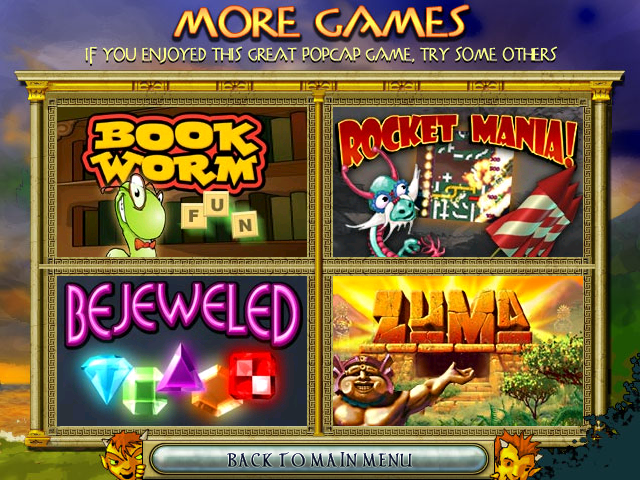 |
Later installers completely scrapped this menu and made the partner.xml change to push you to Popcap.com instead, likely because they felt advertising only four games wasn't enough.
Partner Versions#
Partner versions are setups of the game distributed by other companies that have partnered with PopCap. These setups typically have a similar or special build of the game that makes use of partner.xml to make small changes to the game. Furthermore, upon booting the game, the partner's company logo can be found on the title screen, which was added by editing the loadinggraphic image. Often, these partner versions come with the company's own DRM system, which forces users to purchase the game after a short period of free time. Some partner versions are also full versions of the game, distributed through physical media.
Yahoo! |
Real Arcade |
Oberon Media |
|---|---|---|
 |
 |
 |
Furthermore, partner versions also make use of MoreGamesLink in partner.xml, rendering the More Games menu unused.
Command-Line Parameters#
The game's executable mentions developer command lines for starting the game; it's not friendly with commands using spaces, so use = instead. Starting from this method forces the game to act like it's in "Trial" mode. Note that this does not work on Mac OS as the framework port didn't support them at the time. These are:
- -play: Plays popcap.dmo if it's present. If not present, an error is shown. -demofile can also be used to choose the name and location of the file.
- -recnum: Records demos with Popcap.dmo and Popcap#.dmo if that's taken on every boot.
- -playnum: Plays demos with Popcap.dmo and Popcap#.dmo from -recnum if that's taken on every boot.
- -record: Records a demo named Popcap.dmo and saves after shutdown of the game.
- -demofile: Specifies filename for recorded demos.
- -crash: Crashes the game immediately with an Access Violation error.
- -screensaver: Makes the game act like it's a screensaver. Any movement or key presses will immediately force close the game.
- -changedir: Changes game installation directory for the current boot.
- -version: Shows the product name, version, build number, and build date with a popup instead of starting the game.
Debug Commands#
Pressing CTRL + ALT + D will play a sound (c:\windows\media\Windows XP Menu Command.wav) to indicate debug key input is enabled, allowing options of typing unique keys for debugging displays or mechanisms; another use will disable it.
- F2 - Start/Stop perf timing.
- F3 : Toggle FPS display.
- ⇧ Shift + F3 - Toggle FPS/mouse coordinate display.
- F8 - Toggle 3D acceleration.
- F9 - Show current Video Stats (mostly used to see if 3D acceleration is currently on).
- F11 - Dumps all the game's images loaded in memory to a folder named _dump, which is located in the game's directory. It also automatically generates an HTML file named imagelist.html. The HTML file contains a list of the images dumped as well as their properties.