Debug Patch#
Eternal Punishment has some extensive debug features which can be enabled using a patch (in both US and Japanese versions). A well-known English prerelease version of the game has these and several other debug features available by default; while many of them were completely removed in retail versions, some is still present on the disc, but normally inaccessible.
 |
Download Persona 2: Debug Patches File: persona2debug.zip (8 KB (compressed)) (info) |
Shop Debug Menu#
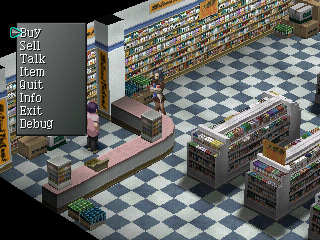

With the patch applied, all shop menus (and the Velvet Room) will have "Debug" as an option at the end of the menu. Selecting it will open a debug menu with various related items.

|
To do: |
Main Debug Menu#

Also, after applying the patch, press Select+Start at nearly any point during the game (starting from the title screen) to access the menu, which has various sub-menus corresponding to the game's multiple programmers. The shoulder buttons can be used to increase/decrease selected values on certain menus.
The menu in the US version of the game is only partially translated; captions that appear at the bottom of the screen when selecting menu items may show unreadable garbage. Also, both the final US and Japanese versions had various debug text removed from the final executable causing a couple of the remaining debug features to have much less useful functionality than they used to.
Michi Menu#
The first menu is named for Michishito Ishizuka (credited as system programmer) and contains these options:
- Stable Random (on/off)
- Sound Test: opens a detailed sound test screen
- Movie / Movie Volume: shows FMVs
Sound Test#

This sound test allows you to play various sounds (primarily voices), view info about memory usage, and more. Select cycles through the on-screen windows and Start opens a menu allowing you to exit back to the main debug menu (along with a disabled "Load from PC" option).
Aso Menu#
The second menu is named for Hisakata Aso (window and shop programmer) and contains these options:
- edit
- Plate Window Color: Allows you to preview various window background styles. Hold L1 to move the window, R1 to resize it, L2/R2 to cycle through window styles, and Select/Start to cycle through window types.
- Event Bit: Not really usable in the final game due to the missing text. The version of the menu in the prerelease build supposedly allows you to load/save and manipulate game data, but the menu doesn't seem fully functional in that version either.
- debug
- Summon Demo Message: view graphics/dialogue of different Personas.
- Name Entry: display the character name entry screen (only works in the Japanese version).
- test
- Font Draw: display font graphics.
- Help/Warning: displays flashing red "error" banner at the top of the screen.
- Message: tests various on-screen text displays.
- List Window: shows a list of items with their buy/sell(?) prices.
- Stationary Graphic: allows you to view various graphics using the D-pad. Pressing Select switches to a screen which lets you test color fades using Up/Down.
- String Input: tests a text entry window.
- Display Effect: tests a screen transition effect, with a now-invisible config menu that uses some removed text. Pressing X and Triangle will play the effect from left to right or vice-versa.
Summon Demo Message#

This sprite shows the name, summon message, sprite, and tarot card of a single Persona at a time; you can cycle through them using Left/Right.
In the prerelease version, additional graphics-related debug text is displayed in the upper left corner, which can be expanded by pressing Square.
Font Draw#

This screen shows the entire alphabet rendered in one of two fonts. Available controls:
|
Message#

This screen is mainly for testing dialogue boxes, but also shows several mini-windows and a list of characters near the top of the screen. The US version of this screen also has a "hellow world" [sic] message from programmer Hisakata Aso.
Pressing Square cycles through various filler messages in the dialogue box, which differ in content and quantity between the US and Japanese versions (as well as between the prerelease and final US versions). The current message can be moved around using the D-pad and restarted using R2. Pressing Triangle regenerates the mini-windows behind the character names.
In the prerelease version, pressing X also displays various debugging information.
Kosaka Menu#
The third menu is named for Yujiro Kosaka (2D map and command programmer) and contains these options:
- Set Parameter: opens a menu allowing you to modify various game variables
- 2D Map: go to one of the overworld locations (note that attempting to enter a location from the overworld in the final game will cause a crash)
- Command Test: test the ingame menu, load/save menus, and item menu
- Title / StaffRoll / RESULT: show the title screen / credits / end-of-game ranking
Set Parameter#

This menu allows you to edit various properties of the currently-loaded game, including money, items, party members, Personas, event flags, and more. The US version of the menu also exclusively features a "Convert" option, presumably to allow importing save data from Innocent Sin, a feature which is normally only available in the Japanese version.
t-sakamo@ Menu#
The fourth menu is named for Takumi Sakamoto (event programmer) and contains these options:
- EVENT_GROUP / EVENTA / EVENTB: supposed to allow you to view various cutscenes and other ingame events, but does not work properly in the final game
- NU-DBMENU
- 顔 (face): view character portraits
- ブルブルマッサージ ("buruburu massage"): controller vibration test(?)
- MUSIK: music test
- 数字プレート: numeric window viewer
- バランスシートMAKER ("balance sheet maker"): prompts you to press a button, then dumps a bunch of unknown text to the debug console
- MAP FACTORY: no longer functional
- UNIT VIEWER: allows you to place various sprites in a mockup battle scene
- EFFECTS!!: also no longer functional
Some of the above menu item names are taken from the Japanese version of the menu, due to being mostly illegible in the English version.
Portrait Viewer#

This screen shows two character portraits facing each other and allows you to cycle through them using the D-pad (for the left side) and face buttons (for the right side). Pressing Select inverts the colors on both currently displayed portraits and pressing Start returns to the debug menu.
Music Test#

This is another sound test screen, this one much simpler than the other and primarily focused on playing music. The "XA" option also allows you to play voice clips.
Numeric Window Viewer#

This screen shows a small window with the number 0, allowing you to freely position it on screen and showing its coordinates and various memory-related statistics.
Unit Viewer#

The unit viewer allows you to basically create a mockup battle scene with a specific environment/background. Controls:
|
|
|
To do: |
Takagi Menu#
The fifth menu, named for lead and dungeon programmer Hidetoshi Takagi, contains only the option "GO! Dungeon" which, predictably, allows you to warp to a dungeon of your choosing. In the final builds of this game this doesn't quite work as intended, always placing you out-of-bounds, and the test map listed as option 2F is no longer present and will crash the game if selected.
Katsuyama Menu#
The sixth menu is named for Futoshi Katsuyama (battle programmer) and contains battle-related options:
- Battle Start!! - start a battle with the parameters selected below
- Rotation
- LoadSystemType
- BGM Type
- Btl Evt
- Contact
Nagai Menu#
The seventh and last menu, named for casino programmer Yasuaki Nagai, allows you to go to one of the casino games. You may wish to give yourself some coins with the Set Parameter menu in order to make the games actually playable.
(Source: Original TCRF research)
Debug Rooms#

In the debug menu via event B, there's a debug room that contain several NPCS for bits about shops and several other features. It also points out that Kataoka made the room and presumably(?) Kuroki as well.
- Shopkeeper NPC 1: Checks for every bit in the game either by TBIT, MBIT, and EBIT. Picking MBIT has the NPC cleverly says "You'll regret it." picking MBIT.
- Shopkeeper NPC 2: Allows you to check every rumor and instantly get 100k yen. Deciding to stop talking to the NPC oddly spouts out tons of number including Tatsuya name.
- Shopkeeper NPC 3: This NPC is called Kaneda whom was one of the developers for the game. You can change events and the party set, whoever you're required to have a certain manual to know the code what to put in. Other option to is pick TV station events.
- NPC 4: This NPC has the sprites of the person who takes Rumors requests. All this does is to enable man search bit requests.


This is a debug room for Wang Long fortune. The song playing in the room is Lunar Palace. There's 3 NPCS that is the CD Shopkeepr, Katsuya, and Ulala.
- CD Shopkeeper: Seems to enable bits that would happen if you had Innocent Sin save data. However picking Metal Jun resets the bits according to the NPC.
- Katsuya: Asks you if you want to run the fortune debug test event. However, it will not run if you don't have a specific code from the manual.
- Ulala: Simply asks you if you want to reset the fortune effect.