 This article has a talk page!

|
To do: |
Mr. Bean is a 3D collect-a-thon based on Mr. Bean: The Animated Series. In this installment, everyone's favorite quiet kook learns that his beloved teddy bear, Teddy, has been kidnapped. Thus, he journeys across Britain to pay the ransom by collecting cat food, coming across a ton of signs along the way, whilst soundtracked by a never-ending stream of smooth jazz.
As an aside, this game has no credits, only copyrights.
Debug Features#
Nintendo DS#
Present in the file MB_Settings.ini are a bunch of settings. Changing these enables the respective debug feature.
    Debug_On        False
    Demo_on         False
    Scroll_On       False
    Language_On     False
    Version_On      False
Music_On True|
|
To do: |
Debug_On#
Enables an extra entry on the main menu: "Debug Mode". This acts as a level select to all areas of the game. Also adds "All Jigsaws", "All Biscuits", "All Teddies" and "Level End" options in the pause menu.
Demo_On#
When the game is started, makes it go straight to the first level.
Language_On#
Enables a language indicator in the top-right corner and the ability to press L and R to cycle between languages.
Version_On#
Adds "V1.7" to the bottom-right corner of the top screen.
Music_On#
Enables/disables music.
PlayStation 2, Wii, Windows#
A similar settings file named Game.ini can be found in the PS2, Wii and Windows releases. Setting a value to 1 enables an option, while 0 disables the option.
ShowVersion=0
Audio=1
QuickBoot=0
EnableDebugMenu=0
DebugMenuItem=0ShowVersion#
Displays "Version 3.5 SLES-54666" for the PS2, "Version 3.9" for the Wii and "Version 5.2" for Windows on the top left corner of the screen. The version is actually right above the options in Game.ini and can be changed to other values, but will round up to the first decimal place. Setting a non-number value defaults it to "1.0".
Audio#
Enables/disables audio.
QuickBoot#
Skips the opening credits and logos.
EnableDebugMenu#

Enables a debug menu that can be selected from the main menu. This also enables a free camera and a real-time language changing option.
The free camera can be activated by pressing R2 on PS2 and F1 on Windows.
The language can be cycled through at any time during the game with SELECT on PS2, Minus (–) on Wii and L on Windows.
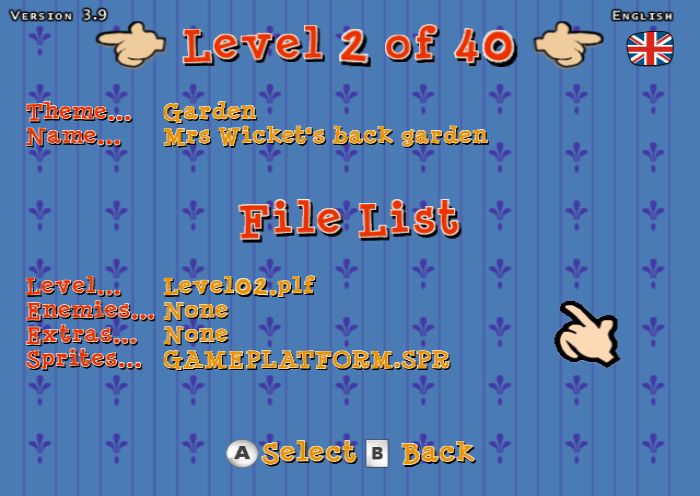
The debug level select menu displays the theme and name of each level, as well as the internal file name and what sprite file is used. Enemies and Extras always say "None" even if a level features both.
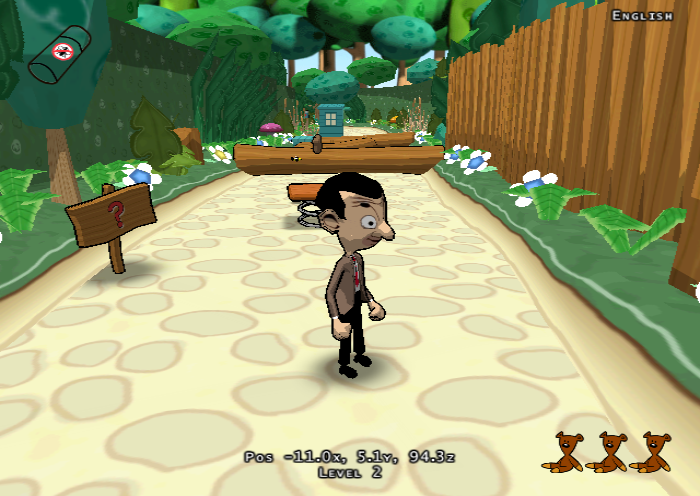
A basic debug display also appears while the main debug option is enabled. It details the player's X, Y and Z position and the level number in accordance with the level select menu.
DebugMenuItem#
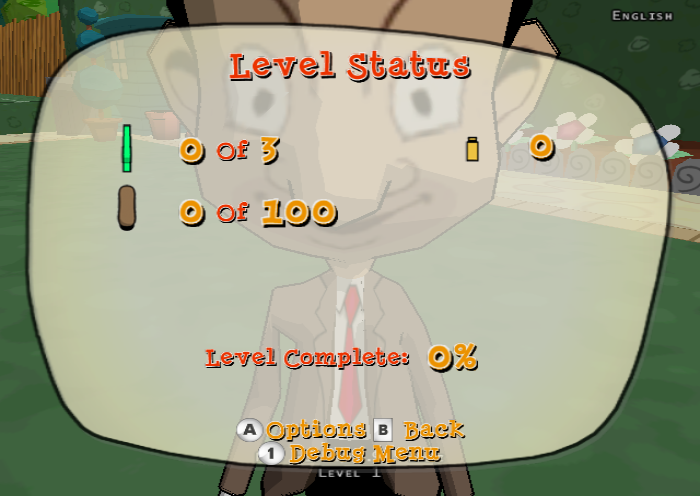
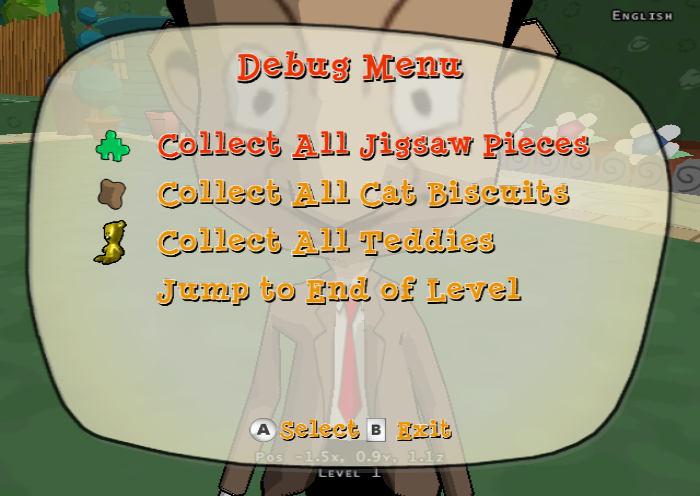 Enables a menu in the pause menu that can give all of a specific item for a level. There's also an option to jump to the end of the current level. This option is automatically enabled with EnableDebugMenu on PS2.
Other Options#
The Windows version has additional debug options available if the game is running in windowed mode under the View tab.
Render Mode > |
Point |
Line |
|
Solid |
|
Textured |
|
Display Mode > |
Off |
Culling Boxes |
|
Collision Spheres |
|
Collision Bounds |
|
Lights |
|
Cameras |
|
Enable Lighting |
|
Enable Fog |
|
Objects |
|
Use Polygon Lists |
|
Height Maps |
|
Texture Viewer |
|
Metric Viewer |
|
Model Viewer |
|
Pathfinder Obsticles |
Render Modes#

There are four different render modes: the regular one, a solid color one where everything is white except the outlines, a lined wireframe and a dotted frame mode.
Texture Viewer#
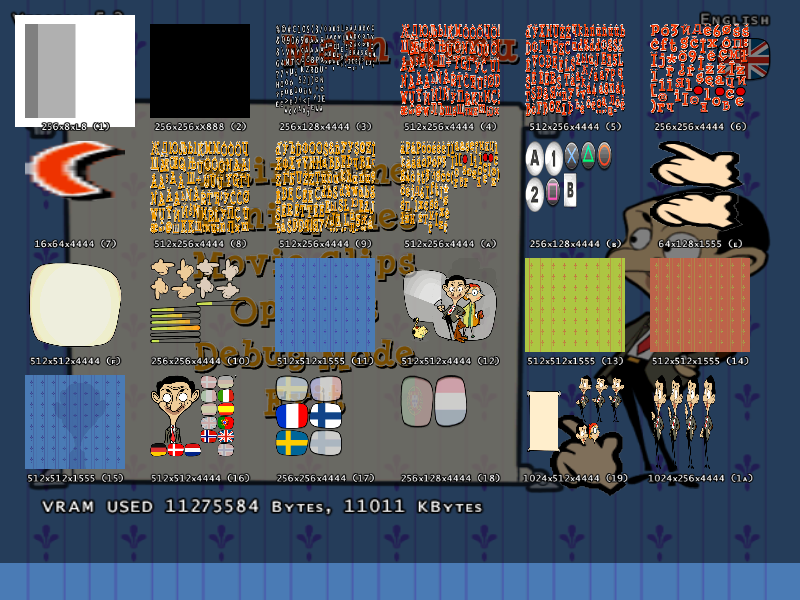
Shows all the currently loaded textures in memory. You can zoom in and out on the currently highlighted texture with [ and ].
This menu is also present in the PS2 version and can be enabled with this code. Zooming on PS2 is done by pressing R2 and L2.
002EEDF4 00000001Metrics Viewer#
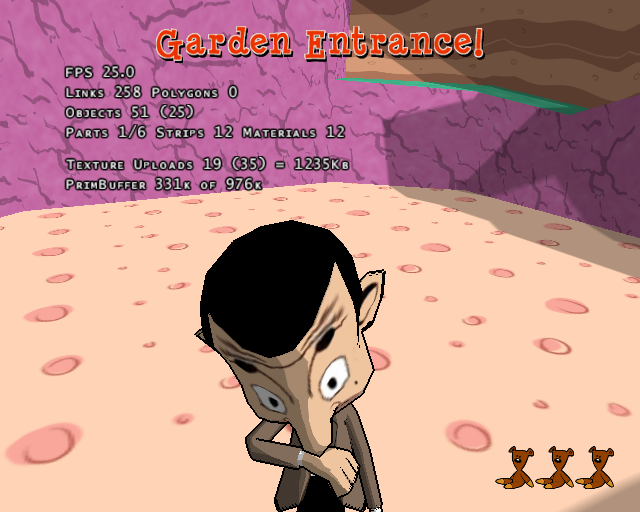
This option only seems to work properly on PS2, displaying the current performance and usage metrics.
002EEDF8 00000001CPU/GPU Usage#
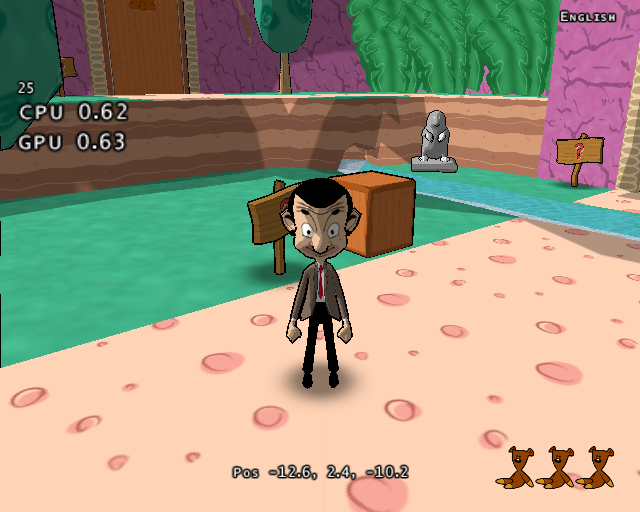

 A broken option that's only present in the PS2 version. Enabling this option displays the frame rate, CPU and GPU usage, as well as enables the coordinates, version display and language selector regardless of the GAME.INI settings. Having this option enabled also has some other unusual side effects such as the game being guaranteed to almost always crash and give a Software Error screen if it's enabled on loading screens, as well as displaying a placeholder Intro.wmv cutscene.
To minimize problems, the display can be toggled by pressing R3 + UP and R3 + DOWN.
D0454F82 0200FFEB
00455960 00000001
007D7288 00000001
D0454F82 0200FFBB
00455960 00000000
007D7288 00000000
(Source: Edness (PS2 codes))
Unused Text#
Bonue Clip 5Present in ENGLISH.TXF, grouped together with the bonus clip text.
Leftover Batch Files#
Only in the Wii version are a couple of batch files that can be found in the root directory of the game disc.
b.bat#
cd..\..r.bat#
setndenv DvdRoot "c:/MrBean/Wii/Exe"
ndrun Game.elf
Game Project Remnants#
 |
File: Mr Bean Wii Game.elf_Data.zip (info) |
Also only in the Wii version of the game is a folder named game.elf_Data. Inside are two files that were originally from the debug version's project folder. CWSettingsWindows.stg contains all of the settings for the project, while TargetDataWindows.tdt contains a file listing of the entire codebase and brief descriptions of each file.
Unused sounds#
MRBEANLAUGH01
A sound of Mr. Bean laughing.
Unused Tutorial Versions#
The PS2 version features a Tutorial option, which displays a short video explaining the basic controls of the game. In the European version, this tutorial is only available in five of the languages (English, French, Italian, Castilian and Dutch), the other languages (German, Swedish, Finnish, Danish, Norwegian and Portuguese) missing the tutorial option from the menu entirely. However, unused versions for these languages exist, located in the MOVIES folder. The quality of the translations seems to be quite poor as seen in the German version using "gepaust" and "Runde Taste" ("round button") instead of "pausiert" and "Kreistaste" ("circle button"), the Portuguese version using "usual" instead of "útil" (useful), and the Finnish version using "pyöreä painike" instead of "ympyrä-näppäin" ("circle button") which is probably why they were left unused.
Although the videos for these unused languages can be loaded by replacing them over the accessible ones as usual, it is also possible to access them by opening the tutorial in one of the used languages and quickly switching to one of the unused ones using the debug language switch option with SELECT before the screen fades to black.
Unused tutorial languages (7:02) |
|---|
In addition, the English tutorial is also present on the Wii version's files, located under Movies/Tutorial.thp, probably left as a placeholder for an eventual Wii tutorial that was never realised.
(Source (German Translation Quality): mrmister3782)
Unfinished Languages#
Some mentions about Russian.txf and Polish.txf can be found in the game's .exe. If we change the field "Language= " in Game.ini with one of their respective language codes (so 1049 and 1045), we can see that the game will default to English and with the Debug Menu active it'll show that Russian/Polish is the selected language, but without any icon.