 This article has a talk page!

|
This page contains no introduction. |
Test Functions#
Apply one of the below codes to change the music player menu with a test function.
BGM Mode = Sound Effect Player Test Menu
201E0E3C 0C045E02

BGM Mode = Test Sprite Function
201E0E3C 0C04052E
Sound effect test menu will bring you to the mini-game selection screen. Press one of the following buttons for debug functionality:
- L1 plays a song.
- L2 plays a voice.
- R1 / Triangle plays a SFX
- R2 toggles looping SFX.
- X / Square / Circle will crash the game.

The Test Sprite Function will bring you to this screen. All you can do here is press Circle to change sprite animations.
(Source: Original TCRF research)
Unused Demo End Screen#
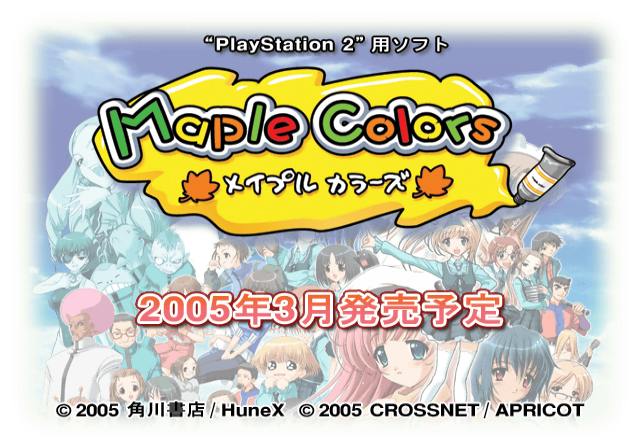
An unused demo end screen telling the player of the release date of the final version of the game.
Debug Logging#
Within the game is a printf function which would have logged various background information to a debug unit. This logs information such as files loaded and memory information. It would also report errors if any occurred. To re-enable this mode, apply the below code:
Re-enable printf Messages
2021F558 0808ADF4
If you are playing the game on a regular PlayStation 2, you will need to use a TOOL, RDB, or a debug version of OPL to view the logs. If you are playing on an emulator, you can see this information by enabling the option "Show Console". Below is an example of what type of information gets logged.
H3D> ===========================================
H3D>  HuneX Consumer 3D System for PlayStation2
H3D>    Runtime Library Release VER 1.01
H3D> ------------------------------------------
H3D>  WELCOME TO PLEASANT GAME DEVELOPMENT!
H3D> Replace Module [cdrom0:¥MODULES¥SCE¥IOPRP280.IMG;1]
H3D> VU1 MicroCode Base [.1fKB]