 This article has a talk page!

|
This page contains no introduction. |

|
To do: |
Developer Mode#
This mode opens up various things normally hidden in the game. This will display debug info on-screen, open up various extra menu options as well as open extra main menu options. Apply the code below for your version of the game to enable this mode.
USA Codes:

Master Code (Needed for a PlayStation 2)
90108A50 0C04223C

Enable Developer Mode
20100540 8F848B84
20100544 34840003
20100548 1000000B
2010054C AF848B84

EU Codes:

Master Code (Needed for a PlayStation 2)
90108A50 0C04223C

20100540 8F848B80
20100544 34840003
20100548 1000000B
2010054C AF848B80

JP Codes (SLPS-20410):

Master Code (Needed for a PlayStation 2)
90108C70 0C0422C4

2010052C 8F848B84
20100530 34840003
20100534 1000000B
20100538 AF848B84
(Source: GameHacking.org USA codes. Punk7890 EU/JP codes.)
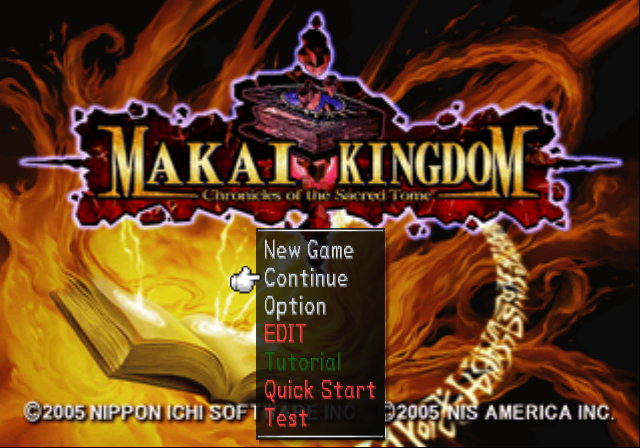
- EDIT sends you to a map editor option.
- Tutorial sends you to a tutorial.
- Quick Start sends you in the game normally, without any opening cinematics.
- Test grants you tons of HL and MT and sends you in-game.
Debug Menu#
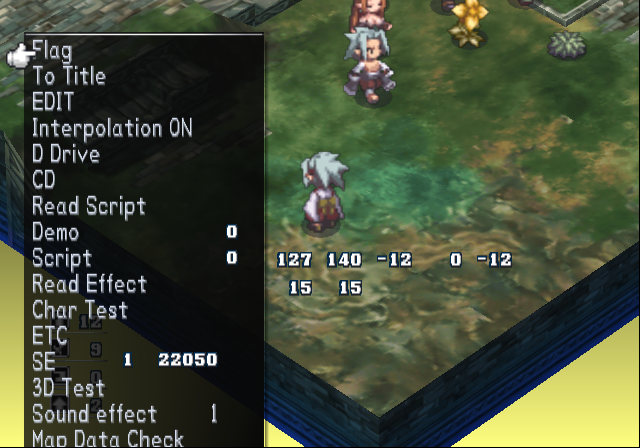
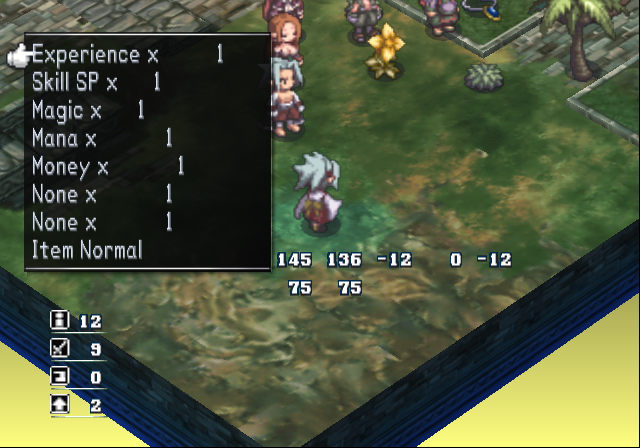
With a second controller plugged in, to bring up the debug menu anytime, press Select on controller 2. The known controller 2 inputs are below:
- Select open / close the debug menu.
- D-Pad / Left Stick moves through the menu.
- Right / Left will toggle the option on or off you have highlighted.
- Circle to enter a option.
EDIT#

Entering EDIT from the debug menu allows you to edit or make new maps.