 This article has a talk page!
This is a sub-page of Kirby Air Ride.
 Kirby Air Ride sports a very feature-rich suite of debugging options that were used by the programmers and testers during the game's development. The menus, data displays and in-game debugging options still remain in the retail games, but can be accessed by either renaming a file in the game's root directory, or modifying the game using an Action Replay or similar software. The debugging features provide a wealth of information surrounding the development of the game and how the game was put together.
debug_level_1.ini#
Similar to the methods seen previously in Super Smash Bros. Melee, Kirby Air Ride attempts to find certain files (debug_level_0.ini or debug_level_1.ini, in this case) in the game's root directory at boot-time.
To restore debug functionality, simply rename debug_level_0.ini, which is included in every retail version of the game, to debug_level_1.ini. By default this will boot into DB Level 1, which only adds displaying the game's build information on the title screen.
Holding Y as the game boots with this file will instead set the DB Level to 3, enabling developer controls and the ability to access debug modes. The DB Level will be maintained after a soft reset.
Once enabled, all debugging features become available during gameplay, and the main debug menu can be accessed.
(Source: armadylo)
Accessing via Codes#
For posterity, the codes that can instead be used to boot into DB Level 3 are as follows:
Japanese Action Replay |
North American Action Replay |
European/Australian Action Replay |
Japanese Gecko |
North American Gecko |
European/Australian Gecko |
|---|---|---|---|---|---|
R4GZ-DXV3-19NVH |
AW39-2M13-UZ7B8 |
H8G0-KAB3-ARJJ5 |
045D8088 00000003 |
045DD630 00000003 |
045D0078 00000003 |
(Source: Kirby's Air Ride Debug Mode Overview (atwiki), GuyPerfect)
(Source: gabrielwoj)
(Source: gabrielwoj)
Debug Menu#

In order to access the main debug menu, press X on the title screen while debug mode is enabled.
The debug menu (which looks a lot like the one in Super Smash Bros. Melee) provides a hierarchy of menus that configure the game with user-selected parameters, which can then be played and tested by pressing Start. Air Ride and City Trial modes can be configured with parameters not available through the game's menus, Checklist entries can be cleared, and hardware tests can be conducted.
For menu navigation, tilt the Control Stick up and down to select items, press A to activate an item, press B to move back one menu, and tilt the Control Stick left and right to select from multiple values for the selected item.
Development Log#

|
To do:
|
The background of the debug menu is a development log in the Japanese and North American versions of the game, but is only a simple "alignment test" in the European/Australian version that shows text and an image aligned in different ways.
Development Log

05/26 Seiji Otoguro
Event [Item Bounce] Added.
Event [What's In the Box?] Added.
Event [Fake Power-Ups] Added.

05/17 Tōru Yamashita
New Course Colosseum5 (Stage Name:Battle2) Added.

04/30 Seiji Otoguro
Breakable Power-Up Box generator added.
Pressing up and down on the D-Pad will scroll through the background development log/alignment test.
TOP MENU#
The top-level menu contains a number of sub-menus that can be selected by tilting the Control Stick up and down and pressing A. From within sub-menus, you can return to the parent menu by pressing A.
The sub-menus of the top-level menu are as follows:
- RACE 3D MODE - Configure the game for Air Ride, City Trial, and Stadium modes.
- RACE 2D MODE - Enters Top Ride mode with a debug menu of its own.
- OPTION MODE - Configure Speed Help and audio settings.
- PAL MODE - Only present in the European version. Configure the game language between supported European languages.
- CLEARCHECK - Contains an option to mark all Checklists as complete.
- SOUND TEST - A full sound test with features not present in the game's Sound menu.
- RUMBLE TEST - Allows the user to test controller rumble patterns.
- MOVIE TEST - Preview the game's videos.
- MEMCARD TEST - Tests various Memory Card functions (BEWARE, this WILL actually write to the card).
- ENDING TEST - Preview the ending videos.
- LAN EMULATE - Configures LAN parameters prior to communication.
- LAN MENU TEST - Hardware diagnostic for LAN interactions.
- SYNC TEST - Significance not known at this time
The contents of the menus may be different between the US, European, and Japanese versions of the game.
(Source: gabrielwoj)
OPTION MODE#
This small sub-menu contains three items:
- BOOST SELECT - It's assumed that this is the option for the speed help setting. Its settings are NONE, LOW X, and HI X.
- HUD SELECT - It's unsure what this option does as it appears to have been disabled, but was likely to allow you to change the style of the in-game HUD.
- SOUND - It is fairly obvious what this does. It contains four settings: MONO, STEREO, SURROUND, and DPL2.
PAL MODE#
Pal Mode contains only one item: LANG SELECT. You can change the game language between English (UK), German (GM), French (FR), Italian (IT), and Spanish (SP). There are also two other options, JP > X and US > X, but selecting one of them just sets the game to English.
CLEARCHECK#
There is only one item in here: ALL FLAG ON. Selecting this option will fully clear all three checklists in the game. However, the changes only seem to take effect if you leave the debug mode and enter the regular menu screen.
SOUND TEST#
This menu contains a fairly simple sound test mode featuring the sound effects and music in the game.
- SOUND MODE - Contains the options MONO/STEREO/SURROUND/DPL2/HAL DPL2. It's uncertain what the difference between "DPL2" and "HAL DPL2" is; maybe the developers were trying to reimplement Dolby Surround in a royalty-free way?
- LANG - Contains the options JP/US. Attempting to play any sound effects while US is selected will freeze the game. There may have been regional differences at one point.
- FGM GROUP - "Foreground Music Group." Contains different Sound Effects Groups.
- PINFO - Generic SFX played during 3D Game Modes (Different Stars sound effects, various City Trial SFX, etc.)
- MAP_HEAT - Various sound effects that are played on the map Magma Flows.
- MAP_DESERT - Various sound effects that are played on the map Sky Sands.
- MAP_CHK2 - Various sound effects that are played on the map Checkered Knights.
- MAP_VALLEY - Various sound effects that are played on the map Celestial Valley.
- MAP_ICE - Various sound effects that are played on the map Frozen Hillside.
- MAP_MACHINE - Various sound effects that are played on the map Machine Passage.
- MAP_SPACE - Various sound effects that are played on the map Nebula Belt.
- MAP_SKY - Various sound effects that are played on the map Beanstalk Park.
- MAP_CITY1 - Contains the environment SFX played in different areas of the City Trial map (Waterwheel slide, Volcano dragons, etc.)
- CITY - Contains more generic SFX found in City Trial (Stadium reveal, Event siren, Box breaking, etc.)
- MENU - Self-explanatory. Contains the SFX used on the menu screen.
- MAIN - More generic SFX played during gameplay (Pause sound, Kirby Exhale noise, etc.)
- STAR - Contains the SFX for the different Air Ride Machines in the game.
- GROUND - Contains the SFX played when riding different terrain (Ice, Gravel, Water, etc.)
- ZAKO - Contains the SFX of all the Air Ride-exclusive enemies (Scarfy, Waddle Dee, etc.)
- 2D_MAIN - Generic SFX played during the Top Ride mode.
- 2D_ITEM - Contains Top Ride items SFX.
- 2D_STAGE - Contains the different environment SFX in the Top Ride maps.
- MAP_PLANTS - Various sound effects that are played on the map Fantasy Meadows.
- FGM - Contains the sound effects of the appropriate group. Make sure LANG is set to JP.
- FGM STOP - Stops the sound effect that is currently playing.
- FGM PITCH - You can change the variable to positive or negative numbers. Resets whenever you play a sound effect. (Goes up to 2400, seems to go into the negatives indefinitely...)
- FGM PAN - Default variable is 127. Presumably changes the left/right balance of the sound. Resets just like the last option.
- FGM SPAN - Presumably changes the forward/backward balance of the effect for surround sound. Resets just like the other two.
- FGM ROUND - Still not sure what this does. Resets in the same way. Anywhere between 91 - 269 seems to break surround/stereo panning.
- FGM VOICE MAX - Changes the maximum amount of sounds allowed to play simultaneously. (Sounds played after the cutoff point will interrupt previous sounds that were playing)
- BGM - Choose from any of the songs in the game. Listed below are all the options.
|
Option Name |
Song Name |
Option Name |
Song Name |
|
|
NONE |
No music plays |
STAGEAUTO |
The music appropriate to the selected stage will play |
|
|
MENU |
01 Menu |
2D_DESERT |
27 Top Ride: SAND |
|
|
2D_DESERT_URA |
34 Kirby 64: The Crystal Shards: Rock Star |
2D_KAZAN |
29 Top Ride: FIRE |
|
|
2D_KAZAN_URA |
36 Kirby Super Star: Versus King Dedede |
2D_KEKKA |
40 Top Ride: Results Screen |
|
|
2D_LIGHT |
30 Top Ride: LIGHT |
2D_LIGHT_URA |
37 Kirby 64: The Crystal Shards: Mid-boss Room |
|
|
2D_MACHINE |
32 Top Ride: METAL |
2D_MACHINE_URA |
39 Kirby: Shooting |
|
|
2D_PLANTS |
26 Top Ride: GRASS |
2D_PLANTS_URA |
33 Kirby Super Star: The Mountain |
|
|
2D_SKY |
28 Top Ride: SKY |
2D_SKY_URA |
35 Kirby Super Star: Revenge of Meta Knight (Map) |
|
|
2D_WATER |
31 Top Ride: WATER |
2D_WATER_URA |
38 Kirby: Float Islands |
|
|
3D_CHECK |
10 Air Ride: CHECKER KNIGHTS |
3D_CHECK_URA |
19 Kirby: Green Greens |
|
|
3D_DESERT |
05 Air Ride: SKY SANDS |
3D_DESERT_URA |
14 Kirby Super Star: The Arena |
|
|
3D_ICE |
06 Air Ride: FROZEN HILLSIDE |
3D_ICE_URA |
15 Kirby's Adventure: Rainbow Resort |
|
|
3D_KAZAN |
07 Air Ride: MAGMA FLOWS |
3D_KAZAN_URA |
16 Kirby Super Star: Revenge of Meta Knight 1 |
|
|
3D_KEKKA |
24 Air Ride: Results Screen |
3D_MACHINE |
09 Air Ride: MACHINE PASSAGE |
|
|
3D_MACHINE_URA |
18 Kirby Super Star: Revenge of Meta Knight 2 |
3D_PLANTS |
03 Air Ride: FANTASY MEADOWS |
|
|
3D_PLANTS_URA |
12 Kirby Super Star: Spring Breeze |
3D_SKY |
08 Air Ride: BEANSTALK PARK |
|
|
3D_SKY_URA |
17 Kirby Super Star: The Beginner's Room |
3D_SPACE |
11 Air Ride: NEBULA BELT |
|
|
3D_SPACE_URA |
20 Kirby: Nightmare in Dream Land: Dream Land |
3D_VALLEY |
04 Air Ride: CELESTIAL VALLEY |
|
|
3D_VALLEY_URA |
13 Kirby's Adventure: Forest Stage |
STADIUMINTRO |
56 Stadium: Title |
|
|
CITY |
41 City Trial: City |
CITY_ISOGI |
42 City Trial: Not Much Time Left |
|
|
CITY_URA |
43 City Trial: City (Backside) |
CLEARCHECKER |
63 Checklist Completed |
|
|
DRAGOON |
54 City Trial: Legendary Air Ride Machine |
ENDING |
25 Air Ride: Ending |
|
|
ENDING_CITY_US |
61 City Trial: Ending |
EVENT_FOG |
53 City Trial: Dense Fog Today |
|
|
EVENT_GORDO |
49 City Trial: What's in the Box? |
EVENT_ITEMBOUND |
52 City Trial: Item Bounce |
|
|
EVENT_KYOSEKI |
47 City Trial: Huge Pillar |
EVENT_METEO |
46 City Trial: Flying Meteor |
|
|
EVENT_MONSTER |
44 City Trial: Dyna Blade Intro |
EVENT_STATIONFIRE |
48 City Trial: Station Fire |
|
|
EVENT_SUPERCHARGE |
51 City Trial: Rowdy Charge Tank |
EVENT_SYOUKINKUBI |
45 City Trial: Tac Challenge |
|
|
EVENT_TOUDAI |
50 City Trial: The Lighthouse Light Burns |
EVENT_FINISH_1 |
21 Finish!: Winner's Finish |
|
|
EVENT_FINISH_2 |
22 Finish!: Second Place or Worse |
EVENT_FINISH_CP |
23 Finish!: CPU Finish |
|
|
GRAPH |
55 City Trial: Properties Graph |
HOWTO |
02 Play Methods |
|
|
MENU |
Copy of MENU |
OPENING |
00 Opening |
|
|
RETIRE |
62 Retire |
STUDIUM_04 |
57 Stadium: DRAG RACE |
|
|
STUDIUM_AIRGRIDER |
58 Stadium: AIR GLIDER |
STUDIUM_BATTLE |
60 Stadium: KIRBY MELEE |
|
|
STUDIUM_DEDEDE |
Copy of EVENT_MONSTER |
STUDIUM_POINT |
59 Stadium: TARGET FLIGHT |
- BGM PITCH >> - Toggles the music playing from normal paced to fast paced and vice versa.
- BGM STOP - Take a guess as to what this does.
- BANK CLEAN - Not sure what this does.
RUMBLE TEST#
Test the various rumble patterns. Yay.
- PATTERN - There are 33 different patterns to choose from. Some last only a few seconds, while some never end.
- FRAME - Specify how many frames the selected pattern will last for before being forcibly ended. 0 means no forcing.
- RUMBLE STOP - Does exactly what it says.
MOVIE TEST#
Contains the "Opening" video as well as the "How to play" and "Machine Intro" videos.
- Opening - The opening intro video.
- HOWTO PLAY - The video that plays if you idle on the title screen too long.
- HOWTO AIRRIDE - The video that plays the first time to start up Air Ride mode.
- HOWTO UERIDE - The How to Play video for Top Ride.
- HOWTO CITYTRIAL - City Trial's how to play video.
- HOWTO NORMAL MACHINE SPEC DEMO - Demo video of the basic Air Ride machines. Plays after idling on the title screen.
- HOWTO HIDDEN MACHINE SPEC DEMO - Video of the unlockable machines. It is unlocked after certain conditions are met in City Trial mode.
MEMCARD TEST#
|
|
To do: |
Contains various memory card management options.
- GOTO UTILITY - Enters the game like normal.
- REQ CHECK -
- REQ SAVE - Saves your game.
- REQ LOAD -
- REQ CREATE - Creates a new save file.
- REQ DELETE - Deletes your Kirby Air Ride save data.
- REQ FORMAT - Reformats your inserted Memory Card.
- REGION WRITE -
- REGION INFO -
- LIB TEST -
ENDING TEST#
Contains the three ending videos.
- AIRRIDE - Air Ride mode's ending credits.
- UERIDE - Top Ride's Ending credits. Freezes for some reason. Likely the movie file was moved at one point.
- CITYTRIAL - City Trial's ending movie. It's also the Air Ride machine outro movie.
LAN EMULATE#
Believed to test LAN connections.
- GC COUNT - The number of GameCubes connected.
- GC INDEX - Specify if you are the host (0), or one of the maximum of three client players.
LAN MENU TEST#
A test for the LAN menu.
- GOTO LAN MENU - Takes you to the LAN menu. Doesn't require a broadband adapter to access.
SYNC TEST#
The purpose of this option remains unclear, but there are seemingly functions attached to it.
- SHORIOCHI - Default value is 0. Can be changed to 1, but the change applied is unknown.
- SHORIBOU - Default value is also 0. If this flag is changed to 1, the game will display an unknown graphic at the bottom of the screen at all times (exactly like if R + D-Pad Right was pressed).
(Source: gabrielwoj)
RACE 3D MODE#
This small sub-menu contains three items:
- NORMAL - Air Ride
- CITYTRIAL - City Trial
- STADIUM - City Trial's Stadium minigames
All three configure game scenarios using the 3D engine, and most of the options under them apply to all three menus. This article will document the individual item menus and list which 3D mode menus they apply to. Unless otherwise noted, the following menu options apply to all three menus.
RACE START / TRIAL START / STADIUM START#
These options begin the game with the selected settings. From any of the three menus and their sub-menus, this option can be activated by pressing Start.
PLAYER NUM#
The number of active players, from 1-4.
STAGE SEL#
Applies to: NORMAL
The stage that will be loaded when the race is started. Note that this list contains every map in the game; not just those ordinarily accessible via Air Ride.
The following maps can be selected:
- PLANTS - Fantasy Meadows (Laps mode)
- HEAT - Magma Flows (Laps mode)
- DESERT - Sky Sands (Laps mode)
- ICE - Frozen Hillside (Laps mode)
- SKY - Beanstalk Park (Laps mode)
- VALLEY - Celestial Valley (Laps mode)
- MACHINE - Machine Passage (Laps mode)
- CHECK - Checkered Knights (Laps mode)
- SPACE - Nebula Belt (Laps mode)
- CITY - City
- ZEROYON1 - Drag Race 1
- ZEROYON2 - Drag Race 2
- ZEROYON3 - Drag Race 3
- ZEROYON4 - Drag Race 4
- AIR1 - Air Glider
- POINT1 - Target Flight
- HIGH1 - High Jump
- BATTLE1 - Kirby Melee 1
- BATTLE2 - Kirby Melee 2
- DEATH1 - Destruction Derby 1
- DEATH2 - Destruction Derby 2
- DEATH3 - Destruction Derby 3
- DEATH4 - Destruction Derby 4
- DEATH5 - Destruction Derby 5
- PLANTSINGLE - Single Race 1
- HEATSINGLE - Single Race 2
- DESERTSINGLE - Single Race 3
- ICESINGLE - Single Race 4
- SKYSINGLE - Single Race 5
- VALLEYSINGLE - Single Race 6
- MACHINESINGLE - Single Race 7
- CHECKSINGLE - Single Race 8
- SPACESINGLE - Single Race 9
- DEDEDE1 - Vs King Dedede
- PLANTSTIME - Fantasy Meadows (Time mode)
- HEATTIME - Magma Flows (Time mode)
- DESERTTIME - Sky Sands (Time mode)
- ICETIME - Frozen Hillside (Time mode)
- SKYTIME - Beanstalk Park (Time mode)
- VALLEYTIME - Celestial Valley (Time mode)
- MACHINETIME - Machine Passage (Time mode)
- CHECKTIME - Checkered Knights (Time mode)
- SPACETIME - Nebula Belt (Time mode)
- PLANTSFREE - Fantasy Meadows (Free Run)
- HEATFREE - Magma Flows (Free Run)
- DESERTFREE - Sky Sands (Free Run)
- ICEFREE - Frozen Hillside (Free Run)
- SKYFREE - Beanstalk Park (Free Run)
- VALLEYFREE - Celestial Valley (Free Run)
- MACHINEFREE - Machine Passage (Free Run)
- CHECKFREE - Checkered Knights (Free Run)
- SPACEFREE - Nebula Belt (Free Run)
- CITYDRIVE - City (Free Run)
- DUMMY - An empty void.
- TEST - Driving test.
- TEST6 - Another driving test.
- TEST7 - Gliding test.
- SIMPLE - Crashes the game.
- SIMPLE2 - Test environment.
The DUMMY, TEST, TEST6, TEST7 and SIMPLE2 maps are inaccessible through normal gameplay. For more information, see the Unused Levels section.
STADIUM SEL#
Applies to: CITYTRIAL, STADIUM
The Stadium event that will be used when the Stadium mode starts (after the trial, or when START STADIUM is selected). The following Stadiums can be selected:
- ZEROYON1 - Drag Race 1
- ZEROYON2 - Drag Race 2
- ZEROYON3 - Drag Race 3
- ZEROYON4 - Drag Race 4
- AIR1GLIDER- Air Glider
- POINTSTRIKE - Target Flight
- HIGHJUMP - High Jump
- BATTLEROYAL1 - Kirby Melee 1
- BATTLEROYAL2 - Kirby Melee 2
- DEATHMATCH1 - Destruction Derby 1
- DEATHMATCH2 - Destruction Derby 2
- DEATHMATCH3 - Destruction Derby 3
- DEATHMATCH4 - Destruction Derby 4
- DEATHMATCH5 - Destruction Derby 5
- SINGLERACE1 - Single Race 1
- SINGLERACE2 - Single Race 2
- SINGLERACE3 - Single Race 3
- SINGLERACE4 - Single Race 4
- SINGLERACE5 - Single Race 5
- SINGLERACE6 - Single Race 6
- SINGLERACE7 - Single Race 7
- SINGLERACE8 - Single Race 8
- SINGLERACE9 - Single Race 9
- VSDEDEDE - Vs King Dedede
KIND SEL#
Specifies how each of the 4 players will be controlled:
- HUMAN
- CPU
- DEMO X - CPU; presumably used in the auto-demos.
- BOSS X - Unknown significance; not used in Vs. King Dedede.
- NONE - Player is not controlled.
RIDER SEL#
Specifies which character is used by each of the 4 players:
- KIRBY
- DEDEDE
- METAKNIGHT
|
|
To do: |
Note that while all three characters are functional on all choices for VEHICLE TYPE (see below), King Dedede is only intended to be used with WHEEL_DEDEDE and Meta Knight with STAR_WINGMETAKNIGHT. Also note that selecting Dedede or Meta Knight in the CITYTRIAL mode will freeze the game upon start. Another thing to note is that Dedede is playable in most stadium modes excluding the destruction derby (he freezes). Meta Knight, however, doesn't seem to work in any of them. By using codes, Dedede and Meta Knight can be selected in the CITYTRIAL and all stadiums without crashing the game.
VEHICLE KIND#
Applies to: CITYTRIAL, STADIUM
Vehicle types for each of the 4 players:
- STARNORMAL - Hovering machine.
- KIRBYWHEEL - One of the Wheelie-based machines.
This setting no longer has any significance, as the value it modifies is managed by VEHICLE TYPE (see below).
VEHICLE TYPE#
Specifies which machine is used by each of the 4 players:
- STAR_NORMAL - Warpstar
- STAR_LIGHT - Compact Star
- STAR_WING - Winged Star
- STAR_DEVIL - Shadow Star
- STAR_HYDRA - Hydra
- STAR_HEAVY - Bulk Star
- STAR_SLICK - Slick Star
- STAR_FORMULA - Formula Star
- STAR_DRAGOON - Dragoon
- STAR_WAGON - Wagon Star
- STAR_ROCKET - Rocket Star
- STAR_RUINS - Swerve Star
- STAR_TURBO - Turbo Star
- STAR_JET - Jet Star
- STAR_FLIGHT - Flight Warpstar
- STAR_FREE - Free Star
- STAR_HANDLE - Steer Star
- STAR_WINGKIRBY - Wing (Copy Ability)
- STAR_WINGMETAKNIGHT - Meta Knight
- WHEEL_NORMAL - Wheel (Unused)
- WHEEL_KIRBY - Wheel (Copy Ability)
- WHEEL_WHEELIE - Wheelie Bike
- WHEEL_REX - Rex Wheelie
- WHEEL_SCOOTER - Wheelie Scooter
- WHEEL_DEDEDE - Wheelie Bike (King Dedede)
- WHEEL_VSDEDEDE - Wheelie Bike (Vs. King Dedede)
Note that Free Star and Steer Star can both be used in 3D mode, though they're normally intended for Top Ride. They handle the same as Warpstar; the reason for their inclusion in 3D mode may have been to make it easier to see the model in action from more angles.
PLCOLOR SEL#
Specifies the colors for each of the 4 players:
- 0 - Pink
- 1 - Yellow
- 2 - Blue
- 3 - Red
- 4 - Green
- 5 - Purple
- 6 - Brown
- 7 - White
King Dedede and Meta Knight have their own variations on colors.
RUMBLE SEL#
Specifies rumble for each of the 4 players:
- 0 - Rumble off
- 1 - Rumble on
CPU LV SEL#
Specifies the CPU level for each of the 4 players, from 0 to 8. (A zero-indexed way of saying 1 to 9.)
CAMERA FLAG#
Specifies the screen display mode for each of the 4 players:
- OFF - The player's camera view is not shown.
- ON - The normal view when playing the game.
- LIVE - A demo-style view of the current race.
- REPLAY - Same as LIVE, but used in the replay mode.
This option can be used to see the game from the CPU players' perspectives.
BGM SEL#
Applies to: NORMAL
Specifies which music plays during the race: Sound List
BGM FLAG#
Applies to: NORMAL
Determines whether the background music will play during the race:
- ON - Background music will play.
- OFF - No music will play.
RULE SEL#
Applies to: NORMAL
Configures the rules for terminating the race:
- LAP - Race the specified number of laps.
- TIME - Race for distance over the specified time limit.
- COIN - Unimplemented. Laps are endless, and attacking opponents would likely drop coins to collect like in Super Smash Bros. Melee.
- FREERUN - Run as many laps as you want, trying to get the fastest lap.
- TIMEATTACK - Race 3 laps as fast as you can. Differentiated from LAP by the game when it saves your scores.
- FREECITY - Crashes the game if not on the City map. Timed City Trial mode.
- TIMECITY - Drive as much as you want, and the timer counts up to show how long you've been at it.
- ZEROYON* - Drag Race rule set. Standard play with no lap counter.
- AIR GLIDER* - Air Glider rule set. Timer ticks up when you cross the finish line, but can only be terminated on Air Glider, Target Flight and High Jump maps.
- SKY DARTS* - Same as AIR1.
- FLICK ROYAL - Unimplemented. Appears to be a coin-based Stadium rule set, but that's just speculation.
- HIGH JUMP* - Same as AIR1.
- JUST GOAL - Unimplemented. Behaves the same as FLICK ROYAL
- BATTLE ROYAL* - Kirby Melee rule set. Timer ticks down and the number of enemies defeated is recorded.
- DEATH MATCH* - Destruction Derby rule set. Timer ticks down and the number of rivals KO'd is recorded. On defeat, players respawn.
- SINGLE LAP* - Single Race rule set. Same as ZEROYON.
- SINGLE TIME* - Unimplemented. Time-limited race with no map or lap counter.
- COIN BATTLE* - Unimplemented. Same as FLICK ROYAL.
- DEDEDE MATCH* - Vs. King Dedede rule set. Timed match to defeat King Dedede. Not known how to make it function.
- DEDEDE ROYAL - Unimplemented. Same as FLICK ROYAL.
- CHICKEN - Unimplemented. Same as FLICK ROYAL.
- CONTAINER - Unimplemented. Same as FLICK ROYAL.
* These rule sets are for Stadiums, and affect the name of the event that displays when entering the level.
LAP NUM#
Applies to: NORMAL
The number of laps to play. If set to DEFAULT, the lap count is determined by the selected map.
TIME NUM#
The number of seconds to play, for time-limited games.
TEAM BATTLE#
Applies to: NORMAL
Has no significance, but presumably would affect whether team mode was active. The game does not support teams.
- ON
- OFF
TEAM ATTACK#
Applies to: NORMAL
Has no significance, but presumably would affect whether you could harm your teammates. The game does not support teams.
- ON
- OFF
ENEMY REQ#
Determines whether enemies appear on the map:
- ON - Enemies may spawn.
- OFF - Enemies will not spawn.
Note: Configuration of this setting is required to play on the TEST course.
ITEM REQ#
Determines whether items appear on the map:
- ON - Items may spawn.
- OFF - Items will not spawn.
VEHICLE REQ#
Applies to: NORMAL, CITYTRIAL
Determines whether Air Ride Machines appear on the map:
- ON - Machines may spawn.
- OFF - Machines will not spawn.
TRIAL FLAG#
Applies to: NORMAL
|
|
To do: |
Setting this flag to ON will normally crash the game. However, the use of codes can allow the functionality of this flag. When enabled, the City Trial map will be displayed at the bottom left of the screen and replace the current track's map. Another interesting thing to note is that players are able to get off their Air Ride machines on any map. Destroying a player's machine will no longer put them in an "unconscious state", since City Trial allows Kirby to board another machine after being defeated.
The codes that allow this function to be used without crashing are as follows:
Japanese |
North American |
European/Australian |
|---|---|---|
MNBD-1D8R-KHCZX |
KH3Y-U2U9-MGNCY |
EACG-PT02-3QHZ5 |
TGF4-KT9Z-7HA62 |
ZMWA-TN6C-07J8X |
9PNJ-57C4-RMTN5 |
0JJ8-5CCV-A0E35 |
9JVD-RZ74-9T60B |
22ZN-HWC8-N3BG8 |
- ON
- OFF
HITPOINT#
Applies to: NORMAL
Determines whether the HP gauges are shown as well as whether players may be defeated.
ON |
Players may be defeated. |
OFF |
Players cannot be defeated. |
BOOST#
Applies to: NORMAL
Configures the Speed Help setting for lagging players.
0 |
None |
1 |
Weak |
2 |
Strong |
BODYATTACK#
Applies to: NORMAL
Determines whether players can deal damage to enemies and other players with a forward ram.
ON |
Players may attack with their machines. |
OFF |
Machine collisions deal no damage. |
MAP DEBUG#
Applies to: NORMAL
|
|
To do: |
Freezes the game if enabled under normal circumstances. With the use of codes, it is possible to enable this flag without crashing the game. However, the effects of this option remain unknown. It doesn't seem to affect gameplay.
3D Mode Features#

While playing in Air Ride and City Trial mode, debugging functions can be activated while debug mode is enabled. Debugging functions are selected with the D-Pad, and additional features can be accessed by holding the L, R or X button before using the D-Pad.
Among other things, the debugging functions can display information in on-screen overlays; can show course parameters such as enemy spawn locations and route paths; can spawn enemies, objects and Air Ride Machines at the player's location; can grant the player any Copy Ability; can show collision information; and can manipulate the camera in various ways.
L + D-Pad/A#
The L Trigger + D-Pad is used to navigate sub-menus while in-game. L + A is used to apply changes or select an option.
Start#
Freezes all animations, but leaves audio unaltered. While frozen, tapping the Z button will advance the animations by one frame. Holding Z will cause the game to advance in slow motion. Pressing the combination of L+R+A will immediately end the current match.
D-Pad Up#
Toggles the different camera views. The options are:
- Static camera - The camera stops following Kirby and you can freely angle the camera with the C-Stick.
- Dynamic camera - Just like the previous camera except it moves with Kirby. Pressing L + R will swap what player your screen is following, but won't play their sound effects properly.
- Normal view - The default game camera with limited angles.
D-Pad Down#
This allows you to choose from a variety of different options that affect the current game such as spawning items. Pushing D-Pad down will go to different groups of sub-menus. Pressing L + D-Pad Left/Right will change the sub-menu of that group.
Group 1#
This group directly affects your player. It has an ability select as well as a machine spawner. Pressing L + D-Pad Left/Right will navigate between them. L + A will select the option.
- Ability Selector - Contains all regular abilities as well as the item roulette.
- Stat Booster - Contains all of the Stat patch items like Glide UP and the All Patch. Selecting any of these will instantly increase that stat by one. Works in all modes. L + B will decrease the selected stat.
- Special Power-ups Selector - Contains the 4 special power-ups. They are: The Gordo, Cracker Launcher, Time/proximity bomb, and the Super Quick Spin.
- Machine Spawner - Contains every vehicle in the game. Selecting one will cause it to spawn on top of you. You can even select the unused and debug ones. They can even be spawned in non City Trial modes.
- Dragoon/Hydra Assembler - Selecting one will play the animation of you collecting all three parts and give you the machine.
- Hidden Stats - Shows various City Trial Stats like # boxes broken and # items collected. This is likely for the internal tracker the game uses for a few of its stat based achievements. Only local human players are counted, not CPUs or remote LAN players.
Group 2#
This group allows you to play any graphical effect. They are centered around your player. Play around with it and find ones that you like.
(Source: gabrielwoj)
Group 3#
Has the ability to spawn any actor in the game. However, spawning TAC, DYNA, or METEO outside of City Trial mode will crash the game. Similarly, spawning the generic enemies in courses that don't support them will also crash the game. Note that not all enemies can be spawned in certain Air Ride Modes. Pressing L + D-Pad Left/Right will show what is assumed to be the spawning coordinates or scale of the actor. Pressing L + A will spawn at the coordinates; however there does not seem to be a way to change the values. Because of this, actors always spawn at the start line. Or in the case of City Trial, at the City Wharf. Pressing L + B will spawn the actor a set distance away from Kirby, and facing him; pressing L + Y will summon the actor at Kirby's coordinates, and facing the direction Kirby is facing; and pressing L + X will spawn the actor at the coordinates and direction the last actor was spawned. Pressing L + Z will delete any manually spawned actors.
(Source: gabrielwoj)
(Source: gabrielwoj)
(Source: gabrielwoj)
Group 4#
This group only applies to City Trial Mode and possibly Stadium mode as well.
- Item Spawner - This can spawn anything that spawns in City Trial mode like food, boxes, and Dragoon/Hydra pieces. They spawn in the same ways as the previous group, but pressing L + X will instead spawn the item at Kirby's coordinates with forward momentum in the direction the camera is facing. Interestingly, using this outside of City Trial does not result in a freeze, as there's an error handler to tell you that the item isn't loaded.
- Event Toggler - This allows you to turn on (with L + A) and turn off (with L + B) a few different city events. Push L + D-Pad Left to get here. Note that these are not the actual events themselves.
- GENE - Not sure what this one affects.
- PATIMON - Causes the fake stat patches to appear.
- BOUND - Makes items bouncy.
- CONTENTS - Causes all boxes to contain the same thing.
Group 5#
Music and sound modifier. Possibly allows you to change the current music track.
- OBGM - Selecting this turns off the music. It can't be turned back on in the same way.
- OFGM - Does the same thing except with the sound effects.
Group 6#
|
|
To do: |
Possibly allows you to make and view replays.
Group 7#
|
|
To do: |
This group allows you to view and set any spawn positions across Air Ride mode and City Trial mode. There are 9 kinds of spawn positions. These are:
- START - Used for player spawn positions. Interestingly, all Air Ride courses have 4 extra spawn positions that go unused.
- ENEMY - Enemy spawn positions. For some reason, Nebula Belt has 4 enemy spawn positions outside of bounds, which go unused as well.
- ITEM - Used for precise item spawn positions.
- ITEMARIA - The region in which items can spawn from. These regions are highlighted with green cubes, and become red when selected.
- EVENT - Used for specific spawn positions of events, such as Tac, Dynablade, Pillar, etc...
- VEHICLE - Used for vehicle spawn positions. Strangely, there are 23 extra vehicle spawn positions that go unused in City Trial's Free Run mode.
- VCAREA - The region in which vehicles can spawn from. These are highlighted using purple flat surfaces, and become blue when selected.
- G_DEAD - The respawn position that is used when you fall out of bounds.
- YAKUMONO - Used for misc. object positions?
How to Use
- A - Navigate forward
- B - Navigate backward
- L+A - Confirm
- R+A / R+B - Scroll through spawn position type
Upon navigating to Group 7 in the debug mode, you will see the XYZ coordinates in the top right. R+A and R+B will allow you to scroll through the types of spawn positions. To view them, press A to see the "LOAD" screen, and press L+A. Press A twice until you see the XYZ screen, and this time, there will be a 0 and a maximum value for the kind of spawn position, depending on what type you loaded in. Note that trying to add positions will sometimes result in a crash, and trying to save on "SAVE" screen results in an error... there hasn't been enough documentation to find a workaround. Pressing Up on the D-Pad and pressing A/B will allow your screen to follow the spawn position. L+A is used to select the spawn position. You can move it around with X-Control Stick, and move it vertically with Y-Up/Down.
(Source: heynow)
Group 8#
No selectable options except "GM TIMECLEAR". Selecting this resets the clock to what it was at the start of the match.
Group 9#
This group seems to have a CPU Monitoring function.
- CPU (x)- The value in here corresponds to the CPU being monitored. Pressing the X button will go to the next value and pressing the Y button will go to the previous value.
-1- Human Player
0 -CPU #1
1 - CPU #2
2 - CPU #3
*3 - CPU #4
*Note: The only situation in where a 5th player may be present is in the Vs. King Dedede Stadium if there are 4 players. Boss King Dedede will appear as a 5th player. The method used to spawn him outside of the said Stadium is to go to the stadium mode and set it to "VSDEDEDE", play on the stadium, and then go to Air Ride and set the rules to "Death Match" or "Zeroyon". The 5th player will still be King Dedede and uses his "DEDEDE" CPU mode.
- CPU Mode
While not precisely indicated "CPU Mode" in-game, the second value after CPU(x) seems to be the preset AI program given to the CPU players. There are different values depending on the game mode chosen.
CITY -This mode is assigned to CPU players when selecting the City Trial game mode. CPUs will chase Items, Boxes, etc.
RACE -This mode is assigned to CPU players when selecting the Air Ride game mode. CPUs will simply follow a predetermined path to the goal.
ZERO - This mode is assigned to CPU players when selecting the Drag Race Stadiums. Same as RACE, but they will attempt to go as straight as possible.
AIR- This mode is assigned to CPU players when selecting the Air Glider or the High Jump Stadium. CPUs will attempt to follow the straightest path possible. As they land, they will get off their machines and walk endlessly.
POINT - This mode is assigned to CPU players when selecting the Target Flight Stadium. CPUs will follow a straight path until they reach the end of the jump. They will then start going in random directions for points.
BATT1 - This mode is assigned to CPU players when selecting the Kirby Melee 1 Stadium. CPUs will follow a path to enemies and attack them. The preset path will randomly change and go to different enemies.
BATT2 -Same as BATT1, but for the Stadium Kirby Melee 2. Additionally, they follow a certain predetermined path on the map.
DEATH - This mode is assigned to CPU players when selecting the Destruction Derby or VS. DEDEDE Stadiums. CPUs will attempt to eliminate the port priority Human Player first. Once the player is defeated or is too far away, they will target the nearest player around them.
DEDEDE - This mode will only be assigned to the Boss King Dedede CPU in the Vs. King Dedede Stadium. King Dedede will randomly attempt to go in one of the four corners of the map. He does not target players, but he will automatically hit them if they get too close to the front of his bike.
Group 10#
Seems to control the shading and color of the different players. It also is the city event modifier as well as the skybox modifier.
- GROUND FOG ANIM - Contains all of the different skyboxes for City Trial. It goes from 0 - 18.
- Ground Fog Anim 0 - Daytime Start
- Ground Fog Anim 1 - Dyna Blade
- Ground Fog Anim 2 - Huge Pillar
- Ground Fog Anim 3 - Burning Rail Stations
- Ground Fog Anim 4 - Fake Items
- Ground Fog Anim 5 - TAC
- Ground Fog Anim 6 - What's in the Box
- Ground Fog Anim 7 - UFO
- Ground Fog Anim 8 - Bouncy Items
- Ground Fog Anim 9 - Dense Fog Event
- Ground Fog Anim 10 - Fog Start
- Ground Fog Anim 11 - Sunset Start
- Ground Fog Anim 12 - Nighttime Start
- Ground Fog Anim 13 - Dragoon
- Ground Fog Anim 14 - Hydra
- Ground Fog Anim 15 - Destruction Derby 4
- Ground Fog Anim 16 - Destruction Derby 5
- Ground Fog Anim 17 - Huge Meteors Incoming
- Ground Fog Anim 18 - Lighthouse
(Source: Wumbus#5418)
- GROUND EVENT - This is the event modifier. Its values range from 0 - 15. All events can be repeated as much as you desire unless noted otherwise.
- Event 0 - Dyna Blade
- Event 1 - Tac's stolen items
- Event 2 - Huge meteors incoming!
- Event 3 - Huge unidentified pillar
- Event 4 - Super charged Air Ride tanks
- Event 5 - Restoration areas appear.*
- Event 6 - Rail Stations on fire
- Event 7 - Boxes contain the same item
- Event 8 - City lighthouse has turned on
- Event 9 - Secret chamber in castle opened.*
- Event 10 - Stadium Prediction
- Event 11 - Air Ride machine formation
- Event 12 - UFO
- Event 13 - Rubbery items
- Event 14 - Dense Fog Today
- Event 15 - Fake Power-Ups
* Do not use this more than once a match!
R + D-Pad Down#
Triggers the usual pause menu.
R + D-Pad Left#
Cycles through 5 general diagnostic displays:
- Mode 1 - Player statuses. Displays information about frame counts, player states and animation states.
- Mode 2 - Additional animation statuses.
- Mode 3 - Displays drift values, and has a bunch of "DUMMY" displays.
- Mode 4 - Grind Rail information. Shows rail ID and percentage of travel along it.
- Mode 5 - Displays all City Trial stats along with an acceleration graph for each player.
R + D-Pad Right#
Displays an unidentified graph; possibly program status and memory usage.
R + D-Pad Up#
Displays player statistics with various states of UI presence. The following stats are displayed:
- Distance traveled - The in-game unit measurement for how far you've travelled.
- AREA - The region of the course where you currently are. Affects what's drawn to the screen.
- LEN - The distance you've travelled in feet/meters.
- DIFF - How far you are from the player in front of you (if any).
- RANK - The player's current ranking.
Note that these values are all zeroes in City Trial mode.
X + D-Pad Down#
Cycles through 29 displays of world information. A bar appears at the top of the screen indicating which mode is selected along with some parameters.
- Mode 1 - The default display. The world and actors are all drawn, but no additional data.
- Mode 2 - The world is not drawn at all, but actors are.
- Mode 3 - Particle collision regions are displayed as red bubbles around actors and projectiles.
- Mode 4 - Combines the features of Mode 2 and Mode 5: world collision is shown, but the world itself is not drawn.
- Mode 5 - Displays world collision information on a per-surface basis with a color code:
- (Pressing X renders the collision information transparent, pressing B cycles through different colorings.)
- Red - The surface can be driven on.
- Green - The surface is a wall.
- Blue - The surface is a ceiling.
- Mode 6 - Combines the features of Mode 8 and Mode 10: CPU AI paths and object spawn locations are shown, alongside main path and rails.
- Blue - Main Path
- Brown - Rails
- Mode 7 - Combines the features of Mode 5 and Mode 6: world collision color coding with paths and spawn locations; world itself is not drawn.
- Mode 8 - Displays object spawn locations as small, red-green-blue brackets.
- Mode 9 - Combines the features of Mode 5 and Mode 8: world collision color coding with spawn locations.
- Mode 10 - Displays all path information used by the CPU AI as lines alongside course path and rail paths.
- Yellow - Path boundaries
- Cyan - CPU AI paths
- Mode 11 - Same as Mode 10, but pressing the X button will toggle the lines on or off.
- Mode 12 - Only a small region of AI paths is drawn. Mode was probably obsoleted.
- Mode 13 - Player orientation is shown, and the world seems to be partitioned into volumes (possibly for events).
- Mode 14 - Combines the features of Mode 2, Mode 5 and Mode 13: world collision and partition information is shown, but the world itself is not drawn.
- Mode 15 - Uses an unknown partitioning scheme
- Mode 16 - The world is not drawn, and pressing X will cycle through partition volumes, which are displayed as wireframe. There is an additional data overlay on the screen presenting parameters for the selected volume.
- Mode 17 - Contains all of the features of Mode 3 as well as the applicable parts of Mode 5 and Mode 13: CPU AI paths are shown, and collision and partition information is displayed, but only close to the player. This is an optimization consideration when calculating collision detection.
- Mode 18 - Combines the features of Mode 2 and Mode 17: paths and nearby collision information are shown, but the world is not drawn.
- Mode 19 - Similar to 18, but with additional, unidentified volumes drawn
- Mode 20 - Unidentified volumes and actors are drawn, as well as particle collision bubbles
- Mode 21 - The X button toggles an overlay that displays camera information.
- Mode 22 - The sky is not drawn, actors are drawn, and the X button toggles whether the world is drawn. The water is always drawn, and when the world is invisible, there's a transparent cube around the volcano.
- Mode 23 - Shows collision bounds for particle FX.
- Mode 24 - Grind Rail collision regions are shown.
- Mode 25 - Combines the features of Mode 5 and Mode 24: actors are drawn, the world is not, and world and Grind Rail collision information are shown.
- Mode 26 - Only the Grind Rail collision region between Heat Top and Castle Hall is shown. This may have been a special case.
- Mode 27 - Actors and the Heat Top/Castle Hall Grind Rail collision region are drawn, but nothing else is.
- Mode 28 - A blue outline appears around the sky. This may be the valid region for meteors to spawn.
- Mode 29 - Unknown significance. Looks the same as Mode 1
X + D-Pad Left#
Cycles through 14 displays of actor position and angle information. A few of these options will enable collision displays, which can subsequently only be disabled via X + D-Pad Right.
X + D-Pad Right#
Cycles through 7 displays of actor collision regions, or "bubbles."
X + D-Pad Up#
This freezes your machine in place and disables most of your collision. You can't pick up items or be hurt, but you can do ramming damage to enemies. If the camera doesn't follow your machine when you do this, press D-Pad Up. To return to normal, simply re-input the combination. While stopped, a machine can be moved on the X and Z axis by holding the L Trigger and moving the Control Stick. The machine can be raised or lowered on the Y axis by holding L and tilting up or down with the C-Stick.
2D Mode Features#
Top Ride has a debug menu all its own, suggesting that this part of the game may have been developed independently from (and concurrently with) the 3D mode.
Window Captions#
In the Japanese and North American versions of the game, the menu windows for the Top Ride mode use Japanese-language Shift JIS text in the GameCube's built-in system font. However, on the GameCube, the codepage used is based on the console's region setting, so on export (North American and European) consoles, the characters appear in Windows code page 1252 encoding. As such, any Japanese text becomes unreadable mojibake.
The European/Australian version of the game addressed this issue by translating most of the text from Shift JIS to ordinary ASCII (which is compatible with Win-1252), though still in Japanese.
This article will present menu options with the export consoles' on-screen mojibake text, their Japanese counterparts, the text from the European/Australian version, and English translations. Hopefully, navigating the menus won't be too bad with this page open in your web browser.
Example#
In the screenshot provided below, the following Win-1252 text strings correspond with the following Shift JIS strings, which themselves translate into the following English captions:
Bytes |
Screen Text |
Japanese |
English |
|||
8C 6F 98 48 8F DA 8D D7 |
Œo˜H Ú × |
経路詳細 |
Route Details |
|||
83 5A 83 4E 83 5E 94 D4 8D 86 |
ƒZƒNƒ^”Ô † |
セクタ番号 |
Sector Number |
|||
8D C0 95 57 |
À•W |
座標 |
Coordinates |
|||
8C 6F 98 48 |
Œo˜H |
経路 |
Route |
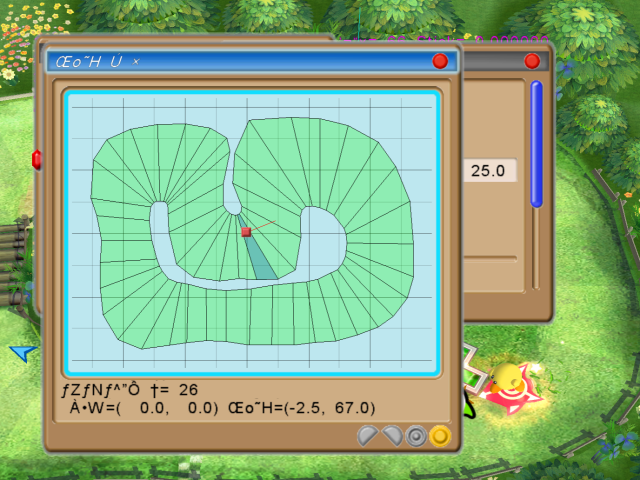
A menu depicting Win-1252 characters
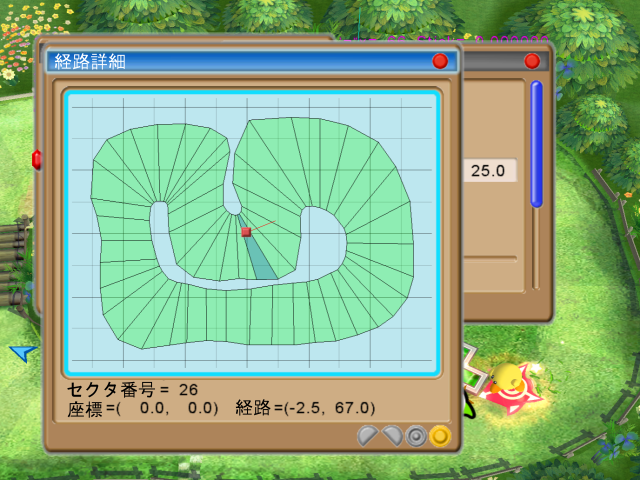
The same image, edited as Shift JIS
Note that this particular menu did not update captions in the European/Australian version.
Main Menu#
When first selecting 2D mode, an overall menu will be presented on a black background. Its title will vary depending on the game version:
- Japanese - Jun 26 2003 01:07:39
- North American - Aug 18 2003 17:00:00
- European/Australian - Dec 10 2003 11:23:54
The main menu contains the following items:
- {|
|- |Screen Text |rowspan=12 style="width:10px;"| |Japanese |rowspan=12 style="width:10px;"| |European/Australian |rowspan=12 style="width:10px;"| |English |rowspan=12 style="width:10px;"| |Notes |- |’² ®—pƒQ [ƒ€“ü‚èŒû||調整用ゲーム入り口||ChousiYouGameIriguchi||Enter game||Game with debug functions active |- |ƒ‹ [ƒ‹ Ý’è||ルール設定||Rulesettei||Rules||Sub-menu |- |ƒR [ƒX||コース||Course||Course||Sub-menu |- |ƒEƒGƒ‰ƒCƒh||ウエライド||Ueride||Top Ride||Game with no debug functions |- |ƒAƒCƒeƒ€”- ¶||アイテム発生||ItemHassei||Item generation||Sub-menu |- |ƒAƒCƒeƒ€— ”Ží||アイテム乱数種||ItemRansuuTane||Item random number seeds||Sub-menu |- |‚â‚-‚à‚Ì— ”Ží||もの乱数種||YakumonoRansuuTane||Feature random number seeds||Sub-menu |- |ƒ^ƒCƒ€ƒAƒ^ƒbƒN||タイムアタック||TimeAttack||Time Attack|| |- |ƒtƒŠ [ƒ‰ƒ“||フリーラン||FreeRun||Free Run|| |- |ƒI [ƒgƒfƒ‚||オートデモ||AutoDemo||Auto demo|| |- | I—¹||終了||ShuuRyou||End||Return to debug menu |}
- The Rules sub-menu is documented later in this article.
-
The Course sub-menu does not contain translated European/Australian captions, and contains the following items:
- {|
|- |Screen Text |rowspan=8 style="width:10px;"| |Japanese |rowspan=8 style="width:10px;"| |English |- |The ‘ I||The 草!||Grass |- |The » I||The 砂!||Sand |- |The ‹ó I||The 空!||Sky |- |The ‰Š I||The 炎!||Fire |- |The Œõ I||The 光!||Light |- |The … I||The 水!||Water |- |The “S I||The 鉄!||Metal |}
-
The Item generation sub-menu contains the following items:
- {|
|- |Screen Text |rowspan=4 style="width:10px;"| |Japanese |rowspan=4 style="width:10px;"| |European/Australian |rowspan=4 style="width:10px;"| |English |rowspan=4 style="width:10px;"| |Notes |- |ƒIƒvƒVƒ‡ƒ“||オプション||Option||Option||Sub-menu |- |ŽQ‰Á l ”||参加人数||SankaNinzuu||Number of participants||Sub-menu |- |TA—pƒR [ƒX•Ê||TA用コース別||TAYouCourseBetu||Course modifiers||Sub-menu |}
-
-
The Option sub-menu contains the following items:
- {|
-
The Option sub-menu contains the following items:
|- |Screen Text |rowspan=4 style="width:10px;"| |Japanese |rowspan=4 style="width:10px;"| |European/Australian |rowspan=4 style="width:10px;"| |English |rowspan=4 style="width:10px;"| |Notes |- | -‚È‚¢||少ない||Sukunai||Low||Numeric; default 0.35 |- |• ’Ê||普通||Futuu||Normal||Numeric; default 0.60 |- |‘½‚¢||多い||Ooi||Many||Numeric; default 1.00 |}
-
-
The Number of participants sub-menu contains the following items:
- {|
-
The Number of participants sub-menu contains the following items:
|- |Screen Text |rowspan=4 style="width:10px;"| |Japanese |rowspan=4 style="width:10px;"| |European/Australian |rowspan=4 style="width:10px;"| |English |rowspan=4 style="width:10px;"| |Notes |- |‚S lŽQ‰ÁŽž||4人参加時||4NinSankaJi||With 4 players||Numeric; default 1.00 |- |‚R lŽQ‰ÁŽž||3人参加時||3NinSankaJi||With 3 players||Numeric; default 1.20 |- |‚Q lŽQ‰ÁŽž||2人参加時||2NinSankaJi||With 2 players||Numeric; default 1.80 |}
-
-
The Course modifiers sub-menu contains the following items:
- {|
-
The Course modifiers sub-menu contains the following items:
|- |Screen Text |rowspan=8 style="width:10px;"| |Japanese |rowspan=8 style="width:10px;"| |European/Australian |rowspan=8 style="width:10px;"| |English |rowspan=8 style="width:10px;"| |Notes |- |The ‘ I||The 草!||The Kusa!||Grass||Numeric; default 1.23 |- |The » I||The 砂!||The Suna!||Sand||Numeric; default 1.11 |- |The ‹ó I||The 空!||The Sora!||Sky||Numeric; default 1.07 |- |The ‰Š I||The 炎!||The Honoo!||Fire||Numeric; default 1.10 |- |The Œõ I||The 光!||The Hikari!||Light||Numeric; default 1.03 |- |The … I||The 水!||The Mizu!||Water||Numeric; default 1.11 |- |The “S I||The 鉄!||The Tetu!||Metal||Numeric; default 1.11 |}
-
The Item random number seeds sub-menu contains the following items:
- {|
|- |Screen Text |rowspan=8 style="width:10px;"| |Japanese |rowspan=8 style="width:10px;"| |European/Australian |rowspan=8 style="width:10px;"| |English |rowspan=8 style="width:10px;"| |Notes |- |The ‘ I||The 草!||The Kusa!||Grass||Numeric; default 6417 |- |The » I||The 砂!||The Suna!||Sand||Numeric; default 711 |- |The ‹ó I||The 空!||The Sora!||Sky||Numeric; default 210 |- |The ‰Š I||The 炎!||The Honoo!||Fire||Numeric; default 5683 |- |The Œõ I||The 光!||The Hikari!||Light||Numeric; default 2001 |- |The … I||The 水!||The Mizu!||Water||Numeric; default 550 |- |The “S I||The 鉄!||The Tetu!||Metal||Numeric; default 8448 |}
-
The Feature random number seeds sub-menu contains the following items:
- {|
|- |Screen Text |rowspan=8 style="width:10px;"| |Japanese |rowspan=8 style="width:10px;"| |European/Australian |rowspan=8 style="width:10px;"| |English |rowspan=8 style="width:10px;"| |Notes |- |The ‘ I||The 草!||The Kusa!||Grass||Numeric; default 1234 |- |The » I||The 砂!||The Suna!||Sand||Numeric; default 1234 |- |The ‹ó I||The 空!||The Sora!||Sky||Numeric; default 1234 |- |The ‰Š I||The 炎!||The Honoo!||Fire||Numeric; default 1234 |- |The Œõ I||The 光!||The Hikari!||Light||Numeric; default 1234 |- |The … I||The 水!||The Mizu!||Water||Numeric; default 1234 |- |The “S I||The 鉄!||The Tetu!||Metal||Numeric; default 1234 |}
Main / Rules#
The Rules sub-menu contains the following items:
- {|
|- |Screen Text |rowspan=18 style="width:10px;"| |Japanese |rowspan=18 style="width:10px;"| |European/Australian |rowspan=18 style="width:10px;"| |English |rowspan=18 style="width:10px;"| |Notes |- |Žü‰ñ ”||周回数||ShuuKaiSu||Laps||Numeric; default 5 |- |ŽQ‰Á Ý’è||参加設定||SankaSettei||Participation||4 toggle buttons: on = player active |- |‚b‚o‚t Ý’è||CPU設定||CpuSettei||CPU configuration||4 toggle buttons: on = CPU player |- |ƒXƒ^ [||スター||Star||Machine||4 toggle buttons: on = Steer Star |- |ƒnƒ“ƒf||ハンデ||Hande||Handicap||4 numeric entries; default 0 |- |‚b‚o‚t @||CPU ||Cpu ||CPU Level||4 numeric entries; default 2 (a zero-indexed 3) |- | F”Ô †||色番号||IroBangou||Color||4 numeric entries |- | U“®||振動||Sindou||Rumble||4 toggle buttons: on = rumble active |- |ƒJƒ ƒ‰Ží•Ê||カメラ種別||CameraShubetu||Camera Type||Sub-menu |- |ƒJƒ ƒ‰Šp“x||カメラ角度||CameraKakudo||Camera Angle||Sub-menu |- |ƒAƒCƒeƒ€”- ¶||アイテム発生||ItemHassei||Items (Generation)||Sub-menu |- |ƒAƒCƒeƒ€Ží•Ê||アイテム種別||ItemShubetu||Items (Type)||Sub-menu |- |‚â‚–‚à‚Ì||やくもの||Yakumono||Features||Sub-menu |- |ƒu [ƒXƒg||ブースト||Boost||Speed Help||Sub-menu |- |ƒXƒ^ [ƒXƒŠƒbƒv||スタースリップ||StarSlip||"Stars slip"||Unknown function; doesn't affect drift |- |ƒuƒ‰ƒXƒg||ブラスト||Blast||"Blast"||Unknown function; doesn't affect boost |- |— BGM||裏BGM||UraBGM||Alternate BGM||Toggle button: on = alternate music |}
-
The Camera Type sub-menu contains the following items:
- {|
|- |Screen Text |rowspan=3 style="width:10px;"| |Japanese |rowspan=3 style="width:10px;"| |European/Australian |rowspan=3 style="width:10px;"| |English |- |’Ê í||通常||Tuujyou||Normal |- |ŒÅ’è||固定||Kotei||Fixed |}
-
The Camera Angle sub-menu contains the following items:
- {|
|- |Screen Text |rowspan=4 style="width:10px;"| |Japanese |rowspan=4 style="width:10px;"| |European/Australian |rowspan=4 style="width:10px;"| |English |- |’Ê í||通常||Tuujyou||Normal |- |ŽÎ‚ß||斜め||Naname||Diagonal |- |‰¡||横||Yoko||Side |}
-
The Items (Generation) sub-menu contains the following items:
- {|
|- |Screen Text |rowspan=5 style="width:10px;"| |Japanese |rowspan=5 style="width:10px;"| |European/Australian |rowspan=5 style="width:10px;"| |English |- |’Ê í||通常||Tuujyou||Normal |- |‘½‚ß||多め||Oome||Many |- | -‚È‚¢||少ない||Sukunai||Few |- |‚È‚µ||なし||Nasi||None |}
-
The Items (Type) sub-menu contains the following items:
- {|
|- |Screen Text |rowspan=4 style="width:10px;"| |Japanese |rowspan=4 style="width:10px;"| |European/Australian |rowspan=4 style="width:10px;"| |English |- |’Ê í||通常||Tuujyou||Normal |- |‰B‚µ||隠し||Kakusi||Mystery |- | UŒ‚||攻撃||Kougeki||Attack |}
-
The Features sub-menu contains the following items:
- {|
|- |Screen Text |rowspan=4 style="width:10px;"| |Japanese |rowspan=4 style="width:10px;"| |European/Australian |rowspan=4 style="width:10px;"| |English |- |‚È‚µ||なし||Nasi||None |- |’Ê í||通常||Toojyou||Normal |- |Œƒ‚µ‚¢||激しい||Hagesii||Many |}
-
The Speed Help sub-menu contains the following items:
- {|
|- |Screen Text |rowspan=4 style="width:10px;"| |Japanese |rowspan=4 style="width:10px;"| |European/Australian |rowspan=4 style="width:10px;"| |English |- |‚È‚µ||なし||Nasi||None |- |’Ê í||通常||Tuujyou||Weak |- |‹-‚ß||強め||Tuyome||Strong |}
Pause Menu#
When in-game, the Start button will bring up a special pause menu with debugging features.
Window Title:
Screen Text |
Japanese |
European/Australian |
English |
|||
ƒ| [ƒYƒ ƒjƒ… [ |
ポーズメニュー |
PauseMenu |
Pause Menu |
The pause menu contains the following items, all of which (except the last one) are sub-menus:
- {|
|- |Screen Text |rowspan=15 style="width:10px;"| |Japanese |rowspan=15 style="width:10px;"| |European/Australian |rowspan=15 style="width:10px;"| |English |- |ƒJƒ ƒ‰ Ý’è||カメラ設定||CameraSettei||Camera settings |- |ƒJ [ƒrƒB Ý’è||カービィ設定||KirbySettei||Kirby settings |- |“GƒvƒŒƒCƒ„ [ Ý’è||敵プレイヤー設定||TekiPlayerSettei||CPU settings |- |ƒR [ƒX Ý’è||コース設定||CourseSettei||Course settings |- |ƒAƒCƒeƒ€ Ý’è||アイテム設定||ItemSettei||Item settings |- |ƒtƒ@ƒCƒ‹||ファイル||File||File |- |ƒNƒŠƒAƒ`ƒFƒbƒJ||クリアチェッカ||ClearChecker||Clear Checklist |- |ƒJƒEƒ“ƒg W||カウント集||CountShuu||"Count Collection" (Bleh!) |- |•\Ž¦—Þ Ý’è||表示類設定||HyoujiRuiSettei||Display settings |- |ƒTƒEƒ“ƒh||サウンド||Sound||Sound |- | U“® Ý’è||振動設定||SindouSettei||Rumble settings |- |–Ÿ•„ Ý’è||漫符設定||ManpuSettei||Emote settings |- |’n k Ý’è||地震設定||JisinSettei||Earthquake settings |- |ƒQ [ƒ€ I—¹||ゲーム終了||GameShuryo||End game |}