 This article has a talk page!
Hybrid Heaven is a rather odd role-playing game with a confusing story. It's also one of the few N64 games to have widescreen support.
Debug Modes#
Several debug modes which display debug info on-screen, enabled a camera control debugging tool, and others can be enabled in their sections below.
Debug Info Display#

A debug info display with various statistics for player coordinates and the current level you are currently in can be enabled with the below GameShark code. With it on, press L + Z to enable, and R + Z to disable. You will need to enter the pause screen and exit after disabling it to clear the text on-screen.
Version |
GameShark code |
|---|---|
Japan |
D105D8D0 2020 |
USA |
D105CE50 2020 |
(Source: Original TCRF research)
Camera Debug Tool#
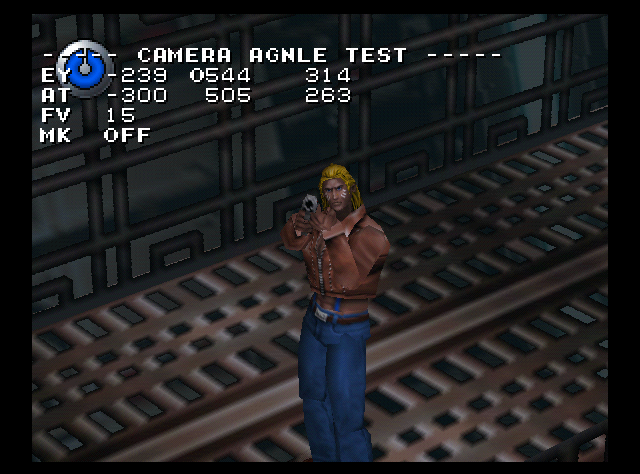
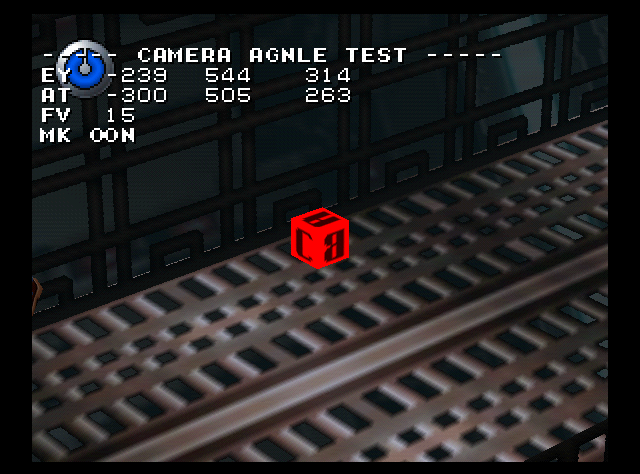
A mode that lets you change various angles of the camera can be enabled with the below GameShark code. With the code on, to enable it, press the GS button while in a level, while standing. To see the debug info of this mode, enable the Debug Info Display code as well.
Version |
GameShark code |
|---|---|
USA |
881BBE9D 0004 |
Controls:
- D-Pad to move through options.
- B to decrease selected value.
- A to increase selected value.
(Source: Original TCRF research)
Animation Test#
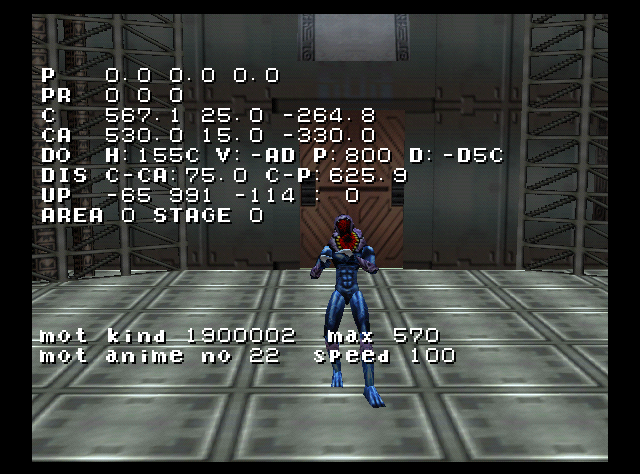
With the below code on, enter a Battle Mode option. You will be able to control your opponent and cycle through all possible animations for them. You will need the debug display as well to view info in this mode.
Version |
GameShark code |
|---|---|
Japan |
811BEEAC 0001 |
USA |
811BBC1C 0001 |
Europe |
811C5C2C 0001 |
Known controls:
- START to change animation category.
- D-Pad Up / Down to change animation.
- B to shift actor left / right.
- R to reverse animations.
- A to stop animations.
- Analog Stick to move actor around.
(Source: Original TCRF research)
Debug Mode#

The level select option. This was where the level select was at one point in development. To re-enable it, apply the below code and press D-Pad Up + Z before the PRESS START screen appears. You will also need the expansion pack in for this code.
Version |
GameShark code |
|---|---|
USA |
D105CE50 2800 |
(Source: Original TCRF research)
Level Select#

A level select can be accessed by entering one of the following GameShark codes and pressing A at the main menu:
Version |
GameShark code |
|---|---|
USA |
801CC8C4 0005 |
Europe |
801D74A4 0005 |
Japan |
801CFB94 0005 |
Developer Text#
Japanese version (encoding EUC-JP):
8004CEE0 当たりを見に行きます1p->2p
8004CEFC 当たりを見に行きます2p->1p
8004CF18 当たった
8004D170 InitFlat
8004D210 err mot_set_suu = 0!! in RotatePolygon2_parts
8004D300 picDecode: unknown format
8004D31C PIC: decode overrun(pset). x=%d, y=%d
8004D344 PIC: decode overrun(reset). x=%d, y=%d
8004D36C PIC: decode overrun(pset). x=%d, y=%d
8004D394 PIC: decode overrun(pset8). x=%d, y=%d
8004D3E4 0123456789abcdef
8004D3F8 PIC: warning: use frame buffer
8004D418 PIC: fatal: no memory
8004D430 セグメント展開情報テーブルを全クリアしました
8004D460 セグメント展開用の固定領域を %x 以降に %x Hbyte 確保しました
8004D4A0 seginfo_Tail エラー
8004D4B8 romNo[%d] は展開領域に存在しません。
8004D4E0 romNo[%d] の展開領域を解放しました。
8004D508 romNo[%d] は展開領域に存在しません。
8004D530 固定展開領域は確保されていません。%x
8004D558 固定展開領域 %x を解放しました。
8004D57C 展開領域:[%x] は segw に存在しません。
8004D5A4 展開領域:[%x] を segw から消去しました。
8004D5D0 新しいセグメント呼び出し %d
8004D5F0 登録オーバー split_info_Add
8004D60C セグメント呼び出し%d回目
8004D628 セグメント開放 split_info_del %d
8004D64C split_info_del 開放終わり
8004D674 Tail->
8004D67C (%02d):romNo[%04d]adr[%08x]
8004D69C (%02d):romNo[%04d]adr[%08x]
8004D6C0 split_seginfo:
8004D6D0 split_seginfo [%x] romNo[%d] counter [%d]
8004D700 sx sy sf wa fa
8004D714 px py sx sy sf wr wg wb fr fg fb
8004D738 px py sx sy sf wr wg wb fr fg fb wa fa
8004D760 wa fa
8004D768 wa fa
8004D770 sx sy sf wa fa
8004D780 wa fa
8004D788 sx sy sf wa fa
8004D8E0 fade flag %d
8004D8F0 fade out %3d fade_time %d
8004D90C glist_page_back %d
8004D920 sw.glist_page %d
8004D934 fade_setで disp_off に2 *************************
8004D984 fade wait %3d fade_time %d
8004D9A4 WAIT
8004D9AC OUT
8004D9B0 IN
8004D9B4 OUT_IN
8004D9BC Error gw.fade_flag に FADE_LOCKが立ったままです。現在 FADE_%s中です
8004DA04 Error gw.fade_g が存在しないのに FADE_LOCKされているので gw.fade_flagを消去します
8004DA58 fade_set ok
8004DA68 Error! GOBJ不足で Fade task を発生できませんでした
8004DAA0 >案÷ 牛>案÷ 牛>案÷ 牛>案÷ 牛MRLLOCりょういきかくほしっぱい
8004DAE0 こていりょういきかくほしっぱい
8004DB24 mallocの管理構造体が破壊されています。修復できませんでした
8004DB60 Warning: free しようとした領域が見当たりません...
8004DB90 領域をfree します %x
8004DBAC
<< malloc 用メモリ使用状況 >>
8004DBD0 %4d byte : 未使用
8004DBE8 %4dk byte : 未使用
8004DC00 %4d byte :
8004DC10 %4dk byte :
8004DC20 romNo[%04d]がseginfo NO %dで%xから%xまで使用。
8004DC50 %d のテーブルNOが使用しています。