
|
To do:
|
Hot Shots Golf 3 is the first game in the series to be released on the PlayStation 2. Interestingly, it is the only mainline title in the series to not be released in Europe.
Japanese Leftovers#
Japanese Intro Cinematics#
In the Japanese version, if the player waited long enough on the title screen, the game would play a short cinematic with the game having 3 cinematics in total outside of the main intro. While these cinematics are inaccessible in the North American version, they are still present in the game's files. The cinematics are not present in the Korean version's files.
Intro 1 |
Intro 2 |
Intro 3 |
|---|---|---|
Ayaka#
|
|
To do: |
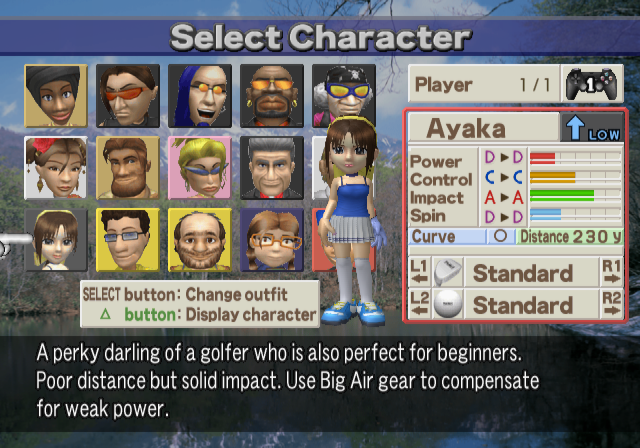
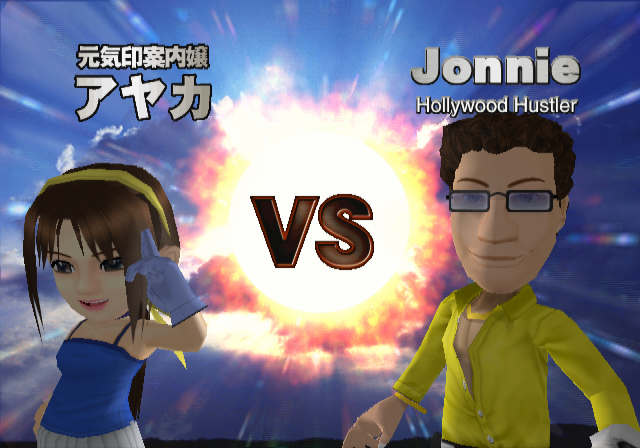
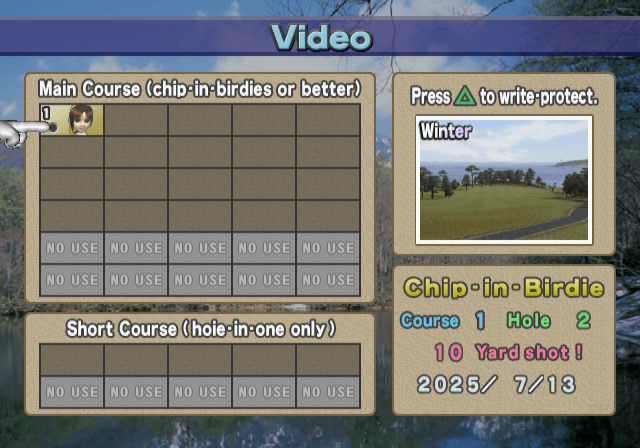
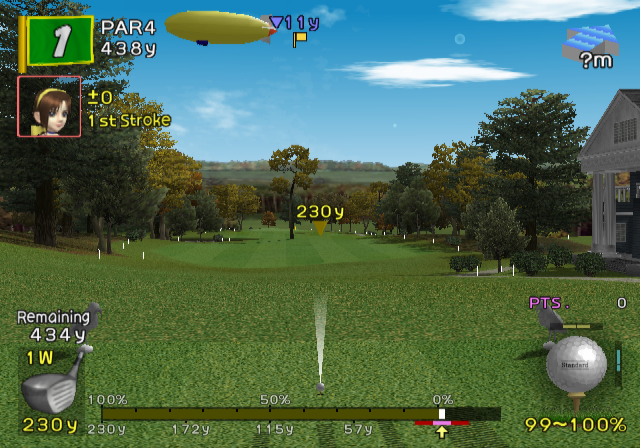
Ayaka was a character in the Japanese version who appeared in the menus and she could be unlocked by reaching the King rank. She shared her character slot with Nanako (who was replaced with Tiffany outside of Japan) as an alternate costume. While Ayaka was never intended to be in any other versions of the game, she does still exist in the North American version and she can even be selected in the base game in the V1.01 version. By going to the National Tournament mode and inputting the code R?d!n6MttmHT, the player can select Ayaka by scrolling through Tiffany's alternate costumes. Selecting Ayaka will still play Tiffany's select quote. Ayaka's name is translated in various menus which could suggest that she may have been planned to be playable in the US version at one point. While Ayaka can be selected, she does not function properly in game as she is invisible during gameplay (due to her gameplay character files being removed) and attempting to swing a shot will result in the game softlocking. Ayaka also cannot be set as a menu character as the file with her menu data was replaced with a duplicate of the random menu character select file. Attempting to load Ayaka as the menu character will crash the game.
Ayaka cannot be selected in the US V2.00 version using the previously mentioned code as attempting to do so will result in the player simply scrolling through Tiffany's costumes as usual. However, Ayaka is still present in the US V2.00 version in the same state as she was in V1.01. Ayaka also cannot be selected in the Korean version as National Tournaments were removed although once again, she still exists in the files in the same state as in the North American version.

Debug Mode#
Applying the below code will enable debug mode which grants access to a debug menu when playing in a game mode.
USA SCUS-97130 codes:

Master Code (only needed for cheat devices)
901110D8 0C0443DE

Enable Debug Mode
0033EB04 00000001
With the code on, press L3 to enable a debug menu when either fully on a course, or when you're in the top-down view of the course. This works in most modes excluding training mode.
(Source: Punk7890)
Course Debug Menu#
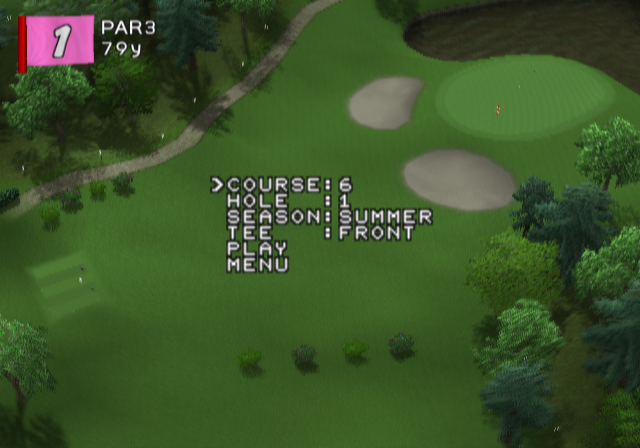
This displays when accessing the debug menu from a course preview.
Text |
Effect |
|---|---|
COURSE |
Allows you to change courses. Courses 1-6 are all of the playable courses. Course 0 can be highlighted but trying to load into it will crash the game as it has no data. Course 0 was likely a test course if it ever existed. |
HOLE |
Allows you to change holes. |
SEASON |
Allows you to change seasons. |
TEE |
Allows you to change the starting tee. |
PLAY |
Takes you into the game. The game takes you to the currently loaded hole, ignoring any changed options. In order to apply changed options, the player has to highlight any of the higher options when selecting. |
MENU |
Takes you back to the menu. The game will play the ending sequence of the mode played before going back to any menus. |
Hole Debug Menu#
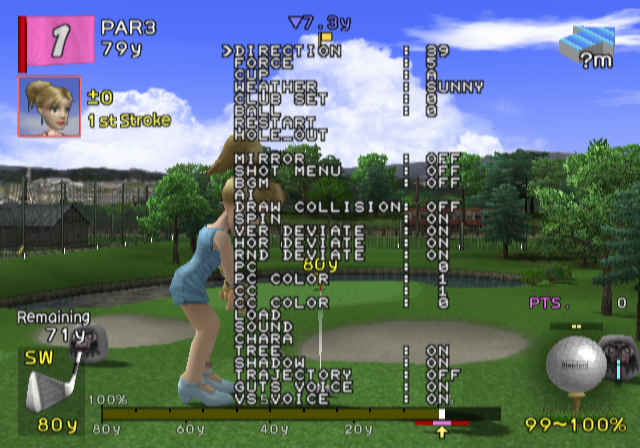
This displays when accessing the debug menu during gameplay.
Text |
Effect |
|---|---|
DIRECTION |
Determines the wind direction. |
FORCE |
Determines the wind strength. |
CUP |
Determines the hole position. |
WEATHER |
Determines the weather. |
CLUB SET |
Determines the club types used. In order to load the visuals for the changed club, the player has to use the "LOAD" option. |
BALL |
Determines the ball type used. |
RESTART |
Restarts the hole, taking the player back to their first stroke. |
HOLE_OUT |
Takes the player back to the hole overview. |
MIRROR |
Sets the mirror option for the hole |
SHOT MENU |
If set to on, after a shot, the game will bring up a sub menu where the player can choose to either continue, restart the shot, restart the hole or go back to the hole overview. |
BGM |
Sets whether the music is on or off. |
AI |
The game will shoot a shot for the player when selected. |
DRAW COLLISION |
Seems to have no effect. |
SPIN |
Toggles extra spin for the ball. |
VER DEVIATE |
Seems to have no effect. |
HOR DEVIATE |
Seems to have no effect. |
RND DEVIATE |
Seems to have no effect. |
PC |
Toggles the player's character. Character stats will change when toggled but the player has to select "LOAD" to load the new character. Note that Ayaka cannot be selected on this menu (Ayaka is slot 15 but the menu cannot scroll past slot 14) and the only way to highlight her is to already be playing as her. |
PC COLOR |
Toggles the player's costume. |
CC |
Toggles the caddie. "LOAD" has to be selected to load the new caddie. |
CC Color |
Toggles the caddie's costume. |
LOAD |
Loads any newly selected character, caddie and clubs. |
SOUND |
Takes the player to a separate menu to listen to sound effects and voices. |
CHARA |
Takes the player to a separate menu to view animations. |
TREE |
Toggles trees. |
SHADOW |
Toggles shadows. |
TRAJECTORY |
When set to it, it triggers debug information about the players shots. It always display the strength of your club and the height of your last shot compared to maximum strength with no spin. When a shot is taken, additional info is shown on the ball's maximum altitude, its distance when it lands, its distance when it starts rolling and its distance when it stops. A graph is also shown showing the ball's trajectory. |
GUTS VOICE |
Seems to have no effect. |
VS VOICE |
Toggles the voices in-between rounds in VS Mode. |
Sound Debug Menu#
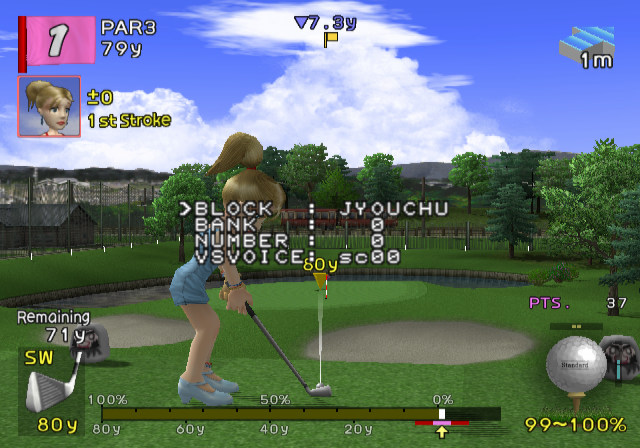
This displays when selecting the SOUND option in the hole debug menu.
Text |
Effect |
|---|---|
BLOCK |
Selects the sound block to play sounds from. |
BANK |
Selects the sound bank for a sound. |
NUMBER |
Selects the sound effect from the given sound block and bank. |
VSVOICE |
Selects the VS mode voice clip for the character you are playing when highlighted. |
Character Debug Menu#
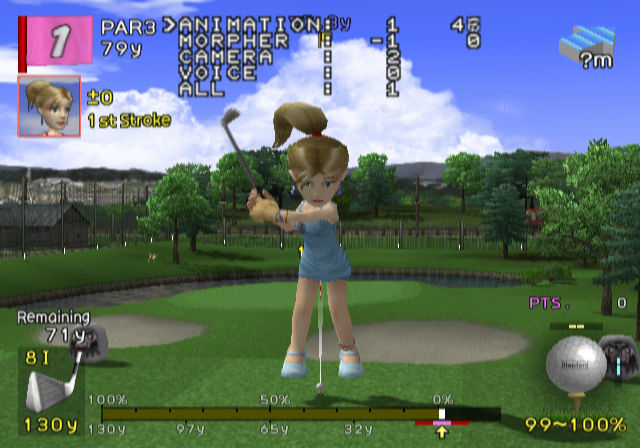
This displays when selecting the CHARA option in the hole debug menu.
Text |
Effect |
|---|---|
ANIMATION |
Selects the animation to play. |
MORPHER |
Selects the character's facial animations. |
CAMERA |
Seems to have no effect. |
VOICE |
Toggles through the character's voice clips although it does not seem to function. |
ALL |
Plays the whole animation when selected including facial animations and sound. |
Shot Debug Menu#
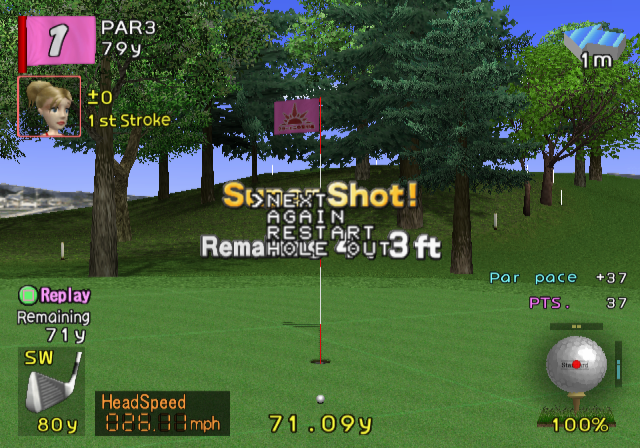
This displays after a shot when the SHOT MENU option in the hole debug menu is set to on.
Text |
Effect |
|---|---|
NEXT |
Moves on to the next shot when selected. |
AGAIN |
Restarts the previous shot when selected. |
RESTART |
Restarts the hole when selected. |
HOLE OUT |
Takes you back to the course preview when selected. |
Trajectory Debug Display#
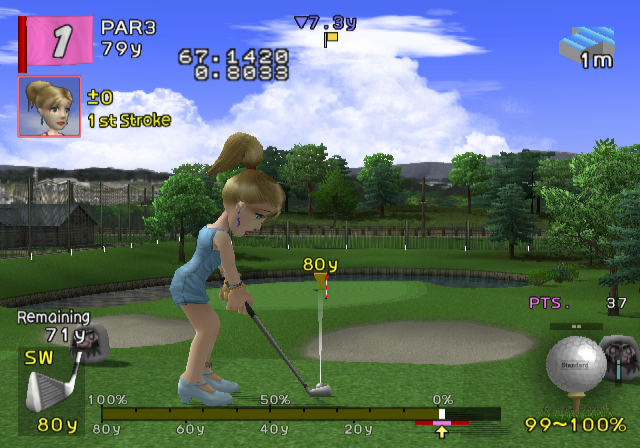
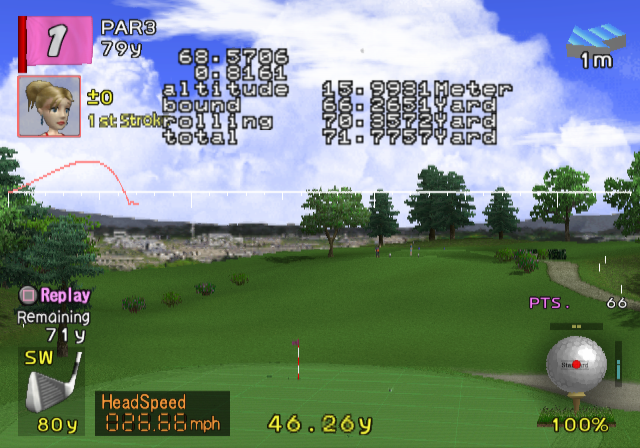
This displays when the TRAJECTORY option in the hole debug menu is set to on. The first two options are always displayed while the following options are displayed after taking a shot. All options are immediately calculated when a shot is taken.
Text |
Effect |
|---|---|
DISPLAY 1 |
Shows the strength of the last shot without taking any extra factors into account. |
DISPLAY 2 |
Shows the height of the last shot relative to a maximum strength shot with no spin. |
altitude |
Shows how high the ball flew in meters. |
bound |
Shows how far the ball went when it starts bouncing. |
rolling |
Shows how far the ball went when it starts rolling. |
total |
Shows how far the ball went rounded to 4 decimals. |
GRAPH |
The graph displays the trajectory of the ball when it is shot. |
Regional Differences#
Title Screen#
Japan |
US |
Korea |
|---|---|---|
|
 |
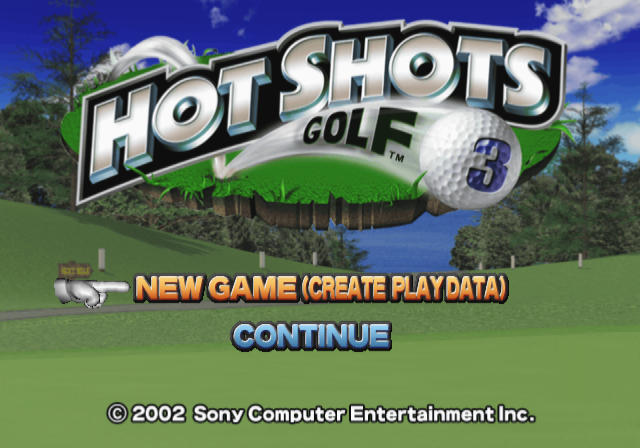 |
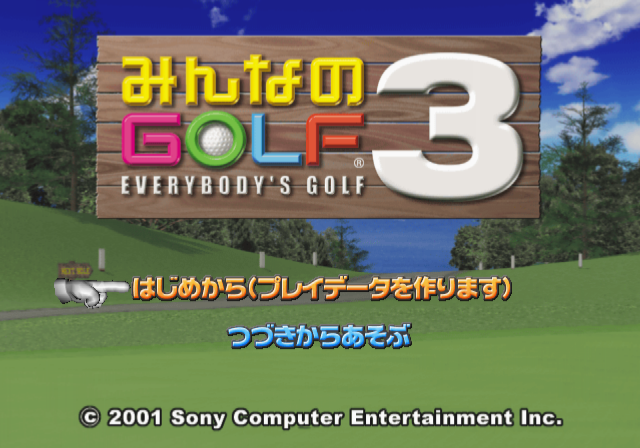
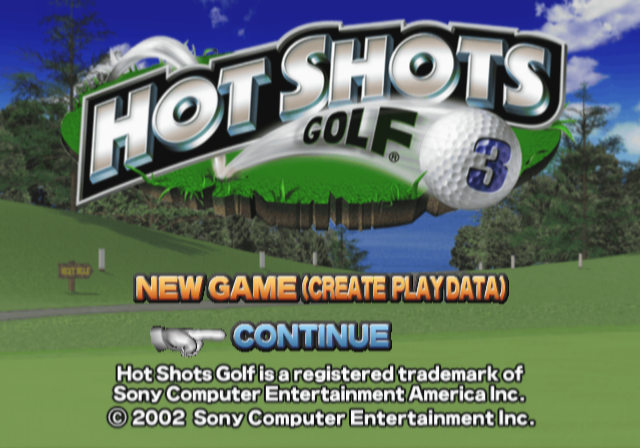
The North American version received a new logo to match the game's changed name in addition to updated copyright information. The title screen in the Korean version is mostly the same as the US version although it lacks the information on the trademark of the "Hot Shots Golf" name. The Registered icon on the "Hot Shots Golf 3" logo was also changed to a Trademark icon.
Menus#
- The book highlighting the continue option says "みんなのGOLF 3" (Minna No Golf 3/Everybody's Golf 3) in the Japanese and North American versions while in the Korean version, it says "Hot Shots Golf 3".
Japan/US |
Korea |
|---|---|
 |
 |
- The cards on the profile option show the Japanese roster in the Japanese version and the localised roster in the North American and Korean versions.
- When selecting the profile option, the cards on the bottom say "みんなのGOLF 3" (Minna No Golf 3/Everybody's Golf 3) in the Japanese and North American versions while in the Korean version, they say "Hot Shots Golf 3".
- The National tournaments exclusively uses Hirigana characters for its password system in the Japanese version while in the US version, the password system uses the full Latin Alphabet, numbers and Punctuation.
- National tournaments were removed in the Korean version.
- In the Japanese version, Ayaka will appear on the course select screen, regardless of the player's choice of menu character. As Ayaka is not present in the North American/Korean versions (nor does she have a replacement), the character who was present in the menus will appear on the course select screen.
- Ayaka additionally had some dialogue and an animation when a course was selected. The base roster does not do anything unique when a course is selected in the North American/Korean versions.
- In the profiles, whenever an animation plays which has some sort of extra prop (i.e. a golf club), that prop does not show up when the animation plays in the Japanese version. The prop does show up however in the North American and Korean versions.
Roster/Cutscenes#
|
|
To do: |
The North American version has a completely different roster compared to the Japanese version with every single playable character and Caddy differing between the two versions. The Korean version uses the North American roster. Because of the different roster, every character has a different menu background and every cutscene differs between versions.
Intro#
Japan |
US/Korea |
|---|---|
As mentioned previously, the Japanese version has three extra short intro sequences featuring the game's cast. These intros were removed in the other versions although they still exist in the US version's files. Additionally, parts of the first extra Japanese intro were incorporated into the intro in other versions.
Other changes#
- Save files takes up 1499KB of free space in the Japanese version while in the North American/Korean versions, they only take up 799KB of free space.
- An animated icon of Ayaka is used for the memory card icon in the Japanese version while in the North American version, a static image of a golf ball with "Hot Shots Golf 3" printed on it is used.
- Circle and X have swapped functionality in the North American/Korean versions compared to the Japanese version both in the menus and during gameplay.
- The Japanese version uses metres for putting while the North American/Korean versions use feet/inches.
References#
|
The Everybody's Golf series | |
|---|---|
|
PlayStation |
|
|
PlayStation 2 |
|
|
Everybody's Tennis | |
|
PlayStation 2 |
|