
|
This page contains no introduction. |

|
To do: |
Debug Menu#
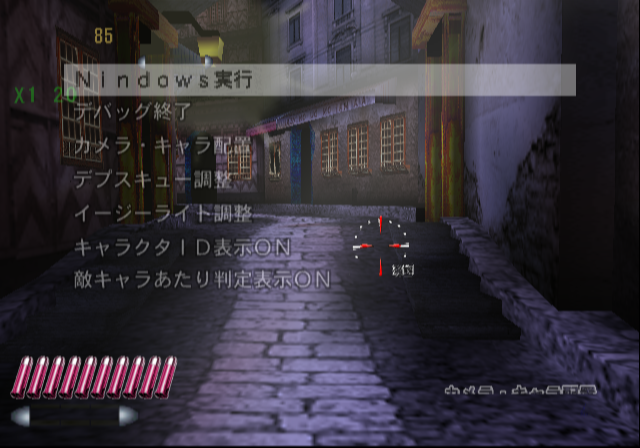
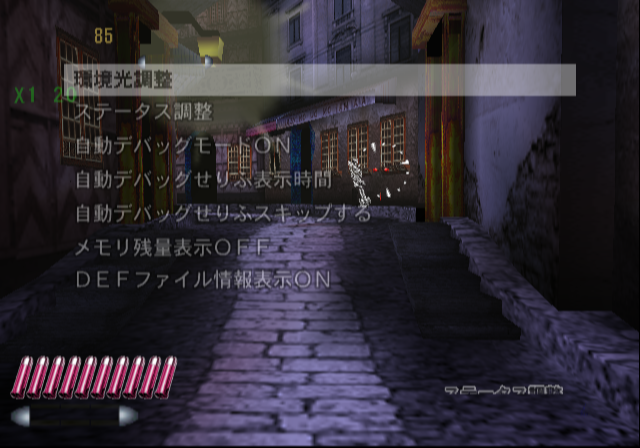
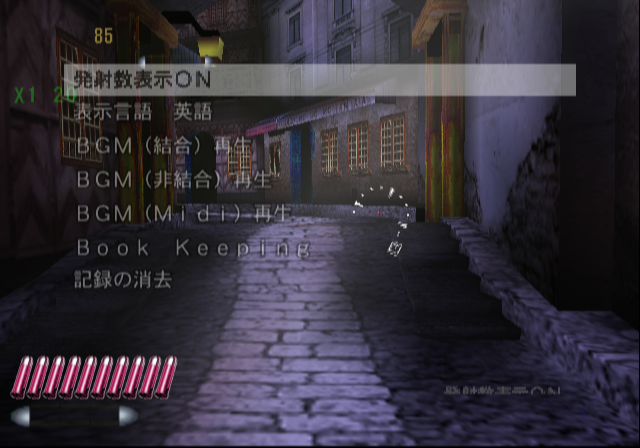
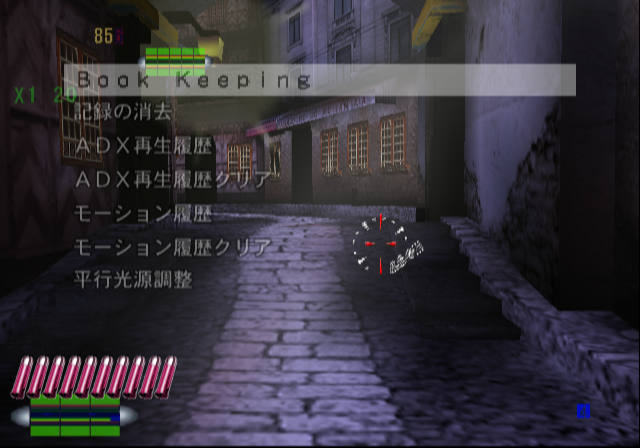
At the Press Start Button screen, press and hold the following buttons to enable the debug menu in game:
Press START Screen Inputs:
- D-Pad Right + D-Pad Up + tilt Left Analog Stick between Right & Up (northeast) + START.
You do not have to press them all in order, although, Start button needs to be the last button pressed. After that, head into game and then, to open the debug menu at anytime, press L1 + R1 + Circle. When scrolling through the menu, it will corrupt some graphics in game for unknown reasons. At one point in development, you could also change this menu to English, however the font or text for the menu has been removed. The menu does not display the correct text in the European version of this game.
Text |
Translation |
|---|---|
Nindows実行 |
Execute the nindows |
デバッグ終了 |
Finish debug |
カメラ·キャラ配置 |
Placement the camera and character |
デプスキュー調整 |
Adjustment the depth queue |
イージーライト調整 |
Adjustment the easy light |
キャラクタID表示ON |
Enable displays the character ID |
敵キャラあたり判定表示ON |
Enable displays the hit check area |
環境光調整 |
Adjustment ambient light |
ステータス調整 |
Adjustment the status |
自動デバッグモードON |
Enable auto debug mode |
自動デバッグせりふ表示時間 |
|
自動デバッグせりふスキップする |
Auto debug: Skip the lines |
DEFファイル情報表示ON |
Enable displays information of DEF files |
発射数表示ON |
Enable displays the fire count |
表示言語 英語 |
Display language: English |
BGM(結合)再生 |
|
BGM(非結合)再生 |
|
BGM(Midi)再生 |
Plays the BGM(Midi) |
Book keeping |
|
記録の消去 |
Delete the record |
ADX再生履歴 |
ADX play history |
ADX再生履歴クリア |
Clear the ADX play history |
モーション履歴 |
Motion history |
モーション履歴クリア |
Clear the motion history |
平行光源調整 |
Adjustment the directional light |

Selecting BGM(結合)再生 from the debug menu will allow you to change music.
(Source: Original TCRF research)