
|
This page contains no introduction. |
Performance Meter#
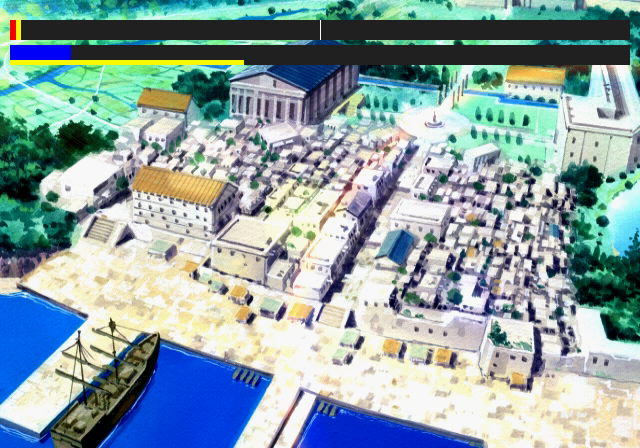
Applying the below code will enable a debug performance meter.
Master Code (only needed for cheat devices)
901123B8 0C044896

Enable Performance Meter
002069D4 00000001
(Source: Original TCRF research)
Debug Logging#
Within the game is a printf function that doesn't print anything anymore. This would have logged various background information to a debug unit. This logs information such as files loaded and memory information. It would also report errors if any occurred. To re-enable this mode, apply the below code:
Re-enable printf Messages
2013FD20 08044790
2013FD24 00000000
If you are playing the game on a regular PlayStation 2, you will need to use a TOOL, RDB, or a debug version of OPL to view the logs. If you are playing on an emulator, you can see this information by enabling the option "Show Console". Below is an example of what type of information gets logged.
HGL Peripheral Version 1.4.3
    Copyright 2000-2003 (C) Human Interface Communications
HGL Sound Version 1.4.27
    Copyright 2000-2003 (C) Human Interface Communications
HGL MIDI Driver Version 1.4.12
    Copyright 2000-2002 (C) Human Interface Communications
HGL PCM Driver Version 1.4.12
    Copyright 2000-2003 (C) Human Interface Communications
HGL Movie Version 1.4.11
    Copyright 2000-2003 (C) Human Interface Communications
HGL Draw Version 1.4.22
    Copyright 2000-2003 (C) Human Interface Communications
HGL Math Version 1.4.3
    Copyright 2000-2003 (C) Human Interface Communications
**FileManage:hlLoadBmr(CURSOR/CURSOR0.BMR)**ID:65536
*/*ST_CALL(HAGL/INIT.HAG)
**FileManage:hlLoadBmr(PICTURE/SYSTEM/DATE.BMR)**ID:65537
**FileManage:hlLoadBmr(PICTURE/BG/LOGO.BMR)**ID:65538
**MyReleaseBmr(65538)
**FileManage:hlLoadBmr(PICTURE/TITLE/TITLE_PU.BMR)**ID:65538
**FileManage:hlLoadBmr(PICTURE/BG/TITLE.BMR)**ID:65539
**FileManage:hlLoadBmr(PICTURE/TITLE/TITLE_BN.BMR)**ID:65540
(Source: Original TCRF research)