 This article has a talk page!
Die Hard: Vendetta is an FPS game taking place after the events of the third Die Hard film.
Level Select#
At the main menu, enter one of the following codes:
Platform |
Code |
|---|---|
GameCube |
X, Y, Z, Z, X, Y, Z, Z |
Xbox |
X, Y, White, White, X, Y, White, White |
PlayStation 2 |
Right, Left, Circle, Circle, Right, Left, Circle, Circle |
(Source: Punk7890 (PS2 button input discovery))
Hidden Cheats#

|
This needs some investigation. |
|
|
This needs some investigation. |
Several hidden cheats and cheats that the internet got wrong for many years for the PS2 version can be inputted below. Like the level select code, you will need to be at the main menu for all of these.
Button Inputs |
Reward |
|---|---|
Triangle, Right, Right, Triangle, Circle, R1, Left, L1 |
Bigger Guns |
L1, R1, Circle, Right, Triangle. |
Kamikaze (exploding bullets when shooting enemies) |
Triangle, Left, R1, R1 |
Exploding Fist |
Circle, Circle, Circle, Circle, L1, R1 |
Infinity Ammo |
Circle, Right, Left, R1, L1, Triangle |
Access To Level Parts |
Triangle, Right, L1, L1 |
Hot Hands |
Triangle, Left, Right, Circle, L1, R1 |
Infinity Hero Time |
Triangle, L1, R1, Left, Right, Circle |
One Shot Kill |
L1, Triangle, R1, R1, Triangle, L1 |
Dev: Trigger Complete |
Triangle, Right, Right, Triangle, Circle, R1, L1 |
Big Guns |
L1, Circle, Right, Triangle, Right, Left |
Steevs Graphical Surprise |
The "Dev: Trigger Complete" cheat will grant you access to a level skip option inside the pause screen.

Additionally, there are five more dummy cheats that cannot be inputted.
(Source: Punk7890)
Debug Options/Unused Cheats#
A few debug options and unused cheats remain in this game. You will need a cheat device that supports raw codes in order to access them, such as a GameShark or CodeBreaker.
Enable Debug Info (displays NPC states)
00693E44 00000001

Another Debug Display (doesn't appear to work anymore)
00693E40 00000001

Freeze All NPCs
00693E4C 00000001

Glowing Red Bodies
00693E74 00000001

Unknown (this apparently does something)
00693E6C 00000001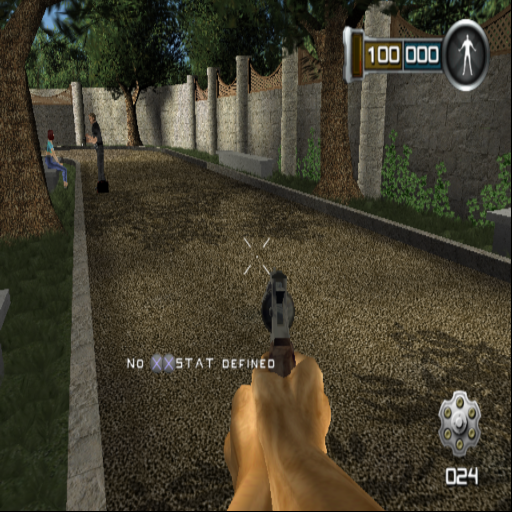
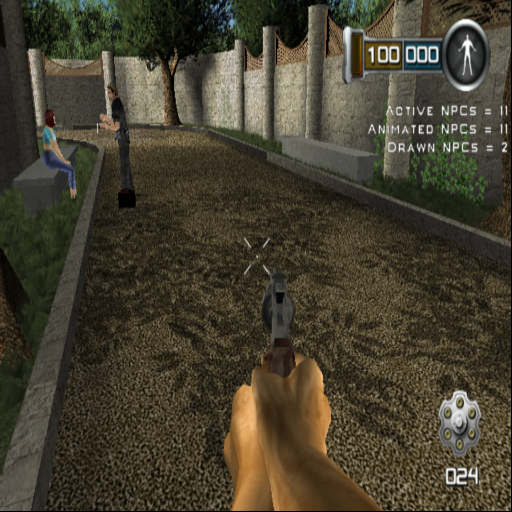
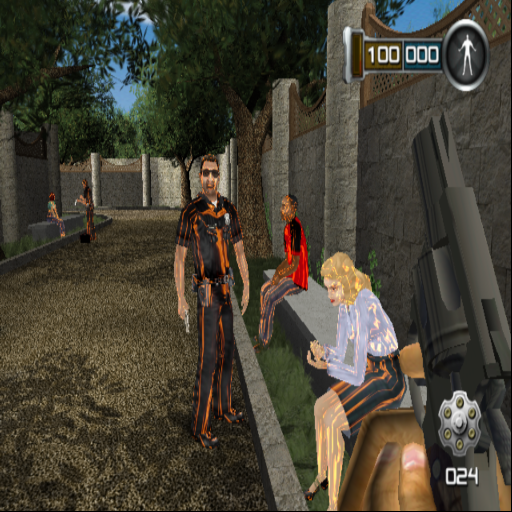
(Source: Punk7890)
Development Text#
Various error messages and development text fragments.
Getting an object that isn't a player or bot here!?!?!?
No MP game fade - Bot hasn't reported death state - emergency bail out :(
"Please create a buMP_GetMinGamePlayers for this game type"
void\tply::ForceDropWeapon(TGS_OBJECT *pObj, int iWeapon)
void\tply::SetBossEnergyBar(TGS_OBJECT *pThis, float fBossEnergyBar)
void\tply::SetDisguiseValid( TGS_OBJECT *pObj, int iValid )
void\tply::SetHeroTime(TGS_OBJECT *pObj, float t)
void\tply::SetPlayerScore(TGS_OBJECT *pObj, int iScore)
void\tply::SetPlayerTimer(TGS_OBJECT *pObj, float fTime)
void\tply::StopAllSpeech()
void\tply::SupressDeathFade(TGS_OBJECT *pObj)
(Source: Punk7890)
|
The Die Hard series | |
|---|---|
|
NES |
|
|
TurboGrafx-16 |
|
|
Arcade |
|
|
PlayStation |
|
|
Nintendo 64 |
|
|
PlayStation 2, GameCube, Xbox |
|