 This article has a talk page!
This is a sub-page of Crash Bandicoot: The Wrath of Cortex.

|
To do: |
Used Debugging Features
At least four separate debug menus of varying functionality can be accessed via one of the following Action Replay codes in the GameCube version.
The following codes activate the debug menu for a varying number of PS2 versions, respective to the region and game version. Hold the corresponding button while paused to activate the menu:
NA |
NA Greatest Hits |
EU |
EU Platinum |
|---|---|---|---|
Main Menu: (R2) |
Main Menu: (R2) |
Main Menu: (R2) |
Main Menu: (R2) |
(Source: Hacc/LXShadow Cheat List)
Main Menu#
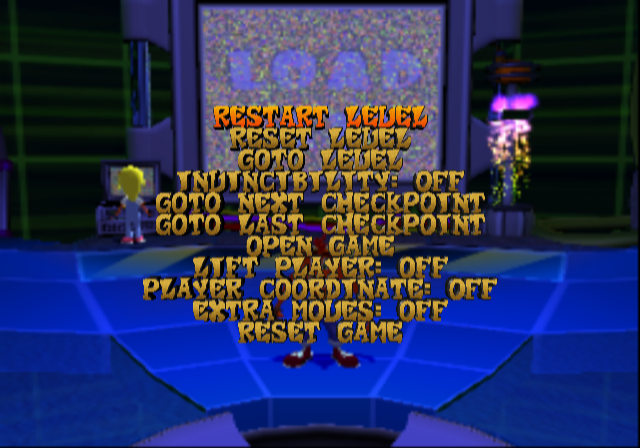
Press R2 in the pause menu. The menu consists of the typical options one may expect in a platformer, and was likely used extensively during testing. Any option labelled in bold can be toggled on or off.
Name |
Function |
|---|---|
RESTART LEVEL |
Warps you to the beginning of a level. |
RESET LEVEL |
Contrary to its description, this option doesn't reset the level itself, but instead resets your box count to 0. |
GOTO LEVEL |
Brings you to a rather neatly organized screen that allows you to warp to any level in the game. Curiously, Lo-Lo's levels are classed as "Weather" as opposed to the "Wind" moniker used elsewhere in the game, and the Game Over screen is actually classed as its own level alongside the 5 unlockable "Bonus" levels. |
INVINCIBILITY |
Does exactly what you think it would do. When turned on, a small "Invincible" notice flashes at the top of the screen. |
GOTO NEXT CHECKPOINT |
Sends you to the next Checkpoint Crate in a level. It does not however send you to the end of the level if you use it at the final Checkpoint Crate. |
GOTO LAST CHECKPOINT |
Sends you to the previous Checkpoint Crate in a level. |
OPEN GAME |
Instantly maxes out all of the Crystal, Gem, and Relic totals, granting you 106% and consequently completing the game. This function is identical to the hidden "WOMBAT" cheat that is in the Xbox and GameCube versions but absent from the PS2 one. |
LIFT PLAYER |
Predictably, allows you to moon jump by holding the Triangle button down. |
PLAYER COORDINATE |
Displays your current XYZ coordinates. This option differentiates itself from most other coordinate tests by constantly tracking your character's movement as opposed to remaining static. |
EXTRA MOVES |
When activated, gives you all of the post-boss "Power-Ups", including the Super Belly Flop which can only be found in a gem path. |
RESET GAME |
The polar opposite of the "Open Game" function above, this option resets your progress back to 0%. |
Cutscene Debugger#

Press L1 in the main menu.
As the name implies, this "menu" tests the "cutscenes" which play in the game. Note that this isn't a comprehensive list, as it omits any "vortex conversations" with the Elemental Masks and Crunch, in addition to the hologram conversations which play upon defeating a boss or starting a new game.
Name |
Function |
|---|---|
LOGOS |
Displays all of the developer logos. Riveting stuff. Since the Universal and Traveller's Tales credits are directly linked to the title screen, it also serves as a warp to the title screen. |
INTRO1 |
Plays the intro cutscene. Despite being labelled as "INTRO1", this actually plays the full cutscene with no interruptions. |
INTRO2 |
The second half of the intro. Selecting this in the PS2 version will simply warp Crash back to the Hub. |
OUTRO1 |
Plays the regular ending. |
OUTRO2 |
Plays the 100% ending, obtained by collecting all of the Gems and Relics. |
Draw Settings#
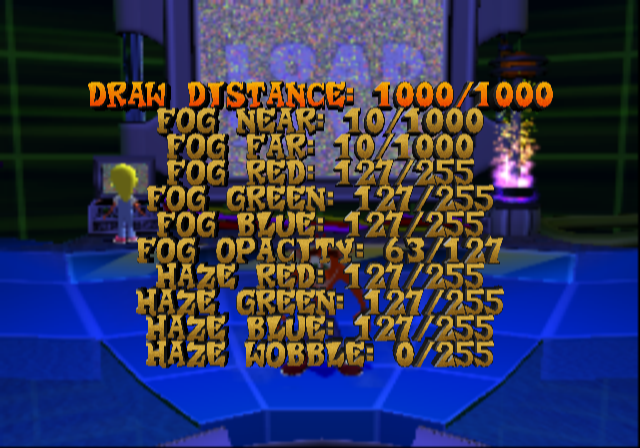
Press L2 in the pause menu.
Presumably controls the draw settings in the game.
DRAW DISTANCE: %i/%i
FOG NEAR: %i/%i
FOG FAR: %i/%i
FOG RED: %i/255
FOG GREEN: %i/255
FOG BLUE: %i/255
FOG OPACITY: %i/127
HAZE RED: %i/255
HAZE GREEN: %i/255
HAZE BLUE: %i/255
HAZE WOBBLE: %i/255
Memory Information#
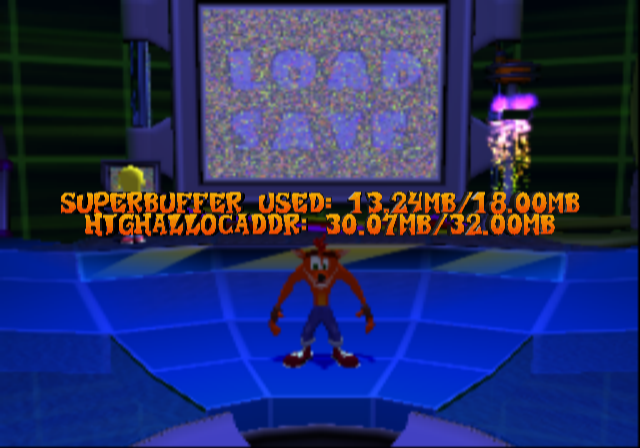
Press R1 in the pause menu.
Shows how much memory is being used up by the game at a current moment in time, relative to the presumed limit.
SUPERBUFFER USED:  %.2fMB/%.2fMB
HIGHALLOCADDR: %.2fMB/32.00MB
(Source: Ralf @ gc-forever (codes))
Unused Debugging Features
|
|
To do: |
Several debugging functions are still present in the game's code, probably intended for very early builds of the game, even before the E3 build. However, the functions responsible for calling them never get called, probably because they were most likely commented out and replaced, but were never removed from the final game executable.
Function Name |
Description |
Caller |
|---|---|---|
edcrtDrawInfo() |
Draws information about crates in a level. |
edcrtRender() |
edwmpDrawInfo() |
Draws information about how much Wumpa fruit are in a level, their height, and position. |
edwmpRender() |