 This article has a talk page!
Covert Ops: Nuclear Dawn takes place on a train, but this ain't no trip for fun. First, you gotta stop those terrorists and then save the kidnapped French ambassador, and also the world.
Unused Images#
The file MENU.DPF contains unused images that refer to some cut features.
PocketStation#
Unused menu screens that refer to a PocketStation mini-game called the Visual Receiver. No such mini-game exists in the final version. These screens are found only in the Japanese version.
The first two screens explain the features of the Visual Receiver, as translated below:

Tune in to the frequency and get the information!

"Visual Receiver" is a communication terminal that converts voice communication into text and displays it in real time.

Tune in to different frequencies and gather a variety of information.

Download it to your PocketStation and use it.

(Number of blocks used: 3 blocks)
When you use "Visual Receiver"...

* Receiving information from European countries
* Communication with friendly soldiers and headquarters
* Intercepting enemy communications

...is possible.

Enemy communications contact information that will be beneficial to you, such as item information.

Once you have the item information, you can actually obtain the item on your PlayStation.

*For more details, please refer to the software manual.
The rest of the images below are various operational messages.

|

|

|

|
|---|---|---|---|
Text that prompts the player to download the Visual Receiver. |
Text that tracks the download progress. |
The download is complete. |
A warning to not unplug the PocketStation. |

|

|

|

|
An error message due to lack of free space on the PocketStation. |
An error message due to the PocketStation not being plugged into Slot 1. |
An error message due to the fact that the mini-game is already downloaded to the PocketStation. |
An error message due to a failure to download the mini-game. |

|

|

|

|
An error message due to the fact that the PocketStation is not initialized. |
A message that the PocketStation is being initialized. |
A message that the initialization is complete. |
An error message due to the fact that something else other than a PocketStation is plugged in. |

|

|

|
|
An error message due to a malfunction of the PocketStation. |
A warning that an error has occurred with the PocketStation. |
An error message that the initialization of the PocketStation has failed. |
The images below are from the title screen. They lead to the PocketStation menu, colored in ways that show disabled, enabled and highlighted, respectively.
 |
 |
 |
|---|
Special#
 |
 |
 |
|---|
There are also unused graphics for a "Special" option menu, though it's not clear if it refers to the special stage/scenario, or Scenario S. However, it may be the former, as there is a hidden menu entry found in MENU.DPF called "Special".
- Scenario S has a slightly different storyline where you can also briefly play as Christina. Also some bosses will have different weapons, making them more difficult.
- Special Stage gives you infinite ammo for guns (but not for TNT Bombs and Grenades) and an Assault Rifle which can be found in the kitchen's freezer. Also, you will receive double pistols at the start of the game, along with a few weapon items in the deposit box.
Both are accessible after completing the game in Rookie difficulty, or completing Scenarios S at Normal or Expert difficulties.
 |
The letter "S" in dark coloring, similar to that of the difficulty level indicator for save files. |
|---|---|
 |
The letter "S" in light coloring, similar to that of the difficulty level indicator for save files. |
There are also "S" icons similar to the icons for the difficulty levels (e.g. "R" for rookie, "N" for normal and "X" for expert). This was meant to be displayed while loading or saving, but instead the save file description will display Special Stage or Scenario S at the start, which later is no longer displayed in subsequent saves in both modes.
Unused Modes#
An undocumented feature of the game is that you can combine Special stage with Scenario S. However, this requires you to modify 1 or 2 specific values in your save file with a bitwise OR-operation, and understanding the very simple calculation of the checksum byte at the end of the save file. Similarly, you can also play Scenario S in Rookie difficulty.
Regional Differences#
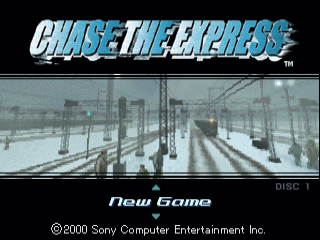
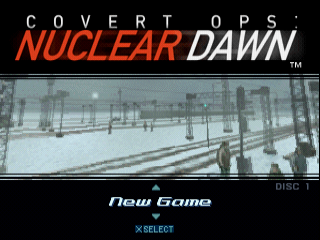
- The title of the game, used in Japan and Europe, was changed in the North American version and the title screen was changed to reflect this. In the North American version, the copyright, which was moved to a separate screen, was removed to make way for button prompts. Additionally, the "DISC #" text was removed in the European versions.
Japan/Europe |
North America |
|---|---|
 |
 |
- The full motion video sequences seem to be sharper in the international versions.
Japan |
North America |
|---|---|
 |
 |
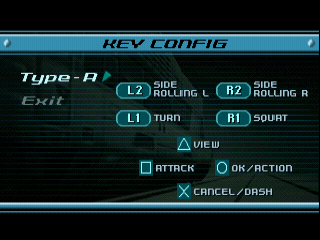
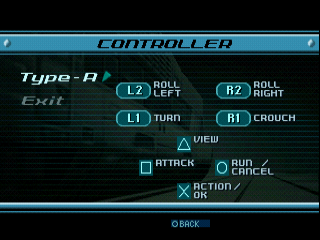
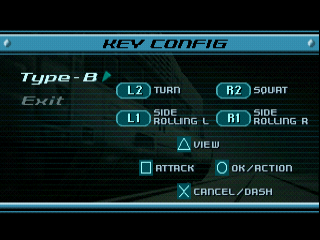
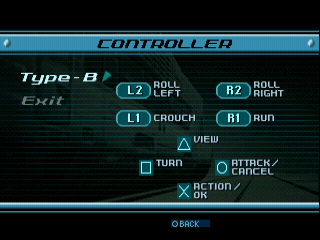
- Both control schemes are different between each version.
Japan |
North America |
Europe |
|---|---|---|
 |
 |
 |
 |
 |
 |
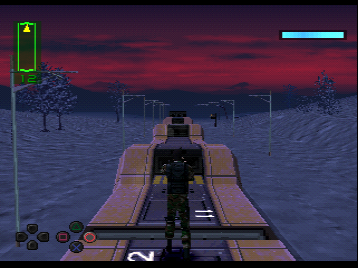
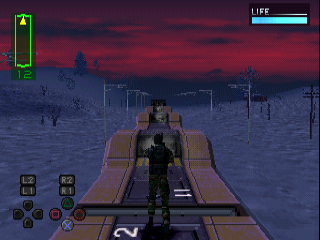
- The button prompts that appear in the lower left of the screen were changed in the North American version.
Japan/Europe |
North America |
|---|---|
 |
 |
- A "Now Loading..." text was added to various loading sequences in the North American version. Load times also seem to be improved in the international versions.
- A "Quit" option to return to the title screen was added to the European versions.
- There are some minor English text differences between the European and North American versions.