 This article has a talk page!
This is a sub-page of Command & Conquer: Red Alert (DOS, Windows).
Walls#
Walls have unused graphics for their final damage level as the game removes the wall when they reach the last stage.1 A cut feature suggests that infantry were once planned to be able to pass through walls when in this damage level.2 Barbed wire fences show both stages of their graphics because they were coded as having a third stage without graphics.3


Iron Curtain#
The iron curtain has an animation for its activation but nothing seems to tell it to animate.
|
Normal |
Damaged |
|---|---|

|

|
Chronosphere#
The Chronosphere also has an animation for its activation but nothing tells it to animate.
|
Normal |
Damaged |
|---|---|

|

|
The Chronosphere also displays the wrong frames for the damaged animation due to it having an animated idle animation and animated active animation.4 Instead of displaying frames 29-32 it displays frames 20-23.
Crate Powerups#


The water crate has an animation but seems to go unused because OverlayTypeClass::Display doesn't tell it to load all frames. 
Radar Animations#
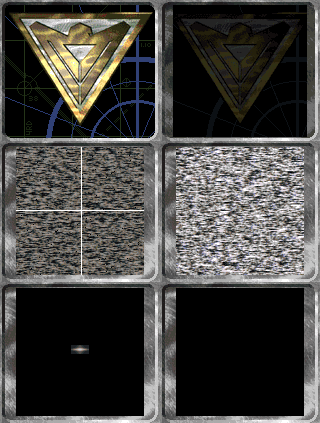
Each faction has an animation for the radar coming online (or offline if placed in reverse), however the game seems to play the animation faster than the game is rendered due to modern hardware, leading to only one frame or multiple segments of frames mixed together, to be drawn instead.
Allies |
Soviets |
|---|---|
 |
 |
In addition each country seems to have an entry for a potential unique radar graphic, but only two were made.
Terrain Tiles#
Interior Theater Alternate Tiles#
In the game's Interior theater, almost all floor tiles, and some wall tiles, contain several different versions of the graphics, showing the same tile in a slightly different state of being damaged or smudged. The tile files identify themselves to the game as having a footprint size of 1×1 cell, but contain more tiles, indicating that the ones beyond the first tile are alternate versions. None of these alternates are used in the game, but all of them (except ARRO0003; see below) are usable if a map editor allows placing them down.
 |
ARRO0001; 6 tiles. |
 |
ARRO0002; 6 tiles. |
 |
ARRO0003; 6 tiles. |
 |
ARRO0004; 6 tiles. |
 |
ARRO0005; 6 tiles. |
 |
ARRO0006; 6 tiles. |
 |
FLOR0001; 12 tiles. |
 |
FLOR0002; 12 tiles. |
 |
FLOR0003; 12 tiles. |
 |
FLOR0004; 12 tiles. |
 |
FLOR0005; 12 tiles. |
 |
FLOR0006; 12 tiles. |
 |
FLOR0007; 12 tiles. |
 |
GFLR0001; 13 tiles. |
 |
GFLR0002; 13 tiles. |
 |
GFLR0003; 13 tiles. |
 |
GFLR0004; 13 tiles. |
 |
GFLR0005; 13 tiles. |
 |
GSTR0001; 6 tiles. |
 |
GSTR0002; 8 tiles. |
 |
LWAL0001; 4 tiles. |
 |
LWAL0002; 4 tiles. |
 |
LWAL0003; 4 tiles. |
 |
LWAL0004; 4 tiles. |
 |
LWAL0005; 7 tiles. |
 |
STRP0001; 12 tiles. |
 |
STRP0002; 12 tiles. |
The Remaster contains remastered versions of all these extra tiles. There is a fan-upgraded version of the Remaster's map editor which allows access to the alternate tiles, including a function to automatically randomise them.
The only tile from these alternate graphics that is used in the game in some way is the second tile of GFLR0001. The hidden mini-campaign with giant ants in the Counterstrike expansion pack features Ant Larvae and a Queen Ant in the final mission, which are classified as structures in-game. The mission is set in Interior theater, and rather than using transparency and generated shadows, these structures are combined with the GFLR0001 tile graphics they are on, with the 2-cell Queen Ant using the second tile from the set for its second cell, under the thorax and head; the floor is noticeably more orange above the thorax. Since the official missions only use the first tile for the actual floor, this has the side effect that the floor texture under the front of the Queen Ant changes slightly when it is destroyed.
 |
||
|
||
The first two tiles of |
||
The first tile of |
In the Remastered edition, the Queen and Larvae sprites were given proper transparency, so this is no longer present. Unlike in the original game, however, the Queen Ant no longer uses remappable house colours, and is simply always coloured red.
Interior Theater ARRO0003 Tile#
The tileset ARRO0003, present in the Interior theater game files as ARRO0003.INT, has internal ID number 255. Unfortunately, since this is the maximum value that can be stored in a byte, this was used as general indication for "Clear Terrain" in earlier versions of the map format, before the tile IDs stored in maps were expanded to two bytes. Since many of the game's older maps still contain tile 255 as clear terrain, the game automatically assumes that any tile with ID 255 is meant to be clear terrain.
Because of this, the ARRO0003 tile, and any of its alternate variants, are replaced by the normal tiling 4x4 blocks of the CLEAR1 tileset, and its real graphics are never shown. This means that interior theater maps can contain floor arrows pointing to the north, east and south, but not west.
|
|
When used in Interior theater, there is one noticeable difference between normal clear terrain and the ARRO0003 tile, namely that, despite replacing its graphics, the game will still use the terrain type stored inside the ARRO0003.INT file. The default black clear terrain in Interior theater is impassable, but ARRO0003 is not, resulting in passable black map tiles.
Snow Theater Clear Terrain#
Like the wall and floor tiles in the Interior theater, the game's default clear terrain files for all theaters identify themselves as having tile dimensions of 1×1, but contain multiple tiles. Unlike the Interior tiles, though, their extra tiles are used; they are tiled over the map in 4×4 cell blocks, filling any cell on the map indicated as 'empty'.
The Snow theater's clear terrain contains 20 tiles, and is still just tiled as 4x4 pattern, meaning the remaining four tiles are never used. However, further analysis of the extra tiles shows that they are copies of tile 3, 6, 9 and 12 of the original 4×4 pattern.
|
Analysis |
|---|---|
 |
 |
Bibs#
Despite no buildings being 4 cells wide, the game contains graphics for 4 wide bibs.


Tree Destruction#
Despite being invulnerable, the multi-cell trees also have destruction animations.


Unit / Structure Graphics#
Infantry#
The engineer, spy, and thief all have animations for crawling but are set to be unable to crawl.


The spy also has unused animations for attacking.


The dog also has an unused version of its fire death without shadow.
|
Used |
Unused |
|---|---|

|

|
Badger Bomber#
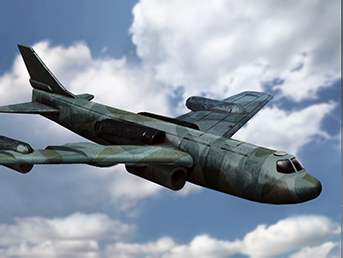
The badger bomber, used for parabombs and paradrops has its own icon that goes unused as it's not buildable.
DOS |
Windows |
Remastered |
|---|---|---|
 |
 |
 |
Helicarrier#

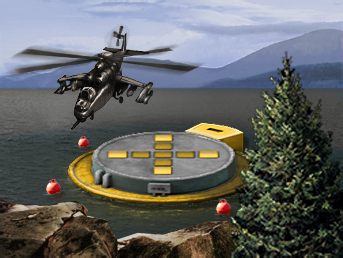
The helicarrier is a cut unit from The Aftermath expansion. It carries up to five helicopters and launches them when ordered to attack. It has both unit graphics and build icons, and is completely usable when configured to be buildable. The Remastered version also contains remastered versions of all the necessary graphics to make the unit function.
Unit:
DOS / Windows |
Remastered |
|---|---|
 |
 |
Icon:
DOS |
Windows |
Remastered |
|---|---|---|
 |
 |
 |
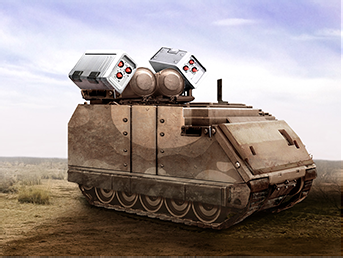
Phase Transport#
The phase transport from The Aftermath also has an icon despite being a unique, non-buildable unit. INI editing allows it to be buildable in the original game.
DOS |
Windows |
Remastered |
|---|---|---|
 |
 |
 |
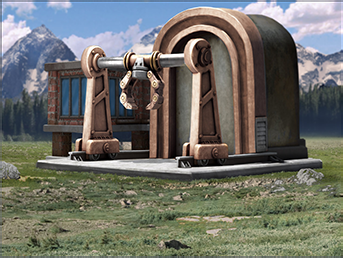
Construction Yard#
The construction yard cannot be built directly (excluding its fake version), rendering its full version unused. Interestingly the DOS version uses the Tiberian Dawn graphic.
DOS |
Windows |
Remastered |
|---|---|---|
 |
 |
 |
Fake Sub-Pen#
Fake buildings are a feature unique to the Allied faction of the game, meaning the Soviet Sub Pen is unused. Still, the game contains an icon for it. Since the Remaster automatically creates the icons for Fake buildings by overlaying the original icon with a "Fake" banner in the user's chosen language, no explicit remastered Fake icons exist for any of the fake buildings.
DOS |
Windows |
Remastered |
|---|---|---|
 |
 |
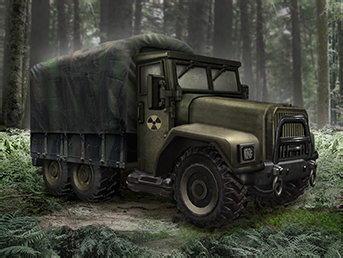
Supply Truck#
The trucks used in the campaign are unbuildable, rendering their cameos unseen. The DOS version has an explosion but is not to be confused with the demo truck's different icon.
DOS |
Windows |
Remastered |
|---|---|---|
 |
 |
 |
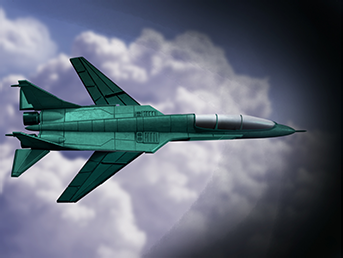
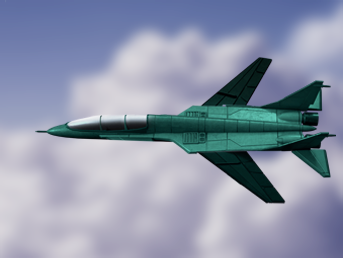
Spy Plane#
The spyplane itself seems to have an icon which is a horizontally flipped version of the ability's icon, without shroud. The DOS version matches the ability's.
Ability |
Unit |
|---|---|
 |
 |
Remastered |
Remastered |
 |
 |
Mine Layer#
The game manual features two separate icons for the Allied and Soviet minelayer units, "AT" (anti-tank) and "AP" (anti-personnel) ones respectively, while in the retail version they both use the same icon. Additionally, the AP one is mirrored. It is possible that minelayers were intended to be separate units with their own icons, while in the final game they're the same unit with logic to deploy different types of mines depending on the owner; another, more simplistic explanation is that manual authors just added these icons themselves, to help players distinguish units' functions.
Final, Windows (shared) |
Anti-personnel |
Anti-tank |
|---|---|---|
 |
 |
 |
The mine layer has an animation for deploying a mine that reuses the APC door logic but doesn't seem to play. In addition the mine layer is told to always face north when deploying a mine so the other angles wouldn't be used.5 
Tiberian Dawn Leftovers#
Nod's flametank's graphics.

The truncated deploy animation of the prerelease MCV, with the faction logo appearing at the end.

The orca, with "HIND" superimposed.

The SSM Launcher's graphics.
|
Body |
Weapons |
|---|---|

|

|
The stealth tank, this was later overwritten by the phase transport in Aftermath.

References#
- https://github.com/electronicarts/CnC_Red_Alert/blob/0dc09bb1d6188d1ec79ab4765b22a48b75ffee32/CODE/CELL.CPP#L1695↩︎
- https://github.com/electronicarts/CnC_Red_Alert/blob/0dc09bb1d6188d1ec79ab4765b22a48b75ffee32/CODE/INFANTRY.CPP#L1297↩︎
- https://github.com/electronicarts/CnC_Red_Alert/blob/0dc09bb1d6188d1ec79ab4765b22a48b75ffee32/CODE/ODATA.CPP#L148↩︎
- https://github.com/electronicarts/CnC_Red_Alert/blob/0dc09bb1d6188d1ec79ab4765b22a48b75ffee32/CODE/BUILDING.CPP#L679↩︎
- https://github.com/electronicarts/CnC_Red_Alert/blob/0dc09bb1d6188d1ec79ab4765b22a48b75ffee32/CODE/UNIT.CPP#L2595↩︎