 This article has a talk page!

|
This page contains no introduction. |

|
To do:
|
Front End Debug Menu#


Enabling the below code will send you to this screen after the game boots.
USA code:

Enable Debug Menu at Boot
20465C48 00000000
(Source: Original TCRF research)
Debug Mode#

Enabling the below code will grant access to a few debug button combinations.
USA code:

Enable Debug Mode
20427FE4 00000001- R2 + L2 - New Character System Debug Menu
- R2 + Square - Debug Camera (doesn't work?)
(Source: Original TCRF research)
Debug Text#
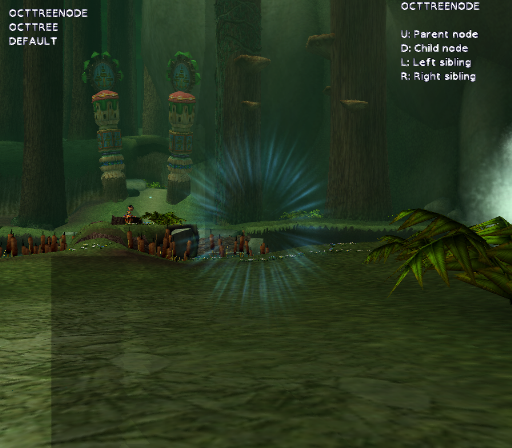
During main gameplay (i.e. after the bear chase sequence at the beginning of the game), holding R2 on Controller 2 will show a debug functionality. The player can press L1 to go to a HUD test (the only option left is a sound test) or L2 to show octree data. Pressing R1 progresses back through the menus.
Development Texts#
Present in SLUS_211.27.
Trying to fly the eagle again too soon, he's still fading out
Storage data has not been allocated!
Character data type %i for %s still present in heap %s about to be destroyed!!!
ERROR COL_InitGame: Error initialising collision system!
Woops, I've forgotten I had effects running.
Particle Effect (%s) Activation failed with code: %x
 Effect Started
 Effect failed to start
Joint %d
Couldn't create particle effect on pickup item
5060Select
PauseRoot
PreFrontEnd
DebugMenu
Select Mode
Front End
Debug Maplist
Format Card
Unformat Card
Language
Language2
Cheat activated, hurrah
GME_UpdateTimers: frame time %f > %f seconds - assuming that the game has been stopped and restarted by the debugger