This is a sub-page of Billy Hatcher and the Giant Egg (GameCube).
A Debug Menu can be enabled with the following Action Replay Codes. Press Start on the title screen to enter it.
Controls for all screens:
- A: Selects option.
- B: Goes back an option; goes back to the title screen on the main screen.
- D-Pad: Change selection.
Main Screen#

The debug menu is neatly organized into the game's different modes.
- Story - Brings you to the Story mode menu.
- Battle - Brings you to the Battle mode menu.
- JoyCarry - Brings you to the JoyCarry menu.
On the right is a list of common files that are referenced when the game starts, sourced from the k_boot.prd for the GameCube version;
- fontdat.bin(US)/fontdat_eu.bin(PAL) - font data for text.
- ge_constplt.bin - Vestigial settings file for multiplayer mode. Notably unmodified since the multidisc demo.
- ge_stagedef.bin - general settings a mission can use, such as what message list is used, what geo obj banks, level audio banks, particles, mission type, rank scores, and player spawn position.
- storyseq.arc - determines code flags for emblems across missions + level select access.
- VIBRegular.vbl - Controller vibration settings for certain events.
- ar_nowloading.arc - canvas .ae ui file container for loading screen.
- nowloading.gvm - texture archive for loading screen.
- SEMapRegular.bin - Specifies sound IDs across all soundbanks and .afs/.adx streams.
- BGMRegular.bin - Music IDs.
Story Screen#

This screen lists all the missions in Story mode and lets you choose your character. Attempting to load a level with anyone other than the intended character crashes the game (Ex. Rolly in any of Billy's missions). This is due to the player .arc file of the selected character not being in the .prd level mission archive.
Adding their .arc file to the .prd archive resolves this.
- Player - Lets you choose your character. Use D-left and D-right to change which character you play.
- Billy
- Rolly
- Chick
- Bantam
- Billy in his normal attire (based on the levels it lets you load it in)
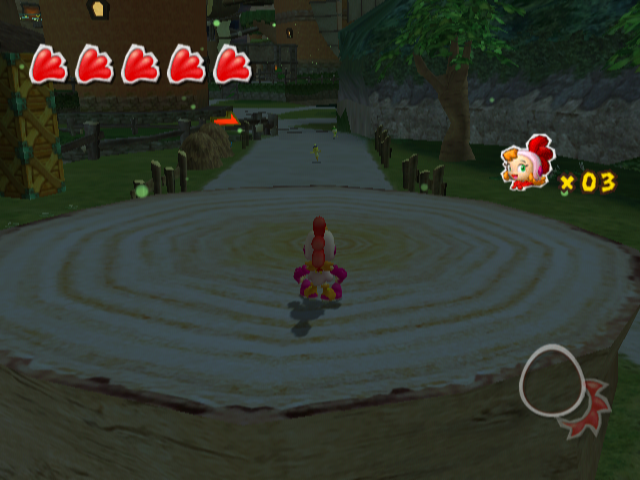
Example of supplying the needed player arc file for the level archive when using a different char than the mission typically uses.
Stages#
- green1 - Mission 1 of Forest Village
- green2 - Mission 2 of Forest Village
- green3 - Mission 3 of Forest Village
- green4 - Mission 4 of Forest Village
- green5 - Mission 5 of Forest Village
- green6 - Mission 6 of Forest Village
- green7 - Mission 7 of Forest Village
- green8 - Mission 8 of Forest Village
- blue1 - Mission 1 of Pirate's Island
- blue2 - Mission 2 of Pirate's Island
- blue3 - Mission 3 of Pirate's Island
- blue4 - Mission 4 of Pirate's Island
- blue5 - Mission 5 of Pirate's Island
- blue6 - Mission 6 of Pirate's Island
- blue7 - Mission 7 of Pirate's Island
- blue8 - Mission 8 of Pirate's Island
- red1 - Mission 1 of Dino Mountain
- red2 - Mission 2 of Dino Mountain
- red3 - Mission 3 of Dino Mountain
- red4 - Mission 4 of Dino Mountain
- red5 - Mission 5 of Dino Mountain
- red6 - Mission 6 of Dino Mountain
- red7 - Mission 7 of Dino Mountain
- red8 - Mission 8 of Dino Mountain
- purple1 - Mission 1 of Blizzard Castle
- purple2 - Mission 2 of Blizzard Castle
- purple3 - Mission 3 of Blizzard Castle
- purple4 - Mission 4 of Blizzard Castle
- purple5 - Mission 5 of Blizzard Castle
- purple6 - Mission 6 of Blizzard Castle
- purple7 - Mission 7 of Blizzard Castle
- purple8 - Mission 8 of Blizzard Castle
- orange1 - Mission 1 of Circus Park
- orange2 - Mission 2 of Circus Park
- orange3 - Mission 3 of Circus Park
- orange4 - Mission 4 of Circus Park
- orange5 - Mission 5 of Circus Park
- orange6 - Mission 6 of Circus Park
- orange7 - Mission 7 of Circus Park
- orange8 - Mission 8 of Circus Park
- yellow1 - Mission 1 of Sand Ruin
- yellow2 - Mission 2 of Sand Ruin
- yellow3 - Mission 3 of Sand Ruin
- yellow4 - Mission 4 of Sand Ruin
- yellow5 - Mission 5 of Sand Ruin
- yellow6 - Mission 6 of Sand Ruin
- yellow7 - Mission 7 of Sand Ruin
- yellow8 - Mission 8 of Sand Ruin
- last - Mission 1 of Giant Palace
- last2 - Mission 2 of Giant Palace
- last3 - Mission 3 of Giant Palace
- last4 - Mission 4 of Giant Palace
- last5 - Mission 5 of Giant Palace
- last6 - Mission 6 of Giant Palace
- last7 - Mission 7 of Giant Palace
- last8 - Mission 8 of Giant Palace
- green_battle_test - Unknown; crashes
- blue_battle_test - Unknown; crashes
- red_battle_test - Unknown; crashes
- purple_battle_test - Unknown; crashes
- orange_battle_test - Unknown; crashes
- yellow_battle_test - Unknown; crashes
- green2_battle_test - Unknown; crashes
- last_battle_test - Unknown; crashes
- blue_boss - Boss fight against Captain Glur
- red_boss - Boss fight against Topo
- purple_boss - Boss fight against Moles
- orange_boss - Boss fight against Saltim
- yellow_boss - Boss fight against Dark Corvo
- green_boss - Boss fight against Era Gecko
- last_boss - Boss fight against Dark Raven
- last_boss2 - Final boss fight against Dark Raven's ultimate form
- blue_boss2 - Post Captain Glur scene the first time you beat it, with Chicken Elder Uri-Uri
- red_boss2 - Post Topo scene the first time you beat it, with Chicken Elder Ura-Ura
- purple_boss2 - Post Moles scene the first time you beat it, with Chicken Elder Ponee
- orange_boss2 - Post Saltim scene the first time you beat it, with Chicken Elder Allani
- yellow_boss2 - Post Dark Corvo scene the first time you beat it, with Chicken Elder Meri-Meri
- green_boss2 - Post Era Gecko scene the first time you beat it, with Chicken Elder Oma-Oma
- title - May be the title screen; crashes
- practice - Unknown; crashes
Unlike normal, when the post-boss scenes with the Chicken Elders are accessed through this menu, they show the results screen on a white background, which looks odd.
Battle Screen#

This screen allows you to choose a Battle mode to play and the stage to begin.
Modes#
- Survival - Survival mode; pre-set at 1 stock.
- Time - Time Battle mode; pre-set at 1 minute.
- Score - Hatch mode; pre-set at 9 points to win.
Each mode automatically boots the level into a four player battle with Billy as player 1, Rolly as player 2, Chick as player 3, and Bantam as player 4 regardless of how many controllers are plugged in.
Stages#

- battle_green - Forest Village Battle Stage 1
- battle_blue - Pirate's Island Battle Stage
- battle_red - Dino Mountain Battle Stage
- battle_purple - Blizzard Castle Battle Stage
- battle_orange - Circus Park Battle Stage
- battle_yellow - Sand Ruin Battle Stage
- battle_green2 - Forest Village Battle Stage 2
- battle_last - Giant Palace Battle Stage
Joy Carry Screen#

|
This needs some investigation. |

This screen lists all the GBA Joy Carry games:
- CHUCHU - Chu Chu Rocket! Challenge
- PUYOPUYO - Puyo Pop
- NIGHTS - NiGHTS -SCORE ATTACK-
- BILLY HATCHER EASY - BILLY HATCHER Hyper Shoot -Easy-
- BILLY HATCHER - BILLY HATCHER Hyper Shoot
If there's an error connecting to the GBA when selecting a game, it will show an error message. Press B to get out of the connection error.