 This article has a talk page!

|
This page contains no introduction. |

|
Oh dear, I do believe I have the vapors. |

|
To do: |
Debug Mode#
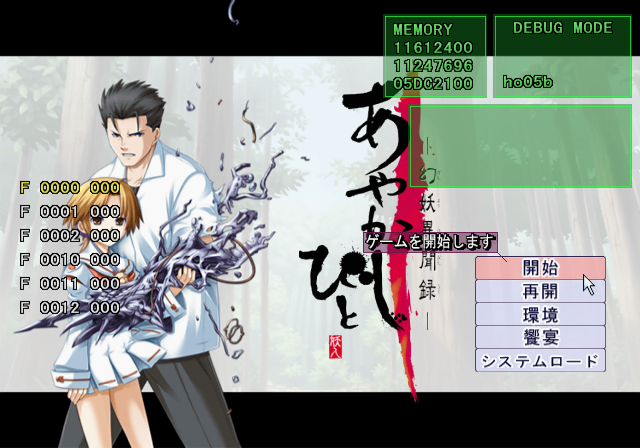
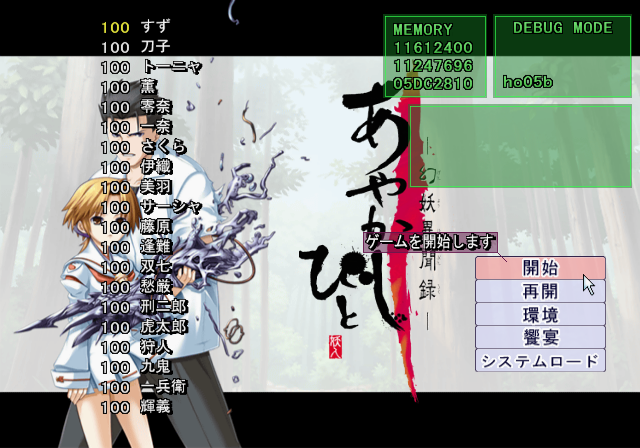
At the main menu, press R3, Square, Circle, Square, D-Pad Left, L3, D-Pad Left, L3, R1, R1, R2, R2 on Controller 2.
This same debug system can also be found in Duel Savior Destiny, and Kyuuketsu Kitan Moonties.
After entering the above code, press Start on Controller 2 to toggle Debug Mode. This allows you to change game-related flags and the volume of each spoken character in the game. Below are the known Controller 2 inputs while this mode is active.
- Hold
 and press
  /
/  to change an event. If SCRIPT JUMP KINSI is enabled, you will start in this event when starting a new game.
 - Press
 for flag list.
 - Press
 for character volume menu.
 - Hold
 to make the menu temporarily invisible.
 - Press
 to enable SCRIPT JUMP KINSI.
(Source: Original TCRF research)
Unused Image#
The following content is |
|---|
 |
Oddly, there is an unused image from the PC version of the game that remains on the disc, censored. The PC version of this image does not have censoring. This appears to be the only censored, unused image from the PC version that made its way into this port. All other instances of nudity were removed.
(Source: Original TCRF research)