Asagao Academy: Normal Boots Club is a Kickstarter-funded choice-based visual novel that allows players to take on the role of Hana, go to a fictional high school in Japan, and date the YouTubers from Normal Boots (including JonTron and ProJared).
Unused Graphics#
Hana Mizuno Yandere#


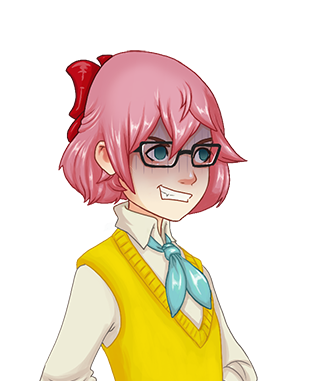

Hana has a few sprites of her with a dark expression that's meant to show her as a yandere, according to the filenames being labeled as such. Only the sprite with her having a blank expression in her pajamas is used, while the rest aren't. It's unknown what they were originally meant to be used for.
Development-Related Text#
Jared Madness#
Present with the other script folders in the game is a unused one named Test Room. Inside of it is a single scene named JAREDMADNESS.rpy, which is a joke script used for testing purposes.
    $ save_name = "JAREDMADNESS"
    $ unlocked_journal_pages = 0
    $ currentRoute = "None"

    stop music
    stop voice
    stop sound

    $ renpy.pause(5.0)
##########GOING TO ASAGAO##############
    scene train with dissolve
    window show dissolve

    show JAREDBAG angry at topleft
    show JAREDD angry at topright
    show JARED mischevious with dissolve
    Jared "Hey gurl..."
    show JARED rage at right as JARED2 with dissolve
    'Jared Two' "Hey! What are you doing talking to my gurl?!"
    show JAREDS eyeclosed at left with dissolve
    'Sexiest Jared' "None of you compare to the sexiest Jared!"
    Hsurp02 "Oh... {w=1}ummm... {w=1}wow..."
    "I had no idea what I got myself into"
    show JARED neutral with dissolve
    Jared "Well you should ditch these losers and hang out with the one true Jared."
    show JARED at right as JARED2 with dissolve
    "The 2nd Jared frowned."
    'Jared Two' "I'm honestly the truest of the Jareds."
    show JAREDS eyeclosed at left with dissolve
    'Sexiest Jared' "Now, now, you two. There's no need to fight when she can all of us."
    voice "vas/Jared/Jared_chuckle7.ogg"
    show JARED mischevious with dissolve
    show JARED mischevious at right as JARED2 with dissolve
    show JAREDS mischevious at left with dissolve
    "A smirk simutaneously emerged on all three of their faces. It was unsettling."
    "I needed to get out of there."
    Hangry  "You're all losers."
    show JARED upset with dissolve
    show JARED upset at right as JARED2 with dissolve
    show JAREDS upset at left with dissolve
    "Their jaws dropped"
    show JARED sad at right as JARED2 with dissolve
    'Jared Two' "Well, it was worth a shot."
    show JARED blush with dissolve
    Jared "Oh... wow, I never realized how handsome I was."
    hide JARED with dissolve
    hide JARED2 with dissolve
    voice "vas/Jared/Jared_chuckle.ogg"
    "Both of them giggled and wandered off."
    "..."
    "..."
    "..."
    "..."
    "..."
    "..."
    "..."
    "..."
    "..."
    "..."
    "..."
    "..."
    "..."
    "..."
    "..."
    "..."
    "..."
    "..."
    "..."
    "..."
    "..."
    "..."
    "..."
    "..."
    "..."
    "..."
    "..."
    "..."
    "..."
    "..."
    "..."
    "..."
    "..."
    "..."
    "..."
    "..."
    "..."
    "..."
    "..."
    "..."
    "..."
    "..."
    "..."
    "..."
    "..."
    "..."
    "..."
    "..."
    "..."
    "..."
    "..."
    "..."
    "..."
    "..."
    "..."
    "..."
    "..."
    "..."
    "..."
    "..."
    "..."
    "..."
    "..."
    "..."
    "..."
    "..."
    "..."
    "..."
    "..."
    "..."
    "..."
    "..."
    "..."
    "..."
    "..."
    "..."
    "..."
    "..."
    "..."
    "..."
    "..."
    "..."
    "..."
    "..."
    "..."
    "..."
    "..."
    "..."
    "..."
    "..."
    "..."
    "..."
    "..."
    "..."
    "..."
    "..."
    "..."
    "..."
    "..."
    "..."
    "..."
    "..."
    "..."
    "..."
    "..."
    "..."
    "..."
    "..."
    "..."
    "..."
    "..."
    "..."
    "..."
    "..."
    "..."
    "..."
    "..."
    "..."
    "..."
    "..."
    "..."
    "..."
    "..."
    "..."
    "..."
    "..."
    "..."
    "..."
    "..."
    "..."
    "..."
    "..."
    "..."
    "..."
    "..."
    "..."
    "..."
    "..."
    "..."
    "..."
    "..."
    "..."
    "..."
    "..."
    "..."
    "..."
    "..."
    "..."
    "..."
    "..."
    "..."
    "..."
    "..."
    "..."
    "..."
    "..."
    "..."
    "..."
    "..."
    "..."
    "..."
    "..."
    "..."
    "..."
    "..."
    "..."
    "..."
    "..."
    "..."
    "..."
    "..."
    "..."
    "..."
    "..."
    "..."
    "..."
    "..."
    "..."
    "..."
    "..."
    "..."
    "..."
    "..."
    "..."
    "..."
    "..."
    "..."
    "..."
    "..."
    "..."
    "..."
    "..."
    "..."
    "..."
    "..."
    "..."
    "..."
    "..."
    "..."
    "..."
    "..."
    "..."
    "..."
    "..."
    "..."
    "..."
    "..."
    "..."
    "..."
    "..."
    "..."
    "..."
    "..."
    "..."
    "..."
    "..."
    "..."
    "..."
    "..."
    "..."
    "..."
    "..."
    "..."
    "..."
    "..."
    "..."
    "..."
    "..."
    "..."
    "..."
    "..."
    "..."
    "..."
    "..."
    "..."
    "..."
    "..."
    "..."
    "..."
    "..."
    "..."
    "..."
    "..."
    "..."
    "..."
    "..."
    "..."
    "..."
    "..."
    "..."
    "..."
    "..."
    "..."
    "..."
    "..."
    "..."
    "..."
    "..."
    "..."
    "..."
    "..."
    "..."
    "..."
    "..."
    "..."
    "..."
    "..."
    "..."
    "..."
    "..."
    "..."
    "..."
    "..."
    "..."
    "..."
    "..."
    "..."
    "..."
    "..."
    "..."
    "..."
    "..."
    "..."
    "..."
    "..."
    "..."
    "..."
    "..."
    "..."
    "..."
    "..."
    "..."
    "..."
    "..."
    "..."
    "..."
    "..."
    "..."
    "..."
    "..."
    "..."
    "..."
    "..."
    "..."
    "..."
    "..."
    "..."
    "..."
    "..."
    "..."
    "..."
    "..."
    'Sexiest Jared' "Oh, was that my cue to go, too??"

    $ renpy.end_replay()
jump JAREDMADNESSCheating?#
Should we enable the use of developer tools? This should be set to False before the game is released, so the user can't cheat using developer tools.options.rpy has a developer leaving a message to other developers if they should prevent players from cheating.
Developer Complaints#
Ugly. We have different code depending on if we're in the game menu or not.A developer complaining about coding, which can be seen in buttons.rpy.
Screen Discussion#
Since saving and loading are so similar, we combine them into a single screen, file_picker. We then use the file_picker screen from simple load and save screens.

Step 1. Create a MusicRoom instance.

Step 3. Create the music room screen.

The buttons that play each track.
The buttons that play each track.
The button that lets the user exit the music room.

how many rows and columns in the gallery screens?

the setting above (267x150) will work well with 16:9 screen ratio. Make sure to adjust it, if your are using 4:3 or something else.

Here we create the thumbnails. We create a grayscale thumbnail image for BGs, but we use a special "locked" image for CGs to prevent spoilers. for gal_item in gallery_cg_items:

screen extra:
THIS IS A SCREEN

This is where we display the currently-selected page of the journal, prefaced by the label "Notes:

If you have a submenu, enter the corresponding name and contatination...Just ask Austin how to do it...
screens.rpy features developers discussing things in screens.rpy.
Voice Files#
 This extra contains a basic implementation of voice support. Right now, voice is given its own toggle, and can either be turned on or turned off. In the future, we'll probably provide some way of toggling it on or off for individual characters. To use it, place a voice "<sndfile>" line before each voiced line of dialogue.

Normally, a voice is cancelled at the start of the next interaction. If you want a voice to span interactions, call voice_sustain.

If this is not None, it should be a string giving a voice tag to be played. If None, this takes its default value from the voice_tag of the Character that causes the next interaction. The voice tag is used to specify which character is speaking, to allow a user to mute or unmute the voices of particular characters.
00voice.rpy also contains some more comments from the developers about voice files.
Credits#
I'm making the Titles for what the

Adding Text into a Ren'Py image format so we can easily show and hide later.
Position properties are added in to make this look nicer. Xalign & Yalign make it so the title is centered to the names. Text Align aligns the title text when it takes more than a single line, like the Character Concepts below.

I'm using the example game's credits for an example, but they all have only 1 person for each thing... So here's a list of random people that I immediately think of. ^^

The spacing property adds padding in between the items in the vbox or hbox. The items in this example are the title and the names. There will be 15 pixels in between the title and the names here.

I'm just gonna repeat the vbox & hbox alignments for a couple of these.

Something simple for the end of the credits in this example.

Because the text was showing up centered and at the bottom and this was the easiest first thing I could think of to fix that. This will center entire block of title and names.

 Start the credits. I have a TITLE for these Credits to name the project, which this is Credits for Cara. Change hard to false if you want people to be able to click past it. I have a lot of $ renpy.pause's in my game set to hard=True because I have a lot of timing due to ATL and music stuff.
hide logo with dissolve # Hide the credit's TITLE image

Start showing the credits and hiding them. Adjust the timing (3.0) as needed.

Restarts Ren'Py and takes you to the main menu screen.
Several developer commentaries can be seen in Credits.rpy.
Entry Point#
This is the entry point into the game.
label start:
    stop music

    window hide dissolve

    jump DayOne
Finally, there's one last comment from a developer in Start_and_test.rpy.