This is a sub-page of Anachronox.
Debug Menu#
To activate the debugging material, press ALT+SHIFT+F10. That enables the debug mode which shows additional information all over the screen and allows to access the console with "~" key. The console can be enabled by editing the Default.CFG file in the CONFIGS folder.
Main#
Patched#

The main debug menu can be accessed by entering "invoke 1:86" (without quotes) into the console.
View/Edit Player Stats#

This menu allows you to change the HP, level, and skill of any character in your party.
View/Edit Inventory#

This menu allows you to add any item to your inventory.
Edit Party/Money#

This menu allows you to change the characters in your party, as well as adjust the number of credits you have.
View/Edit Battle Weapons / Skills#

This menu allows you to add or change the skills your party has. You can also add any battle weapons to your inventory from this screen. It is very similar to the inventory editor.
The Works#


Each character has a unique line after receiving the items:
- Boots: "Bow Before Me.. Weenie Monkeys!"
- Grumpos: "Is there no sick old woman who can stand before me?!?"
- Rho: "You better check yo'self before you wreck yo'self."
- PAL-18: "I'll kick that robot from Short Circut's ass!"
- Democratus: "We want the funk, gotta have that funk!"
- Stiletto: "What's my name bitch?!?"
- Paco: "Yo Quiero a can of whupass?!?"
Find Location / Goto Location#

This menu allows you to go to any XYZ co-ordinate you input.
Random Game Names#

This menu opens a window with randomly-generated names of supposed video games belonging to "Mintendo".
Original / 1.0#
It is not clear why some of the functions were removed in the patched version (such as level select).

Handy Anox Debug Menu#
The old debug menu can be accessed by entering "invoke 1:860" (without quotes) into the console.

There you can warp around the world, track quest status and even set an alarm clock. Some of the functions are unlisted because they are either unfinished or not implemented. The debug menu from the 1.0 release version of the game features most of the functions found here but more or less completed and working.
Go to ... Map ...#

Go to Story Section...#

Apparently Main Menu did not exist when that menu was in use hence start the game with intro cinematic option. The third option does nothing.
Add/Remove Party Members#

Add Beat Weapons for Battle#

Dude, I give up--wake me in 30.#

The textures for numbers are still in the game's files but have different names, so to make them display they needed to be renamed first.
Adjusting Window Colors#
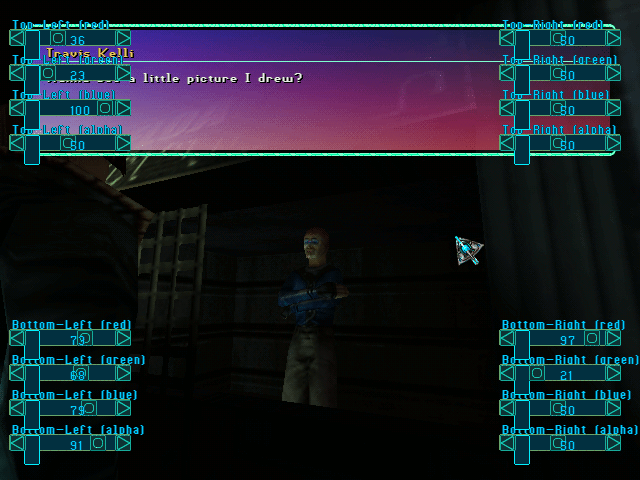
Watch on YouTubeTyping "windowcoloradjust" into the console will display the menu that allows to customize the default color scheme for dialogue boxes. Some planets got customized dialogue boxes and can't be altered. The menu allows to set color for each corner of dialogue boxes (rgba) which it blends together afterwards.
AI Debug Mode#
Watch on YouTubeHighlights paths and control points used by the AI and Characters.
One way to call it is by entering "exec testjosh" into the console.
It is a shortcut which executes a list of commands. It changes controls a little, allowing to switch between the AI view-modes by pressing F1-F4. From 0 to 3, 3 - shows everything.
The list of commands executed can be found in the following file:
anoxdata/configs/testjosh.cfg