3D Ultra RC Racers is a racing game developed by Dynamix and published by Sierra Entertainment in 1999.
Unused Abilities#
Money Powerup#

An unused powerup type with a dollar sign on it that has no effect when used. Likely meant as means to collect vehicle upgrade money in the Circuit game mode.
Developer Messages#
Holding specific keys while the "Help > About..." credits are scrolling temporarily replaces developer names with messages:
Key |
Developer |
Temporary message |
|---|---|---|
M |
Dave McClurg |
Hi Mom! |
K |
Kevin Ryan |
Hi Liam, Brendan, Clare, Sean and Kieron! |
L |
Jon Milnes |
Hi London, luv u! |
B |
Brian Hahn |
i love you laurie, ryan and lindsey |
P |
Peter Lewis |
Aloha Nuuanu Boys |
Pressing the Control key on every fifth repeat of the credits roll permanently replaces additional names with the following messages:
Developer |
Permanent message each 5th repeat |
|---|---|
Glenn Wallace |
Glenn Wallace - dedicated to Alexandra |
Anthony Lewis |
Jo, Sam and Alex, Daddy loves his girls |
James Carey |
Allyson, Heather, Sydney, Hi! Grampa Jimbo |
Kate Alley |
Hi J.T.! |
David Aughenbaugh |
Hi Julia Jongla and Mombo! Love, Stinkley |
Dave Steele |
Now I can ride my Harley! |
Geoff Hampton |
Top of the world, Ma |
Kenn Smith |
Thanks Detroit family |
Garrett Turner |
I have no recollection! |
Aaron Anderson |
Beth Ingram, I Love You |
Trevor Lanz |
Mmmmmm chocolate.. |
John Wolf |
Pure quality since 1993 |
Michael Desalvo |
Thanks Shawni, I Love You. |
Vance Naegle |
In honor of ChrisG |
Danny Rubyono |
Hi Mom and Dad, I love you. |
Richard Gabrielson |
I love Victoria, Carly, Colin and Sierra |
Ken Rogers |
Read Books |
John Leavens |
Hello Slugo |
Note that not all developers above actually appear in the credits of some game versions, making their messages inaccessible.
Development-Related Text#
Incremental Link Info#
The ILK file created by the Visual C++ compiler when compiling the game was accidentally included on the v2.0 CD at \RCRacersDeluxe\RCRacers.ilk. It leaks ~2500 names of functions and variables of the game's source and is only 3 weeks older than the executable in the same directory.
Source File Paths#
The following C++ source file names can be found throughout the executable (as the result of using and related macros), which would be displayed in a message box in case of unexpected errors.
c:\rcracing\Dev\tbShell\APP.CPP
c:\rcracing\Dev\sim\DIRTY.CPP
c:\rcracing\Dev\Sim\script.cpp
c:\rcracing\Dev\sim\task.cpp
c:\rcracing\Dev\sim\track.cpp
c:\rcracing\Dev\sim\vehicle.cpp
c:\rcracing\Dev\sim\vmodel.cpp
c:\rcracing\Dev\menus\Signin.cpp
c:\rcracing\Dev\menus\vdraw.cpp
c:\rcracing\Dev\menus\vehicle_select.cpp
c:\rcracing\Dev\chaos\graph\cGraph.cpp
c:\rcracing\Dev\chaos\io\RESOURCE.CPP
c:\rcracing\Dev\chaos\input\gameInput.cpp
c:\rcracing\Dev\chaos\graph\BMP.CPP
c:\rcracing\Dev\chaos\misc\simbase.cpp
c:\rcracing\Dev\chaos\io\RESBLOCK.CPP
c:\rcracing\Dev\chaos\io\UNPACK.CPP
Debugging Features#
Command Line#
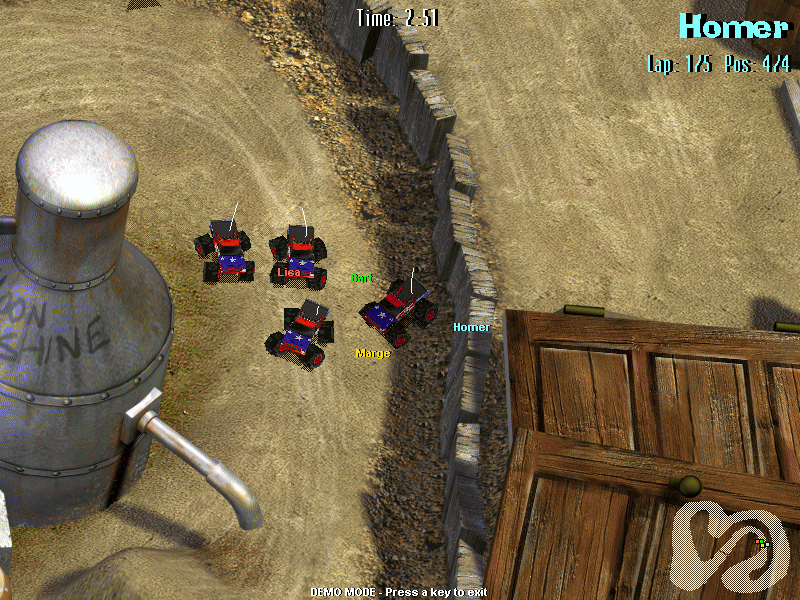
The game can be started with one or more of the following command line arguments to change its startup behavior:
Argument |
Effect |
|---|---|
When passed as the last argument, starts the game directly on the track with this name (e.g. "backyard"). |
|
-count: |
When loading a track directly, forces the races to have this number of players. |
-exit:1 |
No effect. |
-aionly:1 |
When loading a track directly, starts the demo mode and forces all players to be AI controlled. |
-ailearn:1 |
No effect in retail builds. Likely recorded human player to improve AI pathing when loading into a track directly. |
-window |
Forces the race to be rendered in a window. |
-paint: |
When loading a track directly, paints all vehicles in the paint with the given index. |
-vehicle:<buggy,stadium,monster,baja> |
When loading a track directly, forces all players to have vehicles of one of the given types. |
-repos: |
Loads sound files from the given directory with their original subfolder / name if it cannot find them otherwise. |
Default Player Names#
When using the command line to load a track directly with up to 4 racers (e.g. with -count:4 backyard), they will have these default, familiar names:
Homer
Marge
Bart
Lisa
INI Files#
The game comes with a handful of .ini files that allow the user to enable various debugging features.
control1.ini#

Your keyboard, mouse and joystick configuration. There are also files for additional human players, named control2.ini, control3.ini and control4.ini.
The keyboard settings include the following entries by default:
[Keyboard]
...
Trick1=1
Trick2=Control 1
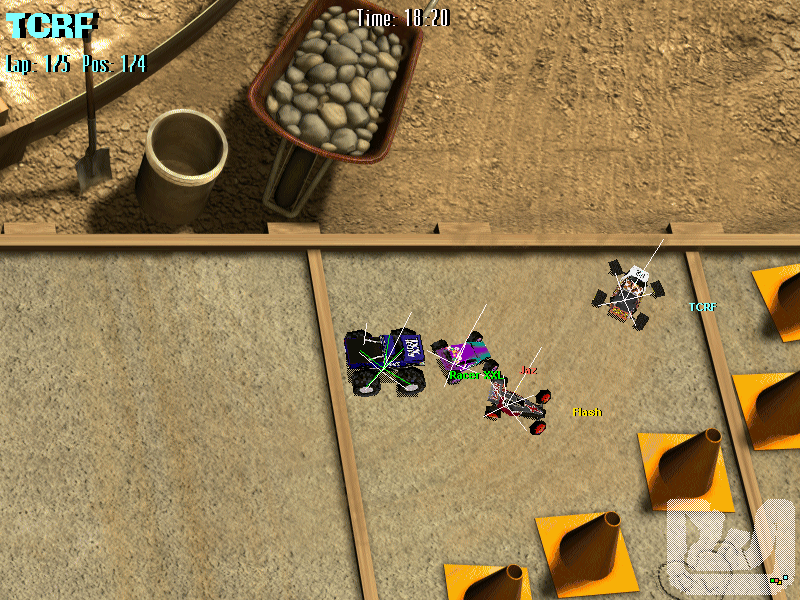
Trick1 and Trick2 seem to have been used for testing. When using either one, it may cause any or all vehicles to lose control. When using the former after a race starts, it draws a white line into the direction that you are pressing. You will now also move into that direction directly without taking facing direction into account.
Additionally, the following actions can be bound that no longer have an effect:
Trick3
Trick4
Trick5
Trick6
Trick7
Trick8
CameraModeInc
CameraModeDec
CameraOrbitLeft
CameraOrbitRight
CameraCloser
CameraAway
CameraRaise
CameraLower
CameraZoomIn
CameraZoomOut
game.ini (v1.x) / control.ini (v2.0)#
[Keyboard]
WirePrevObject=F5
WireNextObject=F6
WireFlaggedObjects=F7
WireTransponders=F4
WireAllObjects=F8
ReloadINIConfigs=F12
SavePointText=F11
Pressing any of those keys in-game doesn't seem to do anything. These features might have had a significance during development but have been disabled or removed before release.
RCRacers.ini (v1.x) / prefs.ini (v2.0)#
This file contains settings mostly relating to the game's logic, physics and debugging features. Interesting ones are listed below.
[Prefs]
...
physicsMode=1
Textures=1
showVehicleInfo=0
showPhysicsInfo=0
showControlInfo=0
showCollisionInfo=0
showBoundaryGrid=0
showHeightGrid=0
showTransponderGrid=0
Particles=0
...
Originally, these were configurable through a Debug menu that is not included in retail builds:
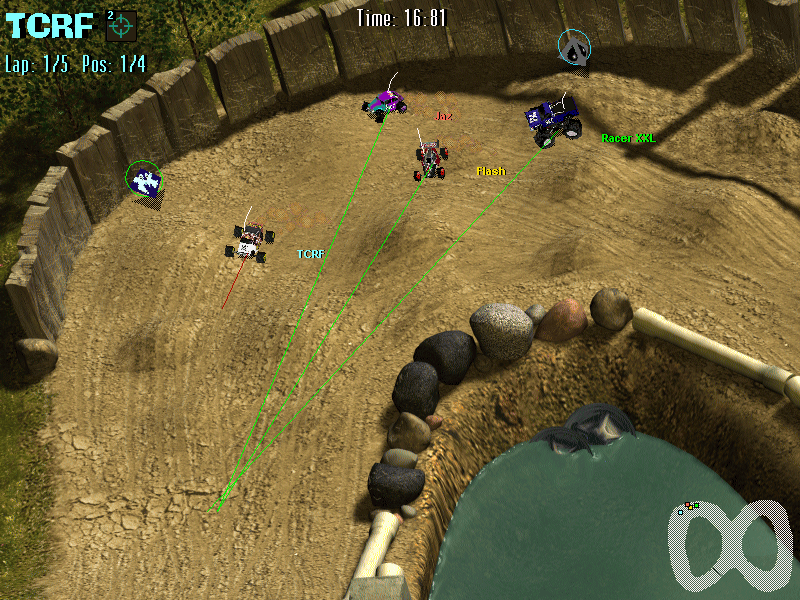
physicsMode=0changes some aspects of the physics. Acceleration seems increased, and gravity seems decreased. Changing it to any other values makes it so that vehicles can't move at all.Textures=0causes the game to not show any vehicle graphics. Only the shadows are shown.showVehicleInfo=1causes the game to draw lines inside each vehicle to show alignment.showControlInfo=1causes the game to draw a green line from each CPU vehicle to the next checkpoint, and a red line from each human vehicle depending on facing direction and the direction you are pressing.- The other
show...settings have no effect as the functionality to render their information is not included in retail builds of the game.
[Debug]
DebugX=9
DebugY=585
DebugW=302
DebugH=200
This might have been for a button or other graphic, but seems to be disabled and was removed entirely in v2.0.
[Desert]
Gravity=50
MusicID=4001

[Test]
Gravity=50
MusicID=4003
These two entries seem to be referring to race tracks. Unlike the other tracks, they don't hold lap times for the CPU. There exist no files for these names, but a Desert race track was added in the game's v2.0 (Traxxas Edition).
V2.0 has a track.ini file which contains the following settings, but the Test race track appears to be absent in all versions.
[Test]
LapTimeOffset=0
DifficultyOffset=0
GammaOffset=0
scroll=1
zoom=100
Gravity=50
CDTrack=3
NormalColor=1.0,1.0,1.0
ShadowColor=0.7,0.7,0.7
Cheat Codes#
These codes can be typed in while racing. Type the same code again to turn it off. The money cheat should be entered while on the vehicle upgrade screen.
Code |
Effect |
|---|---|
bouncy |
Makes you bounce off of walls. |
sticky |
More friction. |
slippery |
Less friction. |
moon |
Low gravity. |
heavy |
High gravity. |
ghost |
No collisions. |
turbo |
Makes cars go double their normal speed. |
hitme |
Hard mode. |
war |
Everyone has an unlimited supply of rockets. |
bugoff |
Disables track hazards. Only works in v1.1, became an accessible game option in v2.0. |
money |
Gives you $200. Only works if your name is "i cheat" (case insensitive). |
win |
Instantly wins the race. You place last instead when playing the Minutes race type. Only works if your name is "i cheat" (case insensitive). |
Revisional Differences#
Changes from v1.0 to v1.1#
There is a patch that updates the game from v1.0 to v1.1. The patch is dated October 25, 1999 and only works for the US version.
- Adds the cheat bugoff which disables track hazards. According to the patch notes, this cheat was suggested by a user named SWMBO Racing.
- Allows custom vehicle skins. In the vehicle skin selection screen, press the graphic in the top right and select a 128x128 24-bit BMP file. The patch adds the folder paint that includes the game's pre-existing BMP files.
- Fixes a bug related to multiple human players using joysticks.
- The Minigolf race track description contains the word Fore!, a golf term used to warn of flying golf balls. This was incorrectly changed to Four!. The Traxxas Edition add-on does not include this change.
|
v1.0, v2.0 |
v1.1 |
|---|---|
|
A truly unique "course," complete with |
A truly unique "course," complete with |
Changes from v1.1 to v2.0#
There is also an add-on titled Radio Control Racers Deluxe: Traxxas Edition which basically acts as the game's v2.0.
- Different intro cinematics.
- The Minigolf description no longer has the Four! typo.
- Six new race tracks: Thrill Ride, Traxxas Raceway, Desert, R/C Off-Road Classic, Aztec, R/C Racers Pro Am.
- A new mode titled R/C Battle which includes two minigames: R/C Soccer, where the objective is to score more goals than the other team. And Battle Ball, where the objective is to move balls into the center of the arena.
- Options in the name entry screen to turn on "controlled steering" and "wear & tear".
- The ini files have been renamed and restructured and moved to their own folder. Vehicle colors, item locations in race tracks and vehicle physics are now customizable.
- The bugoff cheat was replaced with a configurable game option.
- Trick1 has been disabled.