 This article has a talk page!
This is a sub-page of Proto:Theme Hospital (DOS, Windows).
Watch on YouTubeReleased as part of a "Christmas Demo" pack from Bullfrog that was included on the coverdisc of magazines such as PC Zone Issue 37.
General Differences#
Various parts of a pre-alpha build of the game are demonstrated, including limited use of the early "pin board" UI style seen in many pre-release screenshots. The demo content varies from simple scenes with large numbers of NPCs on screen, to how the room creation UI works to glimpses of actual gameplay with patients being treated by Doctors and waiting in the corridors. Unlike the later rolling demo from 1996, this one runs on the games' actual engine, and as such includes many cut graphics and other files that are not actually visible if the demo is played through. As with the Syndicate Wars pre-alpha demo, this demo works by replaying a series of pre-recorded actions. Revealingly, the player can interrupt and take limited control by moving the mouse during playback. This will then cause the demo to fail on replay of the next sequence of the demo.
The demo begins with text promising that the final game will feature "4 locations" and "4 time periods". The latter concept isn't actually present in the final game, which solely uses a modern setting.
The first actual game scene seems to simply demonstrate the large number of on-screen NPCs the game can handle, showing various patients milling around, most interestingly including the Black and Asian Bloaty Heads that were cut from the final game, as well as lots of female patient designs that were also cut.
Next is a demonstration of how rooms are created. This scene demonstrates a large number of cut interface ideas. At this stage of development, it seems rooms start as generic structures, rather than each room having a specific purpose and therefore set size and components. The following can be observed:
- The player clicks on the "blueprint" button in the bottom menu. It seems this instantly puts the game in room creation mode.
- Two empty rooms are placed. Door and window placement work as in the final game based on context and order (door first), rather than using the "fold-out" menu seen in pre-release screenshots and videos.
- Once the doors and windows are placed, they turn into generic empty rooms. These have a decorators' pasting table covered in wallpaper, paste, and paint in them.
- These empty rooms use the bare floorboards tile that is present but unused in the final game.
- A spinning "i" icon hangs above each of these tables, alternating between this and a "?" icon as it spins round.
- Once the room menu is used to define the room and start placing objects, the decorators' table disappears and the bare floor gets replaced with carpet.
- Items are placed in the room. This part uses an early room item UI design that is somewhat similar to the final game's. Many boxes that should clearly have values such as prices on the UI are empty.
The fold-out UI design for windows and doors is revealingly not triggered in this scene despite the graphics being included in the files. That the demo places windows and doors in the way the final game behaves, and that it shows an early version of the final game room items pop-up interface, suggests this original design UI was already cut and on the way to being completely replaced, something more or less confirmed by hacking the demo to allow player control.
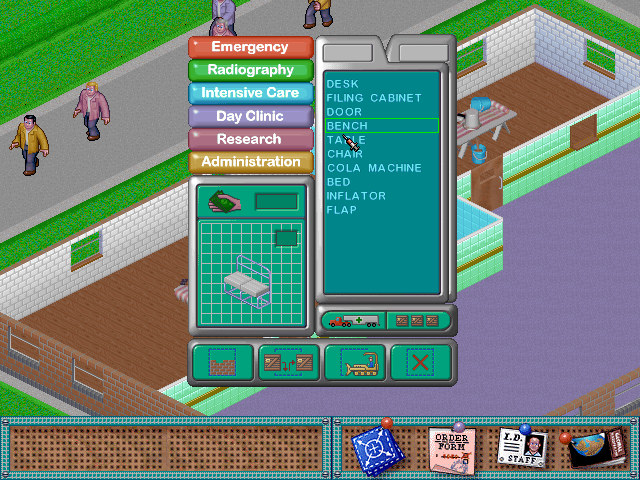
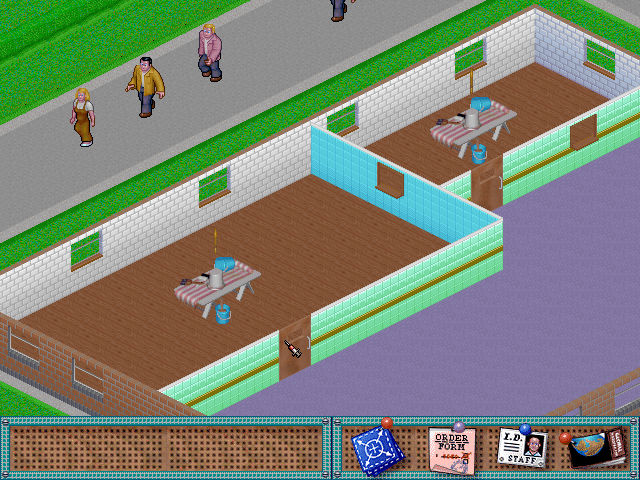
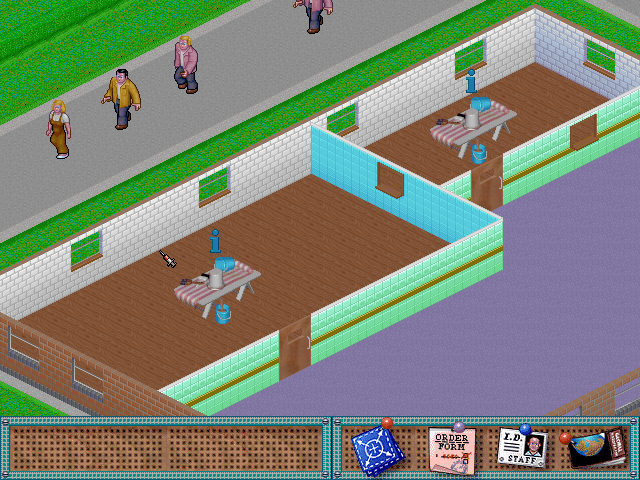
After this, various scenes of patients being treated play. These are less interesting, but visible are the cut wall charts in various rooms, more unused female NPC variations, and extra long windows on exterior walls.
Restoring Player Control#
As with the Syndicate Wars pre-alpha demo, it's possible to hack the demo into being playable.
If the SAVE directory is set to read-only, the demo will fail to playback correctly (the mouse movement recordings are located here in the format of PLAY.RX files), and the mouse pointer will simply constantly move to the top-left of the screen, breaking the demo.
This behavior is controlled by two variables, which are set in function 0004a8a0 (the following addresses assume a code segment with start at 00010000 and data segment with start at 00080000):
; Enable playback of actions stored in recorded demo
0004ad28 c6 05 b5        MOV        byte ptr [DAT_000956b5],0x1
         56 09 00 01
...
; Disable player mouse control
0004ad39 c6 05 b6        MOV        byte ptr [DAT_000956b6],0x0
         56 09 00 00
Therefore, patching the first instruction to set value 0x0 disables playback of actions, and patching the second instruction to set value 0x1 enables player mouse control.
This function also iterates through a list of file indexes stored at 0008fa9a. We can zero out all indexes of the first introductory screens so that after the logo screen we jump straight into the recorded demo.
However, if the player presses any key during playback, the demo exits. This is due to a hardcoded check in function 000120d0, which parses the pressed key, but instead of calling the corresponding handlers it sets a variable that exits the game main loop:
; DAT_002d0910 stores the key value, which is 0x0 if no key is pressed
00012122 80 3d 10        CMP        byte ptr [DAT_002d0910],0x0
         09 2d 00 00

; If value = 0x0, jump to handlers. However, the handlers expect a
; key value != 0x0, therefore none will be called.
00012129 74 0e           JZ         LAB_00012139

; Else value != 0x0, set game main loop variable to exit game
0001212b 66 c7 05        MOV        word ptr [DAT_000956ac],0x1
         ac 56 09
         00 01 00
Therefore, we can change the condition to take the jump if the value != 0x0, and set the game main loop variable to 0x0, so that the game doesn't exit if no key is pressed.
In summary, all these steps can be performed by patching the following file offsets:
          00025d29 = 75 ; don't skip key processing when key is pressed
          00025d32 = 00 ; don't end main game loop when key is released
          0005e92e = 00 ; disable playback of actions from replay file
          0005e93f = 01 ; enable player control
00094690..000946f4 = 00 ; skip loading .LBM files before first replay
The below script will apply these patches:
 |
Download Theme Hospital (1995 Rolling Demo Patch) File: ThemeHospital1995RollingDemo-Patch.zip (2 KB) (info) |
Under player control, the game attempts to load the file SAVE/HOSP.G0, which isn't present, resulting in an empty map. However, any of the HOSP.G* files can be copied over.
Controlling the Demo#
With control restored, it's now possible to see exactly how this build of the game functioned beyond what was selected to be demonstrated by Bullfrog themselves.
Control of the demo reveals that some of the behaviours observed are smoke and mirrors. The patient on the cardio treadmill never finishes running, and other patients never enter the room. The patients in ward beds are actually static graphics and cannot get in/out of bed. However, a lot of the basic AI functions are in place, GP offices seem to work correctly, as does the Scanner.
Patient AI is at a basic but functioning level: patients outside of rooms seem to just gravitate to the closest usable item, and otherwise just mill about. If near the receptionist, they will walk over and the early iteration of the receptionist will perform a basic animation of typing on her computer before gesturing at the patient and the patient walking away. Patients will sit down on benches if placed, will try and enter the doctor's office if nearby, and will also use vending machines if close to them. Queueing works somewhat, but multiple patients often end up trying to access the same item and will endlessly walk backwards and forwards in a loop trying to avoid each other.
Triggering the advisor by pressing A also demonstrates the game really doesn't have a working palette for him. This further suggests this is a later build than the Bullfrog Progress video where these were working, and the early advisor and the pin board UI likely were being deliberately abandoned to be replaced with new revisions of these ideas.
Interface Changes#
Trying to actually use the game's interface, it's pretty much confirmed that the UI design was already moving on from the early "pin board" style exhibited to the less elegant but more functional designs of the later builds. While functional, the pin board control panel is already clearly deprecated as some essential functionality is only possible with keyboard controls, and the UI is clumsy to use compared to not only the final game's UI but also the more functional keyboard shortcuts present in the demo (that are clearly being used by the demonstrator over using the UI).
To use the pin UI, the player has to click and drag one of the pinned icons from the right side of the control panel to the empty area on the left (a neat effect that essentially "rips" the pinned object off the board). Letting go of the mouse button here then plays the folding out animation as shown below. Confusingly, all of the menus must be scrolled by clicking the right mouse button on the arrows at each side. Of the three menus, the room creation menu is the most complete, but this also has some odd bugs not seen in the others: Firstly, the palette used for the actual menu icons is wrong. Secondly, the left-hand arrow is misaligned, being placed too high in comparison to the right arrow or even the left arrow position in the other menus.
Using the buttons gives little feedback, but clicking on the third icon along (the room with arrows in) puts the demo into room creation mode. Once a room blueprint is placed, it doesn't seem that the window and door buttons actually work, the player can only ever place a single door and window, and cannot seem to further move them once placed. Once a room is laid out, the fourth icon of an arrow pointing down completes a room. However, pressing this does not actually finalise the room. The room remains with no decoration (bare floorboards) and the item picker UI does not appear. The B key still needs to be pressed in addition to properly complete the room and make the pasting table appear to proceed to the item placement stage. The last icon in the menu was presumably to delete a placed room, but this doesn't work and doesn't even seem to have a keyboard equivalent command (it doesn't seem to be possible to delete rooms in the demo).
Once a room is placed, the game offers a choice of items that could be bought and then placed in the room. This doesn't actually seem to work properly, but the game does use the choice here as the basis for the core items it will force placement of once the selector is closed by pressing the two crates icon at the bottom (the other buttons do not work). This behaviour is already very like the final game and contrary to what the UI seems to indicate where it seems individual items can be chosen per room type, choosing anything in the top option "Emergency" results in a pre-canned forced selection of a doctor's desk, filing cabinet, and patient chair exactly as when placing a GP's office as in the final game. The same behavior occurs if anything in Radiology is chosen. If the Intensive Care room is chosen, the game places an inflation machine. If one of the lower sub items is chosen from the Intensive Care list, a half-working version of an inflator is placed where a headless patient and doctor will endlessly go through the first few frames of curing the bloaty head disease. The final rooms Day Clinic, Research, and Administration have no items in their lists, so they cannot be used as a room base. Clicking on the icons in the item placement screen also has odd effects - the bulldozer icon brings up the Intensive Care items list, and the X button brings up a subset of the Intensive Care items.
The pin board items menu is completely bare, with nothing to choose and seemingly no effect. Based on no pre-release coverage showing this, it looks like this was simply never finished and was already on the way out at the point of this demo, which already uses a newer pop-up UI for room items similar to that of the final game.
The staff menu works, but has limited functionality. Unlike in the Progress Report video, the staff icons don't have the rating stars behind them. All staff types (including the three cut types) are visible, but it's not possible to hire any of them other than basic doctors. If one of the doctor icons is clicked on, the player's mouse cursor will have a doctor hanging from it and an infinite number of doctors can be placed. Again, the right mouse button scrolls the arrows, not left.
The map icon does nothing, and cannot even be ripped off its pin, unlike the other icons. Based on the crude early map that can be triggered by the keyboard, it's likely any player facing map functionality simply wasn't implemented yet.
Unused Graphics#
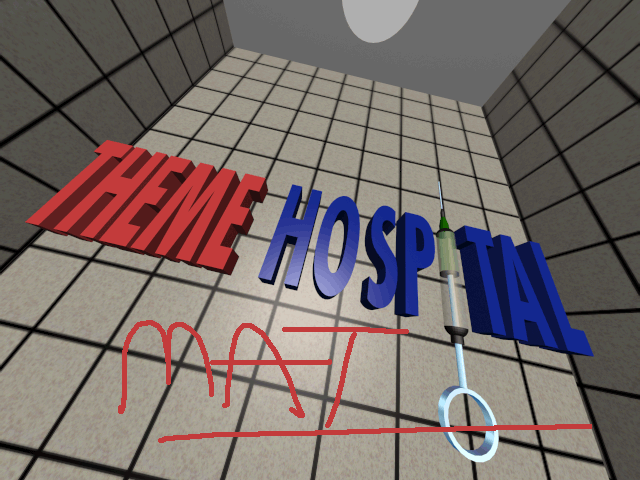
Presentation Screens#
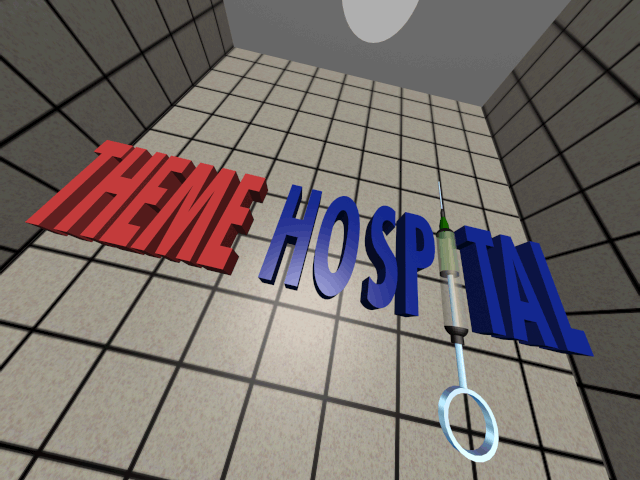
The demo has the following .LBM images included in the directory NEWDEMO that are not actually displayed:



Cut Graphics#
The demo files contain the following graphics that are not present in the final game.
Fir Tree Replaced in the final game with a different style of tree. This design does exist in the final game, but only as a tile with several other plants placed together; this standalone version was removed. 
Wall Pieces with Mounted Fire Extinguishers There are several versions of this same graphic with different palettes. In the final game, fire extinguishers are separate objects that just sit on the floor. These don't even seem to be used in the demo itself. file:ThemehospitalDemo-FireWall.png

Walls with Name Plaques As well as the separate plaque sprite, there are wall segments with plaques already in place. Does not seem to appear in the demo. file:ThemehospitalDemo-WallWithPlaque.png

Wall Plaque Again, a very early feature seemingly removed even by the time of this demo, but visible in the files. file:ThemehospitalDemo-WallPlaque.png

Wall Chart As seen in the earliest screenshots and visible in the demo. file:ThemehospitalDemo-WallChart.png

Pasting Table Only the low-resolution version of this file is included (but unused) in the final game. Used to furnish an unfinished room in this demo. file:Themehospital-pastingtablehires.png

Spinning Letter I The low-resolution version of this is included in the final game's files. Used to draw the player's attention to the pasting table in a newly placed room in this build. file:ThemehospitalDemo-iRotate.gif

Spinning Question Mark The low-resolution version of this is included in the final game's files. As with the "i" above, used to draw the player's attention to the pasting table in a newly placed room. file:ThemehospitalDemo-QuestRotate.gif

Table A low-height table visible in wards in pre-release screenshots. The low-resolution version of this is included (but unused) in the final game's files. file:ThemehospitalDemo-LowTableHi.png

Reading Material Various magazines, books, and newspapers intended to be placed on top of the table, as seen in pre-release screenshots. file:ThemehospitalDemo-Book1.png file:ThemehospitalDemo-Mag1.png file:ThemehospitalDemo-Mag2.png file:ThemehospitalDemo-Newspaper1.png file:ThemehospitalDemo-Newspaper2.png


Bedside Cabinet This is visible in one of the scenes in the rolling demo, however the back plate for cabinets facing away from the camera is not seen. Below is a mockup of it combined with the front-facing cabinet graphic as it would have appeared in-game. file:ThemehospitalDemo-BedCabinet1.png file:ThemehospitalDemo-BedCabinet2.png file:ThemehospitalDemo-BedCabinet3.png


Receptionist Animations Included in the file but not seen in the demo are these animations from the original iteration of the receptionist. Based on these graphics, pre-release screenshots, and the second rolling demo, it seems this first iteration of the receptionist only had animations drawn for facing away from the screen before the idea of the dedicated reception room was scrapped and the final game's simpler receptionist design was used instead. From watching the second rolling demo, the two pointing animations below were for greeting patients and pointing them to the correct hospital department, while the other animation was for typing on a computer. Control of the demo shows she used the first frame of the pointing animation as her default idle state until approached by a patient. file:ThemehospitalDemo-RecepPoint.gif file:ThemehospitalDemo-RecepPoint2.gif file:ThemehospitalDemo-RecepType.gif


Reception Desk A lot of work was seemingly put into this early and vastly more complicated and space-consuming iteration of the receptionist desk. file:ThemehospitalDemo-RD1.png file:ThemehospitalDemo-RD2.png file:ThemehospitalDemo-RD3.png file:ThemehospitalDemo-RD4.png file:ThemehospitalDemo-RD5.png file:ThemehospitalDemo-RD6.png


Reception Desk Walls These graphics are in the VBLK-0 files, used for external walls and ground tiles. However, two of the tiles from the set above are also reproduced in this file (not included here) These seem to be the mandatory core parts of the reception area structure. file:ThemehospitalDemo-RDW1.png file:ThemehospitalDemo-RDW2.png file:ThemehospitalDemo-RDW3.png file:ThemehospitalDemo-RDW4.png file:ThemehospitalDemo-RDW5.png file:ThemehospitalDemo-RDW6.png file:ThemehospitalDemo-RDW7.png


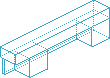
Reception Desk Blueprints Placement blueprints for the desk. Implies that reception areas must have been built from long static segments between corner pieces/joins and was likely considered a room type. Note the entrance flaps have different shading, showing them to be considered "doors" for the room. file:ThemehospitalDemo-RecepBP1.png file:ThemehospitalDemo-RecepBP2.png file:ThemehospitalDemo-RDBP1.png file:ThemehospitalDemo-RDBP2.png file:ThemehospitalDemo-RDBP3.png file:ThemehospitalDemo-RDBP4.png file:ThemehospitalDemo-RDBP5.png file:ThemehospitalDemo-RDBP6.png file:ThemehospitalDemo-RDBP7.png file:ThemehospitalDemo-RDBP8.png file:ThemehospitalDemo-RDBP9.png file:ThemehospitalDemo-RDBP10.png file:ThemehospitalDemo-RDBP11.png file:ThemehospitalDemo-RDBP12.png
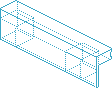


Reception Desk Flap The animations for the entrance flaps for the desk. These flaps are not seen in action in any of the rolling demos, but can be seen in some of the pre-release screenshots of this build. Control of the demo shows that these animations do not play, NPCs simply walk through the flaps rather than them opening. 

Reception Desk Accessories Various items that would be placed on the desk, including several telephone designs, a visitors book, and computers. There is also an extended drawer graphic for the desks with drawers above. It's not clear why there are multiple telephone recolors - possibly they were intended for multiplayer. There are four corresponding phones facing away, but they are all white, so it seems this was abandoned early on. The front-facing white phone is also off the hook. 


Cut Staff Portraits These are for the Staff Management screen, and can be seen in a very early pre-release screenshot. The demo includes what became the final game art for general Doctors, Nurses and Receptionists along with the below, so these are additional classes that once existed in the game.
Clearly the first is a Surgeon, so presumably they were an entire separate hireable class at one point rather than just a specialization of the basic Doctor. Next appears to be a Nurse (with literally the same face as the regular Nurse), but in surgical scrubs. Finally, there is what seems to be a Handyman, but with a very different uniform and overall smarter appearance. Based on the appearance here and the very earliest pre-release screenshots of the game (where similar figures are carrying a stretcher), this class seems to have been intended as some kind of orderly character that was changed to the final game's more generic Handyman. file:ThemehospitalDemo-SurgeonIcon.png file:ThemehospitalDemo-Nurse2Icon.png file:ThemehospitalDemo-OrderlyIcon.png


Stars These are found alongside the staff portraits, and can be seen in the Bullfrog progress report video which shows they were part of the cut fold-out staff hire UI. Presumably gold, silver, and bronze were early versions of the staff rating system. file:ThemehospitalDemo-GoldStar.png file:ThemehospitalDemo-SilverStar.png file:ThemehospitalDemo-BronzeStar.png


Plants A planter and different style of pot plant. Neither of these have corresponding withered plant versions, so they were likely created before the plant watering mechanic had been instated. As such it's likely the introduction of this mechanic that led to the planter being cut and replaced with simpler pot plants. Based on pre-release images, it seems the plant pot here was intended to be placed on top of things like desks and tables. file:ThemehospitalDemo-Planter.png file:ThemehospitalDemo-PotPlant.png


Shopping Bags Graphics for what would presumably be a dropped carrier bag, and other ones in the hands of various kinds of patients. file:ThemehospitalDemo-SBag1.png file:ThemehospitalDemo-SBag2.png file:ThemehospitalDemo-SBag3.png file:ThemehospitalDemo-SBag4.png


Bouquet of Flowers Two different sets of flowers with a gap presumably for a hand to hold them. file:ThemehospitalDemo-Bouquet1.png file:ThemehospitalDemo-Bouquet2.png file:ThemehospitalDemo-Bouquet3.png


Early Advisor Animations

|
To do: |
As in the final game, there are animations for the Advisor to pop up to grant some advice. However, in the demo files and as per early promotional artwork, the Advisor appears in his original Theme Park outfit, before his costume was redesigned to have a doctor theme. In fact, he appears twice - once in his Theme Park garb, but also dressed up in the bowler hat and glasses the bank manager wears in the final game. Presumably he would wear this costume when popping up to offer advice on financial matters such as loans. Unfortunately, the palette used for these two images seems different to that used for the rest of the sprites, and the other palette file included with the game still doesn't look right, resulting in these graphics being a garbled mess. Both of these animations can be seen in the Bullfrog Progress Report video.


Unused UI Graphics#
The demo also includes the complete set of interface graphics for the bottom "pin board" design, despite these animations oddly never being seen in the actual demo. The first "blueprint" set is complete, and includes several icons that would be displayed. The item order form and staff hiring UIs have their basic layout graphics, but no actual items are present in the demos' files. The fact that these interfaces are never seen in the demo suggests either A) they simply were not finished in time, but also B) based on the way the demo behaves where doors and windows are placed in the same way as the final game, and items are placed from a dedicated pop-up window, they were already cut.
The below animations are recreated based on the early pre-release screens of these animations, which are incomplete, so may be incorrect. The mid-animation frame in the pre-release shots also doesn't make sense as it shows the far left edge of the blueprint folding out further away from the edge of the box than it can possibly be for the next (and final) frame of the left edge folding out. It's therefore likely these were mockup screens and this entire design was never actually used in the game.
The staff fold-out menu seems to have been short-lived based on pre-release screenshots that already show a pop-up menu similar to the final game's UI with staff in for this build. However, the Bullfrog progress report video does show this and the room placement menus in action. Revealingly, the actual fold-out animation is never played, even when switching from the room placement to staff hire menu. There is no menu shown at all for room items.
The Room item menu has no object icons at all, and based on the lack of screenshots of them (and that all screenshots showing items being placed use a pop-up menu interface similar to the final game, as does this demo) it's likely this was abandoned before these were ever created.
The blueprint style set for creating rooms seems to be expecting a slightly different palette to that used by the demo itself. This means each part has a clearly incorrect turquoise area at the bottom. That the icon graphics (windows, doors, etc.) still look as in the pre-release shots with the same palette file show this is an error, and the color has been replaced based on these icons in the animations below.
Room Menu 
Room Items Menu 
Staff Hiring Menu 
Room Menu Icons 


Room Menu Graphics Examples with Original Palette 


Debug Stuff#
Unused Console Output#
A variable that controls the console output of some debug messages is initialized in function 00010010 with value 0x1. However, it is then compared with value 0x0 to bypass the output. We can restore it by modifying the condition to compare with value 0x1 by applying patch 00023f04 = 01.
Output:
Hospital v0.0
SIZEOF THING STRUCTURE: 2150
SAVE GAME SIZE: 1106733
Unused Command Line Options#
An unreachable switch-case statement that handles command line options is present in function 00010010. We can restore it by replacing the first jump instruction of that function to instead jump into this parsing logic, by applying patch 00023c30 = c0.
These can be provided in format -x or /x, either lowercase or uppercase, with some also supporting a number parameter: /x-1 for negative, /x+1 for positive.

|
This needs some investigation. |
Options:
/c |
Unused, sets unreferenced variable at 000953a6. |
/d |
Unused, sets unreferenced variable at 000953c8. |
/e |
Loads Map Editor. |
/f |
Loads Complex Editor, but crashes the game. This is likely due to missing a call to function 00022e40, which is done when this editor is activated in-game. |
/g+1 |
Loads HOSP.G1. |
/l+1 |
Loads level.l1. |
/m |
Switches the default video mode (101h, 640×480) with a lower-resolution video mode (13h, 320×200). However, it attempts to load missing graphics files, and crashes the game after the logo screen. |
/n+2 |
Enables networking between two peers if value >= 2. Communication is done with NetBIOS over IPX, which can be emulated with two DOSBox instances. The game exits if NETBIOS.EXE is not found in the game directory. If this option is used along with /s+0, NetBIOS names for each peer are HOSP00 and HOSP01. The implementation appears to be buggy, since both peers print on screen |
/o |
Unused, no-op. |
/p+1 |
Enables playback of file SAVE/PLAY.R1. |
/q |
Enables console debug output, although it requires a patch. |
/r+1 |
Enables recording to file SAVE/PLAY.R1, however it only appears to allow player control. Unknown if any recording is actually written. |
/s+0 |
Sets the NetBIOS name prefix HOSP0, used along with option /n. |
/x+1 |
Tests shift operations applied on the given number. First operation is a Shift Arithmetic Right (SAR) with expression |
In-Game Screen#
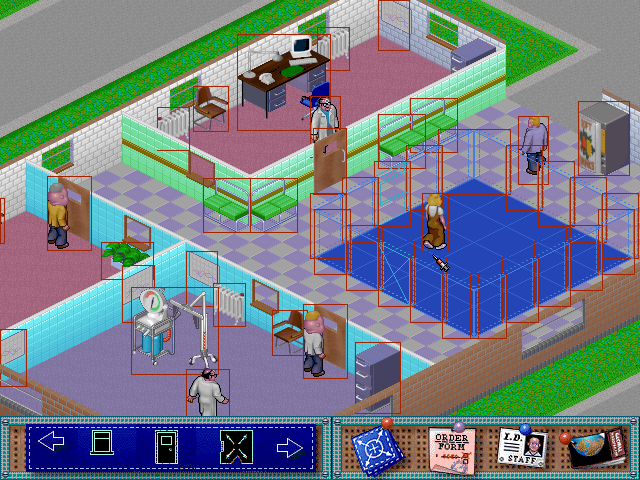


When taking screenshots, these are stored under the directory scrshots, which isn't present. Therefore, make sure you create it beforehand.
It's possible to activate editors from the in-game screen, but due to buggy behavior, they only show up after toggling the Progress Report screen.
|
|
This needs some investigation. |
Controls:
F1 |
Toggles Progress Report screen |
1 |
Create a peep |
Shift + 1 |
Create a peep at mouse position |
2 |
Enter room creation mode (click+hold mouse button to place blueprint) |
5 |
Create a peep on mouse click |
8 |
Place a room object |
9 |
Place a decorative object |
a |
Plays advisor animation |
b |
Complete all rooms in Blueprint mode on the map |
e |
Open map editor |
f |
Open complex editor |
i |
Draw bounding boxes around objects |
m |
Build Reception desk (click+hold mouse button to place blueprint) |
p |
Pauses animations |
t |
Blacks out screen and creates picture-in-picture window |
Keypad + |
Creates Picture-in-picture windows. Can be used in conjunction with t. Windows can be resized with mouse. Last clicked window can be scrolled with cursors/mouse. Click in main window to scroll that view again. Toggling map editor removes windows. |
. |
Toggles the Town Map screen |
Alt + c |
Takes a screenshot and saves in scrshots\HOSP001.LBM |
Alt + r |
Loads level.l0 tiles. However, this file isn't present in the demo. Attempting to copy over a level from a later version loads garbled tiles, likely due to differences in the level format. |
Alt + l |
Loads HOSP.G0 |
Alt + s |
Saves HOSP.G0 |
Shift + n |
Loads level.l0 |
Shift + Esc |
Exits the level |
Map Editor#

Controls:
Right-Click on panel |
Scrolls to next/previous entries |
Left-Click on panel |
Selects tile |
Left-Click on ground |
Places tile |
f + Right-Click on ground |
Fills the ground with the selected tile |
u |
Undo placed tile |
Unused Functions#
Located near the map editor's initialization function 0002d5d0 are two unreferenced functions that add additional debugging functionality. These can be activated by replacing the return instruction of function 0002d5d0 with a jump instruction to either one of those unreferenced functions. To do so, apply one of the following patches at the corresponding file offset:
- Function 0002d700:
000412fa = e9 01 00 00 00 - Function 0002dd00:
000412fa = e9 01 06 00 00
Function 0002d700 adds both a debug display and an overlay mode, where a flashing white rectangle represents the mouse position. The player can place marks on the overlay. Additionally, the top panel has visible buttons when the overlay is active. These buttons can also be activated without the overlay, even though they aren't rendered.


Controls:
1 |
Clears mark |
2 to 5 |
Places different styles of marks |
7 |
Toggles overlay |
8 |
Places a large mark |
Function 0002dd00 only adds a slightly different debug display.

Complex Editor#

The Complex Editor is where the game's disparate animations were combined to create coherent behaviors for the game's characters, as demonstrated in the later rolling demo.
Some functions load and save files under the directory CDATA, which isn't present. Therefore, make sure you create it beforehand.
|
|
This needs some investigation. |
Controls:
Right-Click on panel |
Scrolls to next/previous entries |
Left-Click on panel |
Selects object |
Left-Click on ground |
Places object |
1 |
Increases HEAD variable |
2 |
Increases BODY variable |
3 |
Increases SHOES variable |
4 |
Increases ACCESS variable |
5 |
Increases SPECIAL variable |
F1 |
Loads bottom panel entries with peep animations |
F2 |
Loads bottom panel entries with objects |
c |
Closes sub-menu |
e |
Hides objects |
r |
Reveals objects |
n |
Input FUNCTION NAME |
p |
Switches to CDATA/CTHING_P.d* save file |
s |
Switches to CDATA/CTHING_S.d* save file |
Shift + Delete |
Deletes objects |
Shift + f |
Exits the editor |
Up / Down arrow keys |
Loads the next/previous save file under CDATA |
Unused Main Menu#
Function 00035130 checks for left and right mouse clicks while the complex editor is active. However, it then calls functions that were compiled as no-ops. Near these functions, there's the unreferenced function 000353e0 that sets up a main menu with some available actions.
We can activate this menu on right mouse click with this patch:
00048dab = 31
00048dac = 02
00049050 = 08
Development-Related Text#
Complex Editor Main Menu Entries#
Menu entries start at file offset 0009280D.
PLACE
STAFF
PEOPLE
FILE & UTILS
OPTION5
OPTION6
RETURN TO GAME
EXIT GAME
STAFF
PATIENTS
OBJECTS
MAIN MENULIST FUNCTIONS
NEW FUNCTION
CHANGE FUNCTION
ADD ACTION
REMOVE ACTION
DELETE FUNCTION
MAIN MENULIST FUNCTIONS
NEW FUNCTION
CHANGE FUNCTION
ADD ACTION
REMOVE ACTION
DELETE FUNCTION
MAIN MENULOAD STAFF
SAVE STAFF
LOAD PEOPLE
SAVE PEOPLE
WRITE PBM
MAIN MENUMenus/Defined Animations List#
Starts at file offset 0008A3BD.
Desk                                              Cabinet                                           Door                                              Bench                                             Chair                                              Drinks 1                                          Bed                                                9
10                                                11                                                12
13                                                14                                                15                                                cX                                                 ÈNull                                     GOTO OBJECT                             PLAY ANIMATION                          SETUP EXIT COMPLEX                      XX                                      ST - DOCTOR_IN_OFFICE                   ARRIVE AT OBJECT                        LEAVE OBJECT                             ADVANCE OBJECT 1 FRAME                  XX                                          XX
Null                                    Null                                    Null
Null                                    Null                                    Null                                    Null                                    Null                                    Null                                    Null                                    Null                                    Null                                    Null                                    Null                                    Null                                    Null                                    Null                                    Null                                    Null                                    Null                                    Null                                    Null                                     Null                                    !Null                                    "Null                                    #Null                                    $Null                                    %Null                                    &Null                                    'Null                                    (Null                                    )Null                                    *Null                                    +Null                                    ,Null                                    -Null                                    .Null                                    /Null                                    0Null                                    1Null                                    2Null                                    3Null                                    4Null                                    5Null                                    6Null                                    7Null                                    8Null                                    9Null                                    :Null                                    ;Null                                    <Null                                    =Null                                    >Null                                    ?Null                                    @Null                                    ANull                                    BNull                                    CNull                                    DNull                                    ENull                                    FNull                                    GNull                                    HNull                                    INull                                    JNull                                    KNull                                    LNull                                    MNull                                    NNull                                    ONull                                    PNull                                    QNull                                    RNull                                    SNull                                    TNull                                    UNull                                    VNull                                    WNull                                    XNull                                    YNull                                    ZNull                                    [Null                                    \Null                                    ]Null                                    ^Null                                    _Null                                    `Null                                    aNull                                    bNull                                    cNull                                    dNull                                    eUNUSEABLE - Goto Desk                   fUNUSEABLE - Goto Cabinet                gUNUSEABLE - Goto Door                   hUNUSEABLE - Goto Bench                  iUNUSEABLE - Goto Chair                  jUNUSEABLE - Goto Drink1                 kUNUSEABLE - Goto Bed                    lUNUSEABLE - Goto 9                      mUNUSEABLE - Goto 10                     nUNUSEABLE - Goto 11                     oUNUSEABLE - Goto 12                     pUNUSEABLE - Goto 13                     qUNUSEABLE - Goto 14                     rUNUSEABLE - Goto 15                     sUNUSEABLE - NE                          tUNUSEABLE - SIT DESK                    uUNUSEABLE - WORK DESK                   vUNUSEABLE - LEAVE DESK                  wUNUSEABLE - A_ST_USE CAB
A second table of animations is found at file offset 0008A6E3:
Null                                     GOTO OBJECT                             PLAY ANIM                               CHOOSE ANIM                             SET EXIT SEQ                            FACE OBJECT                             MAKE PERSON WAIT                        PERSON SITS                              ARRIVE AT OBJECT                        LEAVE OBJECT                              ARRIVE DOOR
LEAVE DOOR                              GOTO OBJECT - DEST SET                  Null
Null                                    ST PERSON_GONE                          ST PERSON_AT_DOOR                       ST PERSON_IN_QUEUE                      SP PERSON THROUGH DOOR                  ST PERSON_WAITS                         ADVANCE OBJECT BY FRAME                 Null                                    Null                                    Null                                    Null                                    Null                                    Null                                    Null                                    Null                                    Null                                    Null                                    Null                                    Null                                     Null                                    !Null                                    "Null                                    #Null                                    $Null                                    %Null                                    &Null                                    'Null                                    (Null                                    )Null                                    *Null                                    +Null                                    ,Null                                    -Null                                    .Null                                    /Null                                    0Null                                    1Null                                    2Null                                    3Null                                    4Null                                    5Null                                    6Null                                    7Null                                    8Null                                    9Null                                    :Null                                    ;Null                                    <Null                                    =Null                                    >Null                                    ?Null                                    @Null                                    ANull                                    BNull                                    CNull                                    DNull                                    ENull                                    FNull                                    GNull                                    HNull                                    INull                                    JNull                                    KNull                                    LNull                                    MNull                                    NNull                                    ONull                                    PNull                                    QNull                                    RNull                                    SNull                                    TNull                                    UNull                                    VNull                                    WNull                                    XNull                                    YNull                                    ZNull                                    [Null                                    \Null                                    ]Null                                    ^Null                                    _Null                                    `Null                                    aNull                                    bNull                                    cNull                                    dNull                                    eUNUSEABLE - Goto Desk                   fUNUSEABLE - Goto Cabinet                gUNUSEABLE - Goto Door                   hUNUSEABLE - Goto Bench                  iUNUSEABLE - Goto Chair                  jUNUSEABLE - Goto Drink1                 kUNUSEABLE - Goto Bed                    lUNUSEABLE - Goto 9                      mUNUSEABLE - Goto 10                     nUNUSEABLE - Goto 11                     oUNUSEABLE - Goto 12                     pUNUSEABLE - Goto 13                     qUNUSEABLE - Goto 14                     rUNUSEABLE - Goto 15                     sUNUSEABLE - Anim CHECKIN                tUNUSEABLE - Anim KNOCK                  uUNUSEABLE - Anim BUY DR                 vUNUSEABLE - Anim SIT1                   wUNUSEABLE - Anim SIT2                   xUNUSEABLE - Anim SIT3                   yUNUSEABLE - Anim ENTER DO               zUNUSEABLE - Anim EXIT DO                {UNUSEABLE - Anim STAND                  |UNUSEABLE - Anim SITTING                }UNUSEABLE - Anim GET UP                 ~UNUSEABLE - Face Desk                   UNUSEABLE - Face Cabinet                €UNUSEABLE - Face Door                   UNUSEABLE - Face Bench                  ‚UNUSEABLE - Face Chair                  ƒUNUSEABLE - Face Drink1                 „UNUSEABLE - Face Bed                    …UNUSEABLE - Face 9                      †UNUSEABLE - Face 10                     ‡UNUSEABLE - Face 11                     ˆUNUSEABLE - Face 12                     ‰UNUSEABLE - Face 13                     ŠUNUSEABLE - Face 14                     ‹UNUSEABLE - Face 15
Several labels and filenames are at file offset 00084DEC:
CEDITOR BACKED UP %SAVE/HOSP.R%d tisave/HOSP.g%d ].save/level.l%d  COMPLEX RETRY OCCURRING PEEP %d COMPLEX RETRY OCCURRING PEEP %d %d èEDITOR LEVEL %d   Owner Status %d  üSAVING MAP DETAILS  X=%d,Y=%d timap_pos=%d %MouseX=%d  MouseY=%d  cdMOUSE LOCKED LBM************** EDITOR : LEVEL %d ************** save/back.g%d ELsave/level.l%d t******* %d ******** %d *****  %d *********** os=NOTHING MORE TO UNDO =%dNOTHING MORE TO REDO ***PUT LINE * ECOPY  : CUT PASTE **FILL ***UNDO    REDO    PLACE  üSTAFF  üPEOPLE üFILE & UTILS      üOPTION5 OPTION6 RETURN TO GAME *EXIT GAME      HPATIENTS TO OBJECTS                 MAIN MENU T LIST FUNCTIONS  NEW FUNCTION ILLCHANGE FUNCTION ADD ACTION FREMOVE ACTION LEDELETE FUNCTION           6 LOAD STAFF ASAVE STAFF MLOAD PEOPLE SAVE PEOPLE WRITE PBM       DETAIL FOR FUNCTION %d DELETED  CHANGES HAVE BEEN MADE - SHIFT + ESC TO RETURN TO GAME WITH NO CHANGES NDESTINATION STORED AS CELL %d - PRESS D TO SET DESTINATIONS DESTINATION RESET FOR %d STAFF CDESTINATION RESET FOR %d PEEP(S) N MCHANGES HAVE BEEN MADE - SHIFT + F TO RETURN TO GAME WITH NO CHANGES N SDISK ERROR - UNABLE TO SAVE FUNCTION %d SAVED - COMPLEX TABLES SAVED FOR STAFF & PATIENTS  RDISK ERROR - UNABLE TO SAVE FUNCTION %d DISK ERROR - UNABLE TO SAVE FUNCTION %d DISK ERROR - UNABLE TO SAVE FUNCTION %d DISK ERROR - UNABLE TO SAVE FUNCTION %d       à¿      0@      à?      à¿      0@      à?      à¿      0@      à?      à¿      0@      à?      à¿      0@      à?      à¿      0@      à?hosp  - FUNC %d NEW P FUNC %d       à¿      0@      4@      à?      $@      à¿      0@      4@      à?      $@      à¿      0@      4@      à?      $@      à¿      0@      4@      à?      $@NEcdata/CTHING_S.d%d ¿cdata/CTHING_P.d%d  cdata/S_COMP.BAK    data/S_COMP.LEX cdata/S_COMP.TXT    cdata/S_COMP.LEX  4@w           %d, // %s à¿
   #define %s @%d  S_COMP.LEX @cdata/P_COMP.BAK d%ddata/P_COMP.LEX cdata/P_COMP.TXT P.Bcdata/P_COMP.LEX    P_COMP.LEX .cdata/PREF.CED PNULL ACTION COMPLEX EXIT BRANCH TO FUNCTION %d %FINDOBJECT %s   DO %d   DODETAIL %d   NEWSTATE %d   COUNT %d   REPEAT %d datFINDOBJECT %s   DO %d   DODETAIL %d   NEWSTATE %d   COUNT %d   REPEAT %d LEXFINDOBJECT %s   DO %d   DODETAIL %d   NEWSTATE %d   COUNT %d   REPEAT %d TE FINDOBJECT %s   DO %d   DODETAIL %d   NEWSTATE %d   COUNT %d   REPEAT %d NEWMODE : STAFF UNTMODE : PEOPLE d FUNCTION NO : %d   DACTIVE THINGS : %d  FUNCTION NAME : %s TBRANCH TO F%d %s E F_ DOR EC* %sFUNCTION NAME : %s%s d  FUNCTION %d DETAIL LOADED   UNABLE TO LOAD FUNCTION %d DETAIL  P//*S*
  *SE* ION*S* r %dCPXTABLE.C T//*P*
  *PE* UNC*P* DISK ERROR - UNABLE TO SAVE FUNCTION %d cdata/S_TEMP.LEX  : cdata/S_TEMP.TXT    cdata/P_TEMP.LEX NCTcdata/P_TEMP.TXT /*SHEAD %d   BODY %d   SHOES %d   ACCESS %d   SPECIAL %d
Unused Text#
The executable MAIN.exe has a huge amount of unseen text inside it, both from debug information, and what is clearly the game's editors' menus.
There is also a list of pictures to load during the initial slideshow part of the demo, which includes two pictures not present in the actual demo released: x.LBM and, um, SHIT.LBM. Starts at position 0009421C.
SHIT.LBM newdemo/frog4.LBM newdemo/logo.LBM NEWDEMO/Demo3.LBM NEWDEMO/Demo4.LBM NEWDEMO/sign.LBM NEWDEMO/Demo6.LBM NEWDEMO/Demo7.LBM NEWDEMO/x.LBM NEWDEMO/x.LBM NEWDEMO/Demo7.LBM NEWDEMO/COMING.LBM NEWDEMO/HI-RES.LBM NEWDEMO/16000.LBM NEWDEMO/TIME.LBM NEWDEMO/4LOCS.LBM NEWDEMO/PLAN.LBM NEWDEMO/DIAGNOSE.LBM NEWDEMO/ADVTECH.LBM NEWDEMO/NET.LBM NEWDEMO/ELVIS.LBM NEWDEMO/SOON.LBM NEWDEMO/WILLSEE.LBMThis list of files includes some not seen in the demo, most notably the mspr files, which in the final game are the low-resolution mode graphics. This suggests that while they aren't included with the demo, they were already being worked on at this point in development. Found at position 00088F8C.
data/mspr-0.dat ŒS data/mspr-0.tab „S xS data/mfra-0.ani |S lS data/msta-0.ani S data/mele-0.ani XS LS data/mblk-0.dat €S data/mblk-0.tab tS ˆS data/mpalette.dat œS data/mpointer.dat ”S data/mpointer.tab ˜S S data/mfont-0.dat ¸G data/mfont-0.tab pH PH data/mpanel-0.dat ÈR data/mpanel-0.tab @S \S data/vspr-0.dat ŒS data/vspr-0.tab „S xS data/vfra-0.ani |S lS data/vsta-0.ani S data/vele-0.ani XS LS data/vblk-0.dat €S data/vblk-0.tab tS ˆS data/mpalette.dat œS data/mpointer.dat ”S data/mpointer.tab ˜S S data/vfont-0.dat ¸G data/vfont-0.tab pH PH data/font01v.dat ¼G data/font01v.tab tH TH data/vpanel-0.dat ÈR data/vpanel-0.tab @S \S data/vpspr.dat ¼R data/vpspr.tab <S S data/border01.dat ØR data/border01.tab S S data/button01.dat \ % data/button01.tab L % 8 % data/slab01.dat P % data/presents.dat hS data/presents.tab PS S data/emerg.dat DS data/emerg.tab 4S 0S data/sptdoc.dat 8S data/sptdoc.tab HS S data/dpalette.dat $S data/languk-0.dat ”H ”R data/s_comp.lex (S data/p_comp.lex dS *WB_SCREEN ¤ % ` *VESA €P& *MAP TS `S p *ROOMS ,S äR *SKILLREGISTER ÄR ÐR è *PAGERS ìR S x *COMPUTER øR àR ª *CONTROL ÀR üR ¬ *HOSPITAL ðR ÌR ì *THINGError Messages#
We can find messages for different kinds of errors that would be displayed on screen. However, attempting to load one of these errors (for example, by patching a jump instruction with 00055DDB = 74) makes the game crash, without allowing the player to continue or quit.
Error display labels at file offset 00084C04.
COMPLEX FUCKED AT %d AND %d
%s(%d) : ERROR!
>%s<
Press [F10-Continue] [ESC-Quit].
Error details at file offset 000858B0.
tri_new : overflow ünavigate.c ¤default.tri rotate_edgeAC : lB not found CESrotate_edgeAC : A not found rotate_edgeAC : B not found tri_split3 : A not found /S_tri_split3 : B not found    tri_split2 : A not found ateinsert_point : triangle not found  nmake_3point : skip>4 for nonquad  fomake_edge : border point  fothin_wall : border edge edge_points : edge not found %d->%d route_to_path : loop i:%d pl:%d (%d,%d)->(%d,%d) fouExceeded max path length (i:%d,L:%d) (%d,%d)->(%d,%d) orExceeded max path length (i:%d,R:%d) (%d,%d)->(%d,%d) e Exceeded max path length - gate_route_to_coords Exceeded max path length (i:%d,rl:%d) x Exceeded max path length (i:%d,rl:%d) d)path_init8 : implement random externally    %d  CHARTS %s ü%2d * : %s  %2d   : %s ü%d Ð[%d,%d]

ERROR: Allocation %s.
Press return to continue
ERROR: File %s.