 This article has a talk page!
This is a sub-page of Proto:Banjo-Kazooie: Nuts & Bolts.

|
This prototype is documented on Hidden Palace. |
A testing build dating to September 18, 2008 of Banjo-Kazooie: Nuts & Bolts was dumped and released by the user "Cheato" on October 16, 2025. According to available assertions, it was built by the user "banbuild" on the machine "rarerender05".
While mostly the same as the final, some minor changes can be found in this build alongside debugging features.
General Differences#
- "Challenge Select" can be found as an option in the pause menu.
- The music for Spiral Mountain has slightly different mixing.
- A couple lines of text are different compared to the final game.
Text Changes#
The only change of note in this build is with the intro sequence for Showdown Town, where Kazooie calls L.O.G. "Freeview Features" instead of "tube head" when being given the magic wrench. The rest relates to minor frontend text changes.
- The timestamp on the file in the prototype is Sept 05, 2008 at 11:33:01.
aid_loctext_banjox_ui_ingame_main (Debug/11/0F/97/57) |
|---|
String Tag |
ingame__blueprints_countingoutbox |
ingame__blueprints_deleteinboxtitle |
ingame__blueprints_sendingtitle |
- The timestamp on the file in the prototype is Sept 09, 2008 at 22:22:23.
aid_loctext_banjox_ui_multiplayerfrontend (Debug/11/3B/4C/15) |
|---|
String Tag |
dialog__cantacceptjoinasnetworkerror |
dialog__cantcontacttargetpartymachine |
- The timestamp on the file in the prototype is Sept 05, 2008 at 10:39:56.
aid_loctext_banjox_showdowntown_intro (Debug/11/E0/CA/E5) |
|---|
String Tag |
dialog__kazooierusty |
Debugging Features#

Present in both executables are a number of debugging elements, primarily debugging features to speed up testing.
BanjoXT_Xenon_062.xex contains some additional features, such as a framerate counter & memory tracker, player position and a unique debug menu.
===Testing Build Exclusive===
Global Debug Menu#
The Debug Menu can be accessed by pressing LT + LB + RB + RT. Scrolling up and down is done with LB and RB and selecting an option is done with Y.
Option |
Description |
|---|---|
GameSave |
Toggles game saving. |
Blocks |
Toggles between your obtained vehicle parts and all vehicle parts. |
UI |
Toggles the in-game UI. |
Scene Debug |
Toggles the visible debugging information. |
Tunes |
Toggles the in-game music. |
VSync |
Switches between several framerate options. |
Add Jiggy |
Adds a jiggy to the Nutty Acres Jig-o-Vend. |
Add Notes |
Adds 10 notes to your current total. |
Add Jinjo Token |
Adds 1 of each colour of Jinjo Token to your current total. |
Spawn Townsfolk |
Spawns a random Showdown Town NPC at the current area the player is in. |
Album Menu |
Enters a sub-menu which allows access to photo and replay viewing. |
Leaderboard Replays |
Enters a sub-menu which provides access to saved replays. |
MP: Show updates |
|
MP: Use forward prediction |
|
Scene Check |
Runs the scene check once. |
Scene Check Loop |
Runs the scene check on a loop. |
Goto Dialog Test Scene |
Immediately loads the scene aid_script_banjox_test_dialogaudio. |
Push Blank |
Attempts to load something but asserts during it. |
Insert MicroLOMP Fence |
Doesn't appear to do anything. |
Show Perf Stats |
Doesn't appear to do anything. |
Exit Debug Menu |
Closes the menu. |
Challenge Debugging Combo#
During any challenge, if you hold LB, LT and Left Stick while pressing either A, B, X or Y, it will trigger the end of challenge state with different conditions.
Controls |
|---|
Button |
A |
B |
X |
Y |
Devkit Logging#
If a devkit is connected to the console, several files will be created and constantly updated for logging purposes.
File |
Description |
|---|---|
AssetLog.csv |
Stores any asset-related calls. |
NetLogs/GameLog.html |
Stores all debug messages made relating to the game. |
NetLogs/Netlog.html |
Stores all debug messages made relating to network and game calls. |
NetLogs/NetlogSpam.html |
Stores all debug messages made relating to the above that get filtered as spam. |
Available on Both#
Main Menu Debug Options#
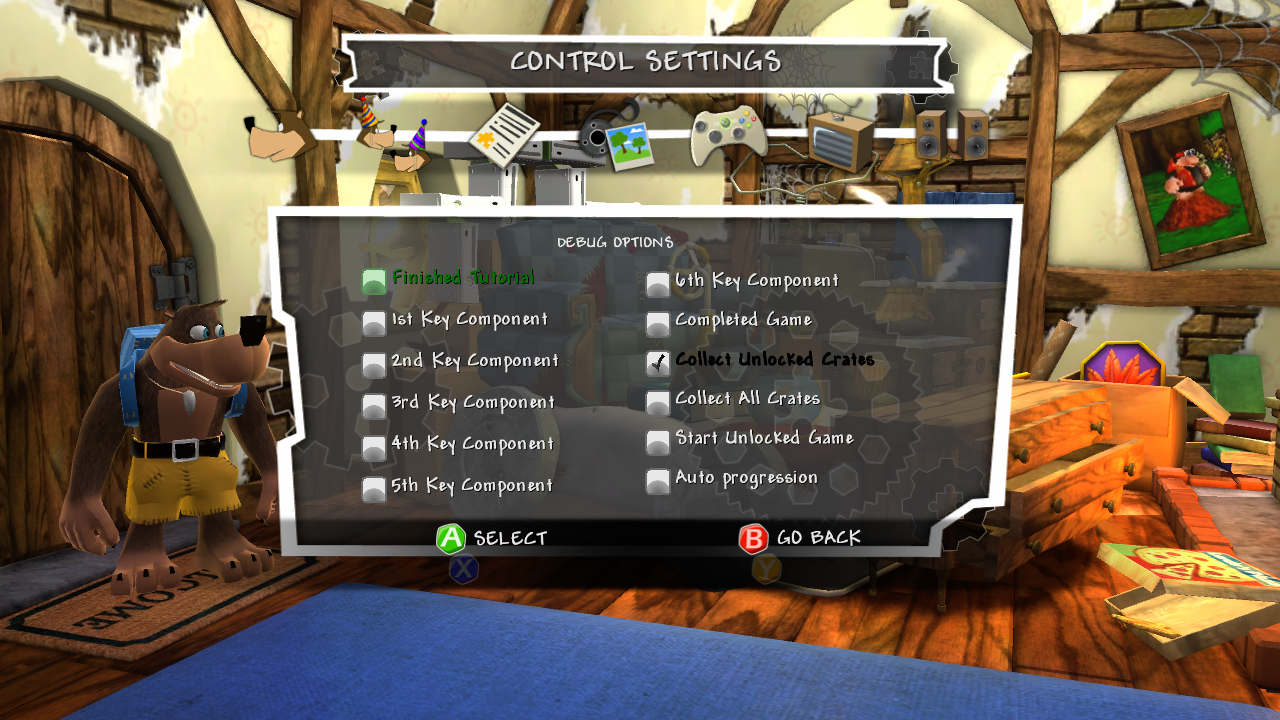
Holding X for a few seconds while on the main menu will open a debug options menu with several in-game testing options will appear. These only take effect when starting a new save.
Flags that directly affect progression will auto-complete all Jinjo & Jiggy challenges in the affected acts to Jiggy scores.
Option |
Description |
|---|---|
Finished Tutorial |
Skips the intro sequence for Spiral Mountain and Showdown Town and have Nutty Acres Act 1 unlocked. |
1st Key Component |
Sets progression of the game up to the key components that are enabled. |
2nd Key Component |
|
3rd Key Component |
|
4th Key Component |
|
5th Key Component |
|
6th Key Component |
|
Completed Game |
Enables all the previous flags as well as the flags for Spiral Mountain. |
Collect Unlocked Crates |
Sets all crates that correlate with current game progression to be collected. This is enabled by default. |
Collect All Crates |
Sets all available crates to be collected. |
There are also two additional checkboxes that are disabled by default. These are still checked for in the game code and can be re-enabled via patching the executable.
Option |
Description |
|---|---|
Start Unlocked Game |
Unlocks all worlds & acts in the game as well as setting your jiggy total to 100. |
Auto progression |
Enables the flag "gameFlag_Normal_EnableAutoProgression". |
Build Info#
BanjoXT_Xenon_062.xex contains a build string intended to be printed to a logger, which features information regarding the build and its compilation date, along with on-screen assertion text.
Executable |
Combined Build String(s) |
|---|---|
BanjoXT_Xenon_062.xex |
Console: Banjo X: TESTING ROM with RELEASE libraries for |
 [Compiled Sep 18 2008 at 14:53:06] On-Screen: Build 18.09.2008.1.61.00035uT