 This article has a talk page!
This page details development materials of The Simpsons Game (PlayStation 3, Xbox 360).
Sub-Pages#

|
Early Voicelines |

|
Early Subtitles |
80 Bites Animatic Cutscene#
An early animatic of the ending cutscene of Around the World in 80 Bites by Thomas Richner. It features several differences from the final version, including alternate dialogue, camera angles, and placeholder voice actors.
Springfield#
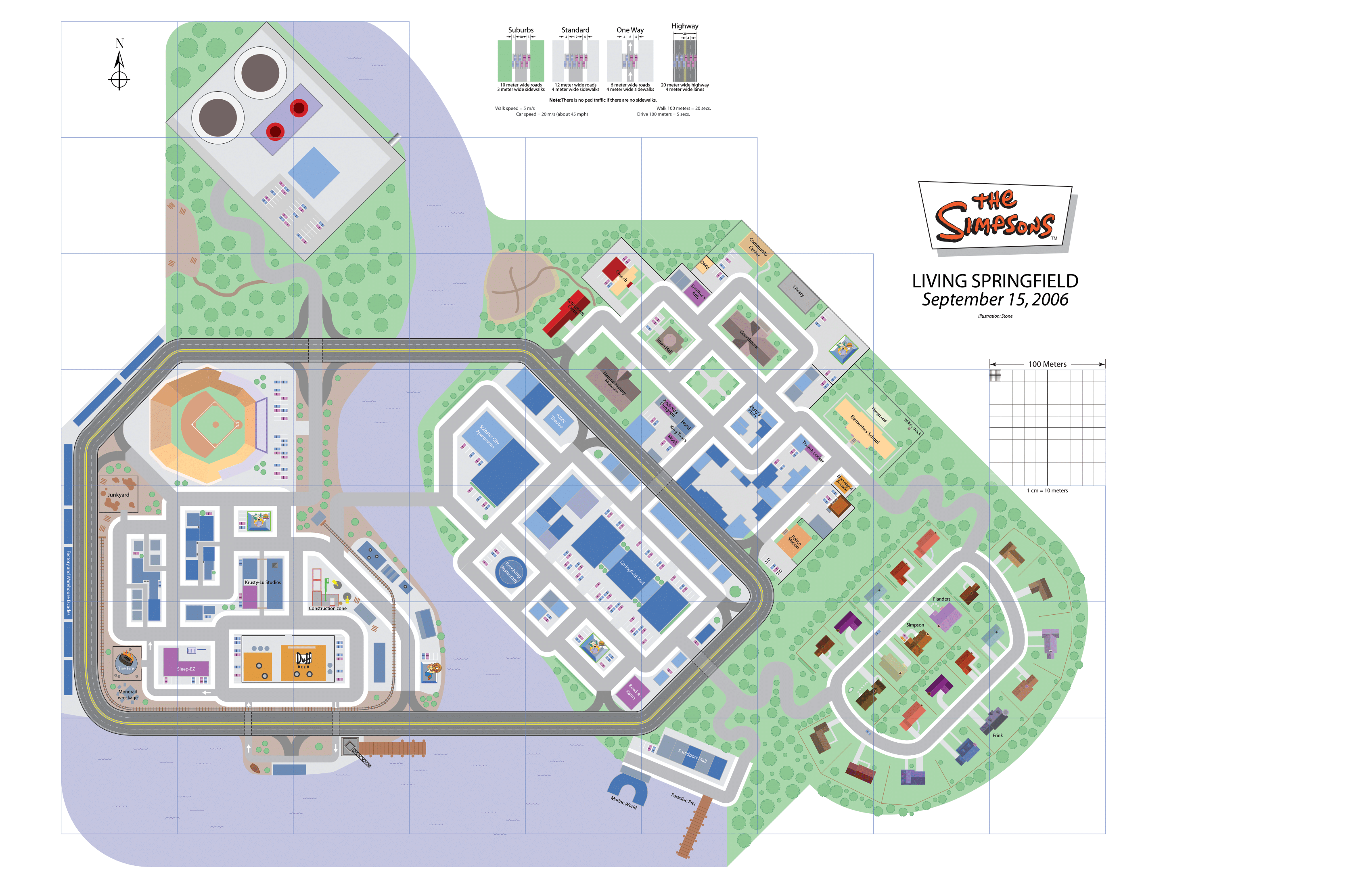
Springfield Design (Finalized)#
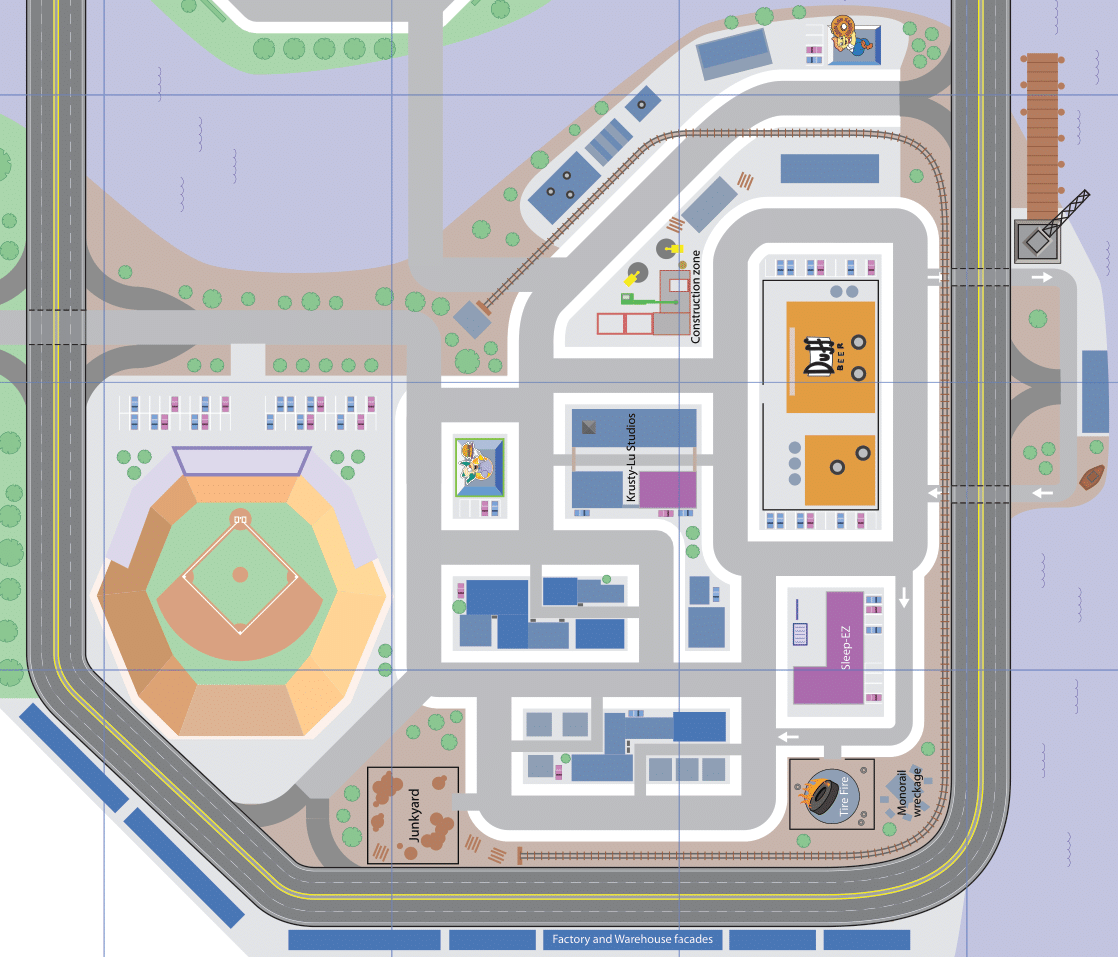
Created during the prototype phase, this early version of the Springfield Hub was significantly larger and more detailed, with numerous interactive features and areas that were downsized or removed entirely for the final game.
- Players could freely visit the Industrial District and Power Plant areas, rather than only encountering them in isolated episodes.
- Originally there were drivable cars to get around faster throughout the world. There were plans to include many iconic cars and vehicles (Homer's Car, Marge's station wagon, Bart's skateboard, Lisa's bicycle, Wiggum's police cruiser and many more).
- Highways surrounded the map, originally intended to connect different districts of Springfield
- Beside the Paradise Pier is the Squidport Mall and Marine World.
- Springfield Graveyard was found behind the Retirement Castle (it appears in the E3 build but was removed from the final version)
- The Suburbs area (including the Simpson house) had an additional street behind it.
- Many locations are moved to different areas.
- Tire Fire and Junkyard were separate, unlike the final game where they are merged
- Retirement Castle was placed next to the Church
- Noiseland Arcade sat beside the Kwik-E-Mart
- Spinster City Apartments was located next to Springfield Mall
- Smithers’ Apartment was placed next to the Courthouse
- Krusty Burger was placed next to Barney’s Bowlarama
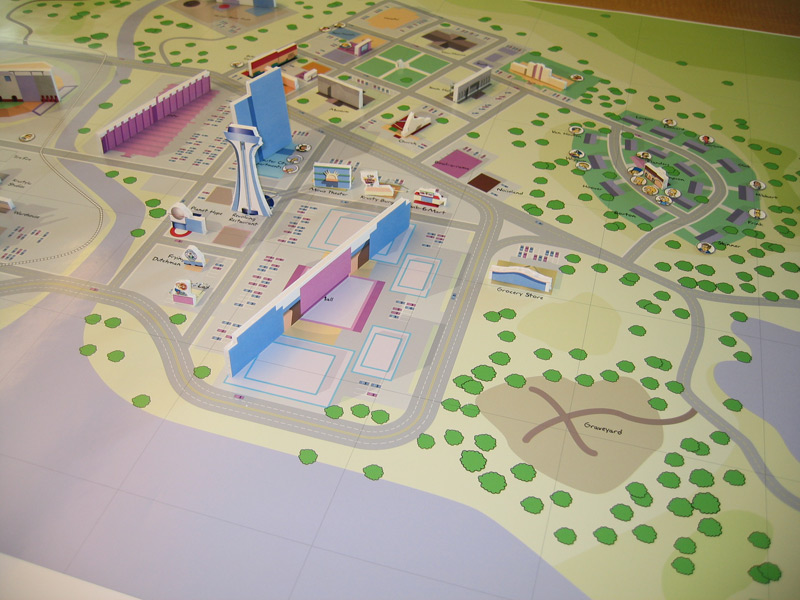
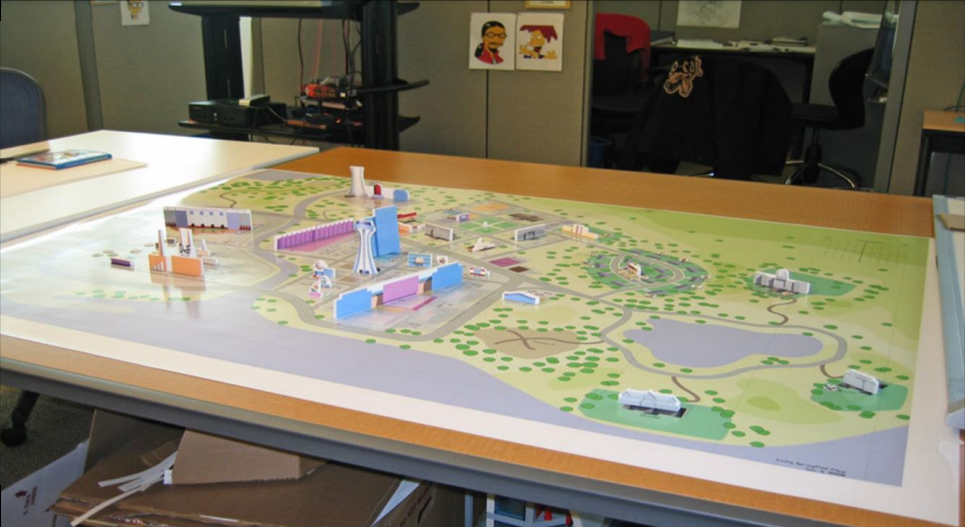
Springfield Map Design (Early)#
An even earlier iteration of Springfield.
Interiors Design#
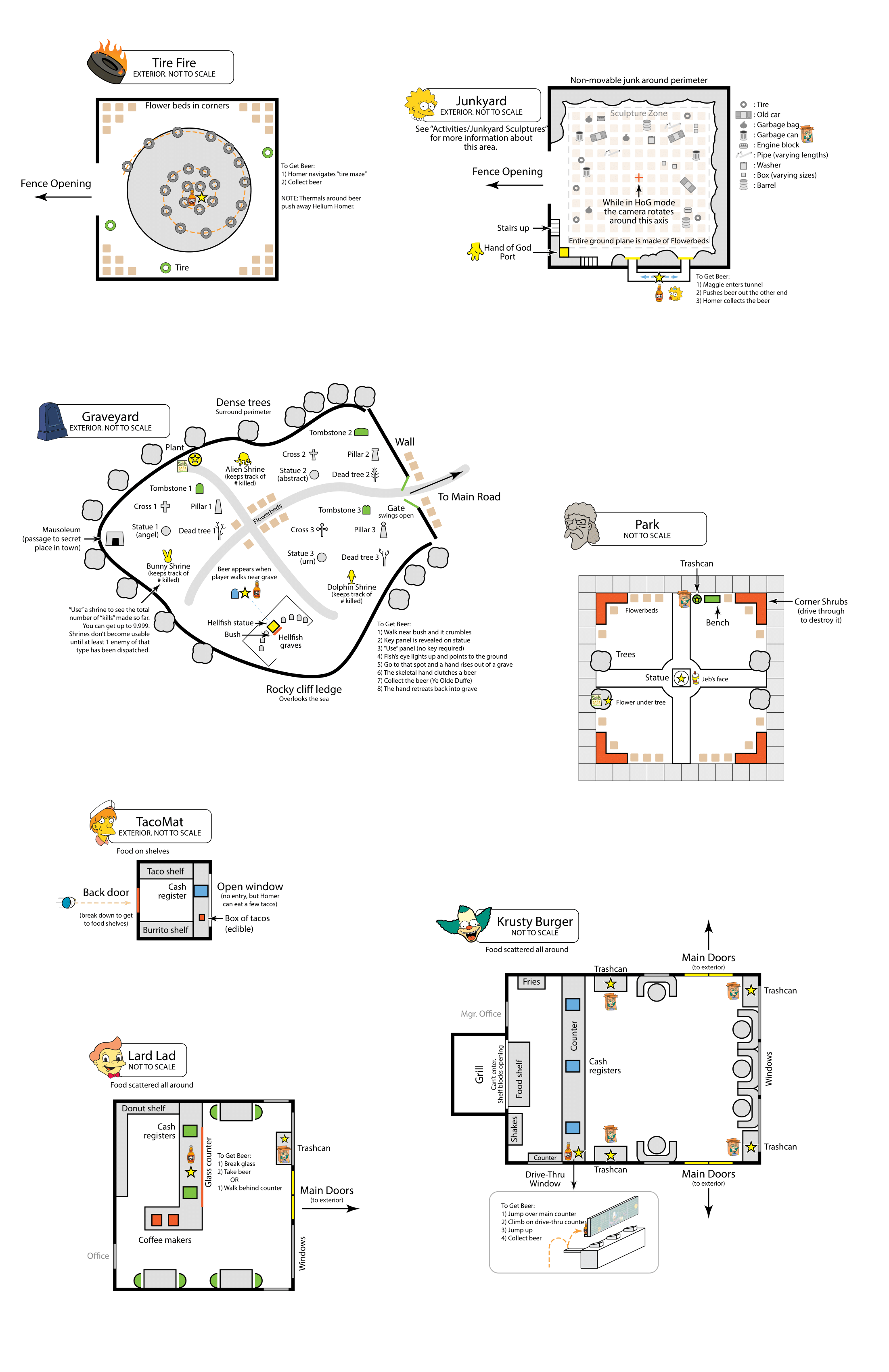
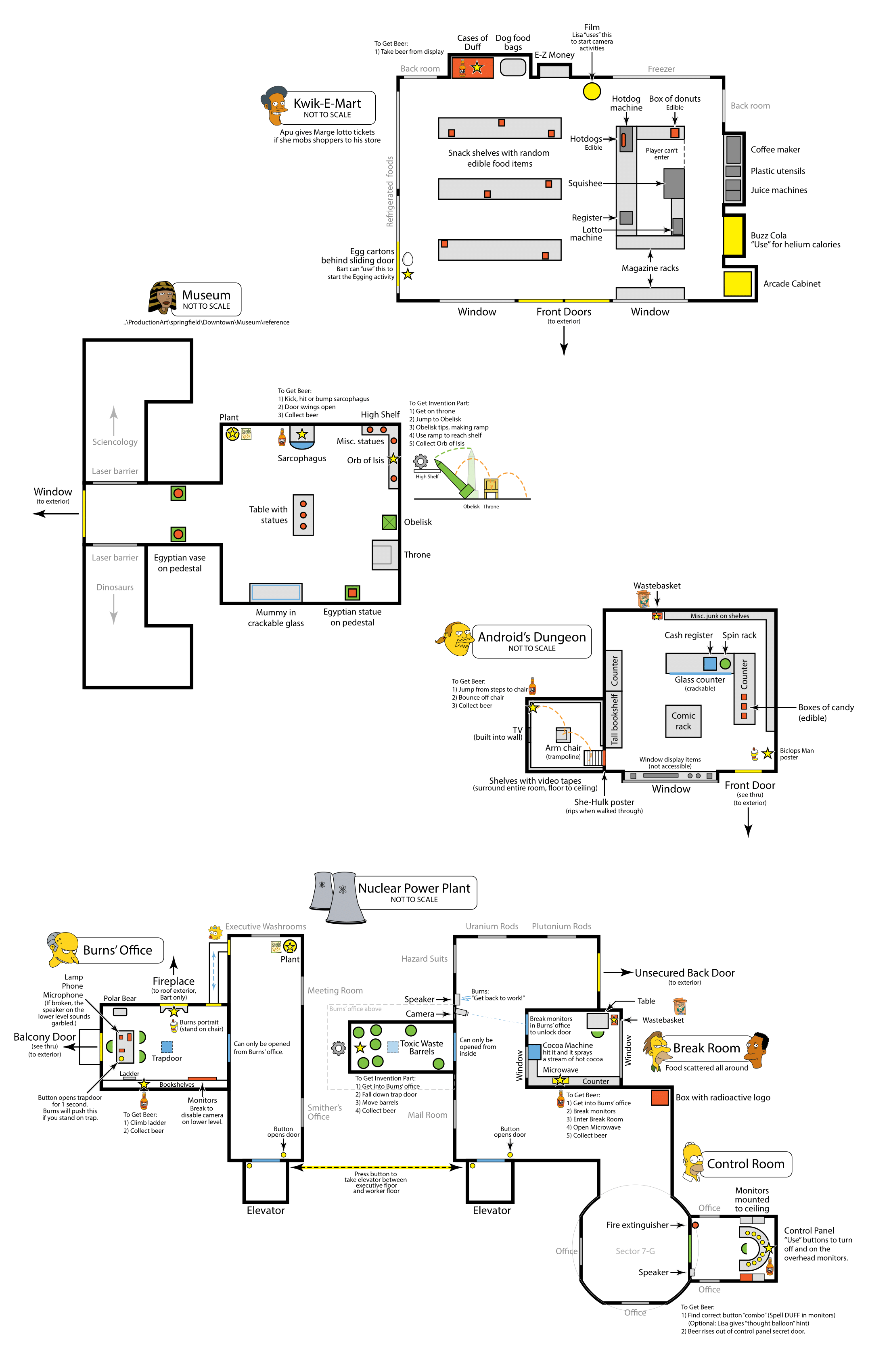
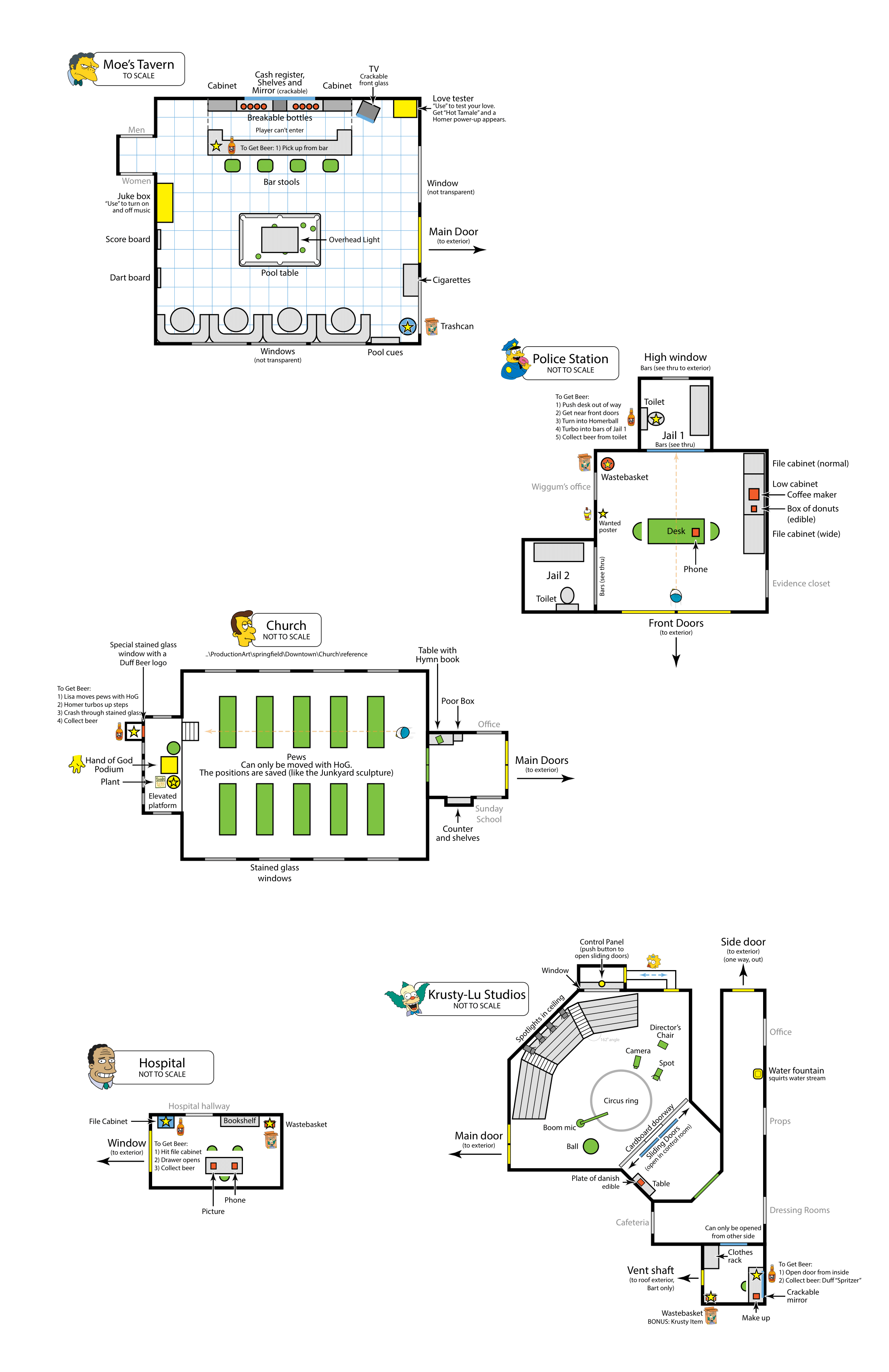
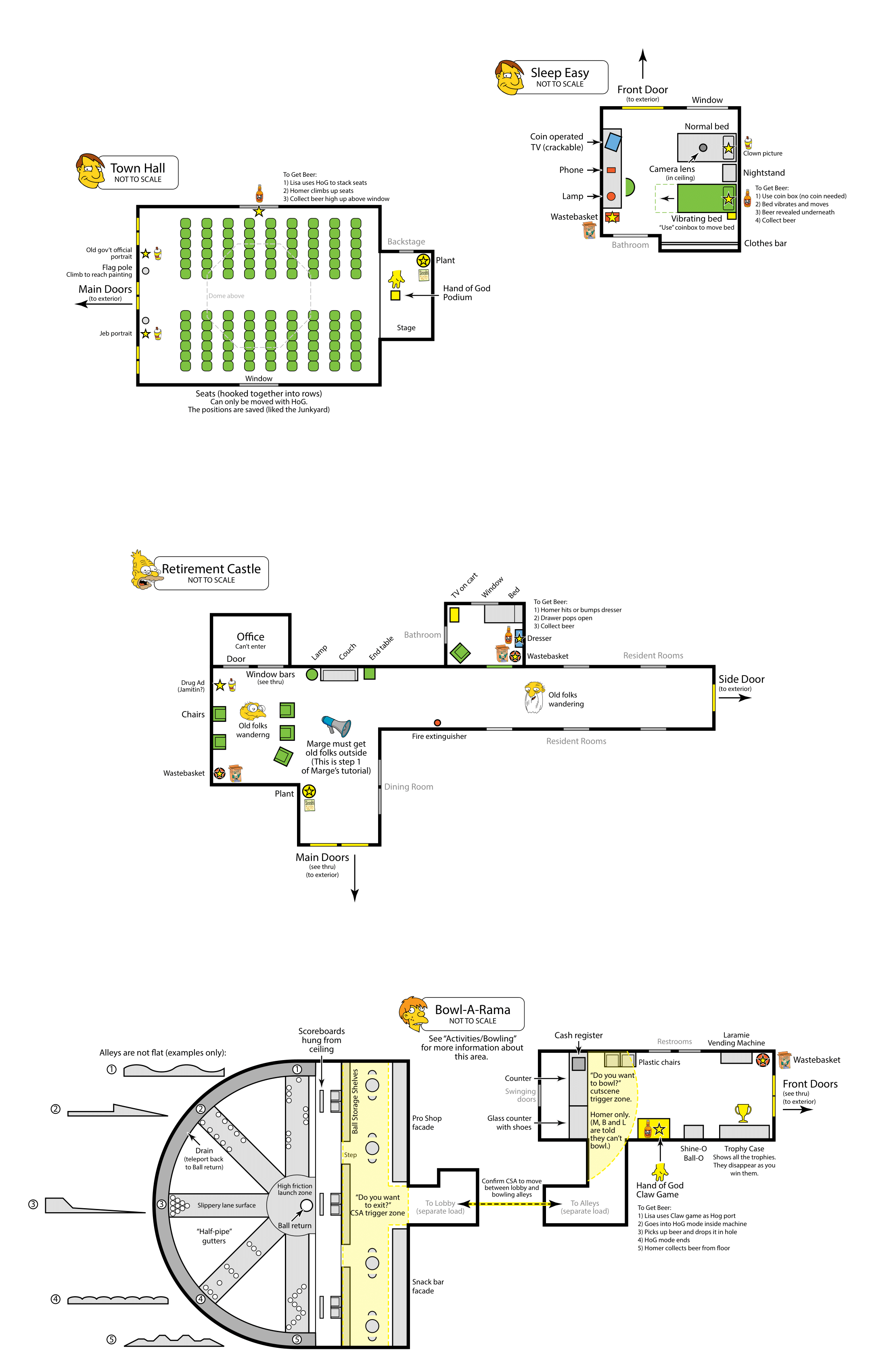
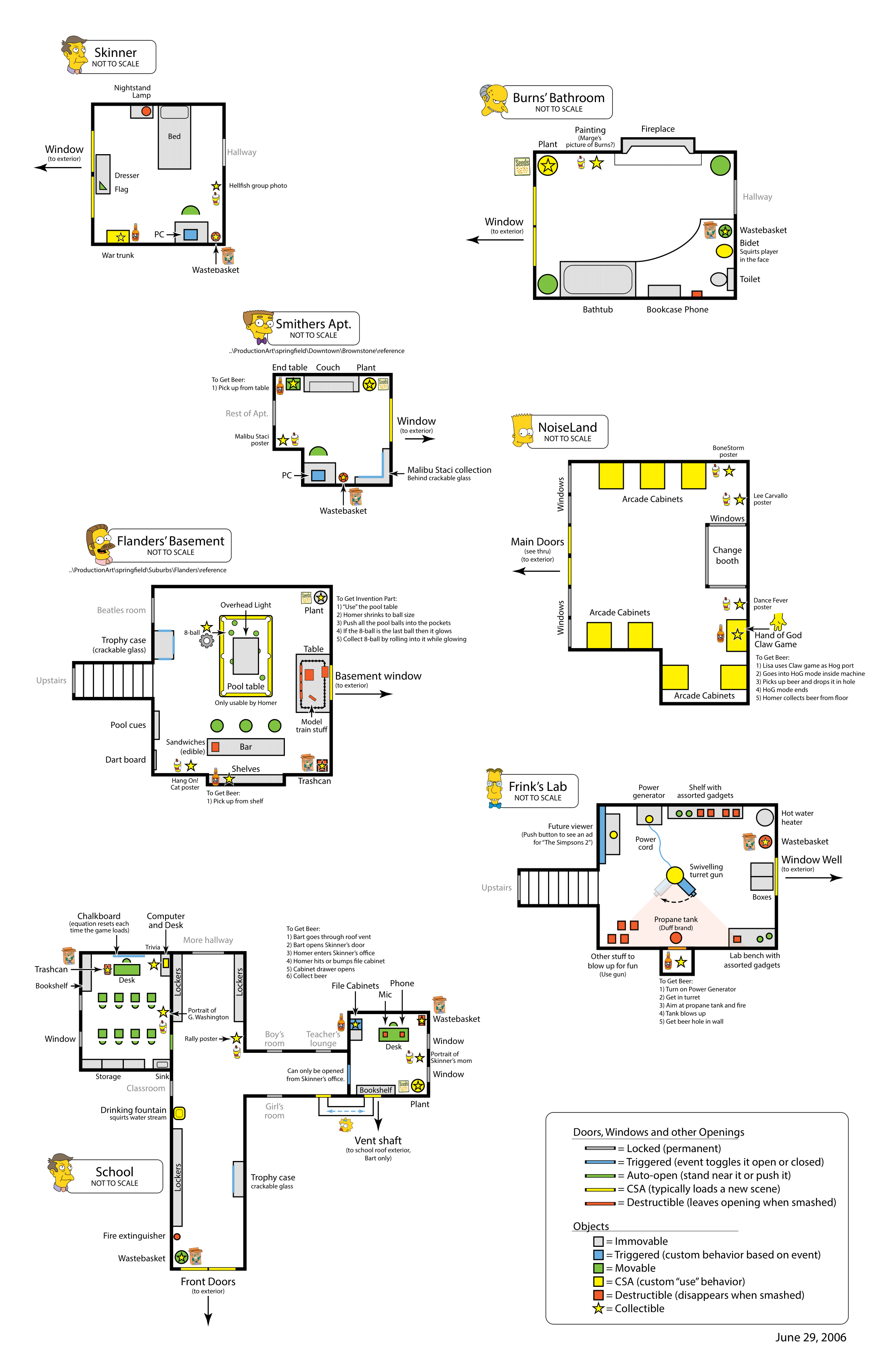
- The interiors for the following locations were planned but do not appear in the final game: The Tire Fire, Junkyard, Graveyard, TacoMat, Lard Lad, Springfield History Museum, Nuclear Power Plant, Hospital, Krusty-Lu Studios, Town Hall, Sleep-Eazy Motel, Retirement Castle, Barney's Bowl-A-Rama, Skinner's House, Smithers' Apartment, Burns' Bathroom, Flanders' Basement, and Noiseland Arcade. Notably, the Graveyard appears in the E3 build, though with a different design, the TacoMat appears as a truck in Shadow of the Colossal Donut, and both the Retirement Castle and Smithers' Apartment exist in the game files but go unused.
- The Hand of Buddha was originally referred to as the Hand of God.
- Frink's Lab lacks some of the interactive objects like the turret gun seen in the documents.
- Homer collects Beer Bottles instead of Duff Bottle Caps.
- Lisa collected seed bags instead of Malibu Stacy Seals.
- Bart collected Krusty-O Boxes instead of Krusty Koupons.
- The Graveyard included shrines dedicated to Chocolate Bunnies, Aliens, and Dolphins, which tracked how many of these enemies you had defeated.
- The Kwik-E-Mart featured an "Egging Activity" for Bart, where he collected eggs, likely to egg the houses of Springfield citizens.
- Apu would give Marge lotto tickets if she used her mob powers to bring shoppers into the Kwik-E-Mart.
- Inside the Kwik-E-Mart, there was a Buzz Cola machine that Homer could use to get "Helium Calories," potentially allowing him to store or activate Helium Homer at will.
- Lisa had a "Camera Activity" in the Kwik-E-Mart, which involved using film for an unknown purpose.
- Bart had the ability to vandalize posters and pictures in certain locations.
- Some interiors contained collectible invention parts, though their purpose remains unknown.
- Marge would have used her mob powers in a tutorial to lead the elderly out of the Retirement Castle.
- The Graveyard featured a collectible beer bottle called "Ye Olde Duffe," similar to the "Ye Olde Duff" trophy from the NeverQuest level.
Early Industrial District#
An early iteration of the Industrial District used in the episode Shadow of the Colossal Donut, shows a number of differences compared to the finalized version completed in September 2006.
- In this version, each hatch battle against Lard Lad was planned to occur in a distinct area of the industrial zone, with the final battle taking place inside Duff Stadium, which in contrast the final version has Lard Lad roaming freely around the Industrial District. Notably, there are leftover voice lines and a subtitle string related to a cut in-game cutscene "Kool-Aid IGC", still present in some early builds.
- The Duff Brewery and the Sleep-Eazy Motel were originally placed within the Industrial District in this map. Both locations were relocated to the main Springfield hub in the final release.
- The Springfield Tire Fire and the junkyard were initially designed as two separate locations, which in the final game were merged into a single combined area.
Early Map (August 2006) |
Finalized Map (September 2006) |
|---|---|
 |
 |
Also present is an alternate version of the map with the locations for Homer's Duff Cap collectibles for the Springfield hub world. 
Marge's Meals#
A scrapped mechanic where Marge would be able to find food in different areas throughout Springfield and combine them together and then bake them into a tasty meal. Any family member that eats the food will be temporarily altered in different ways.
 = Cooking Boosts =

Designer - Stone Librande

== Overview ==

Marge's main activity in Springfield will be to cook for the family. Marge can combine 3 different food items together and then bake them into a tasty meal. Any family member (including Marge) that eats the food will be temporarily altered.

The cooking game is not random, but follows rules similar to the board game ''Mastermind''. Each meal will produce results, but many of the effects will be minor. By carefully substituting ingredients in successive meals, the player can "shape" the results, making them more or less pronounced.

As part of the cooking game, Marge must find food in different places throughout Springfield. Common items can easily be acquired at the grocery store while rare items are hidden in less obvious places.

 * **Category:** Boost

 * **Simpson:** Marge

 * **Location:** ''Ingredients'' can be found all over Springfield. Cooking occurs in the Simpson's kitchen.

 * **Trophy Room:** Recipe book in kitchen

 * **Reward:** Temporary gameplay bonus

 * **Objective:** Marge cooks meals which give boosts for family members.

== Details ==

=== Ingredients ===

The secret to any great meal is the ingredients. Marge can find a wide variety of food items as she explores Springfield and those items can be combined in nearly limitless ways. There is not a fixed list of food items; rather each food item in the game is described by a small number of underlying parameters (which are not exposed to the player). This lets us add in new ingredients at any time without affecting the recipes.

 * When Marge touches an ingredient it instantly teleports to the Simpson’s refrigerator and a message appears, “[Food name] collected”. In smaller text is the message, “Use your refrigerator to prepare a meal”.

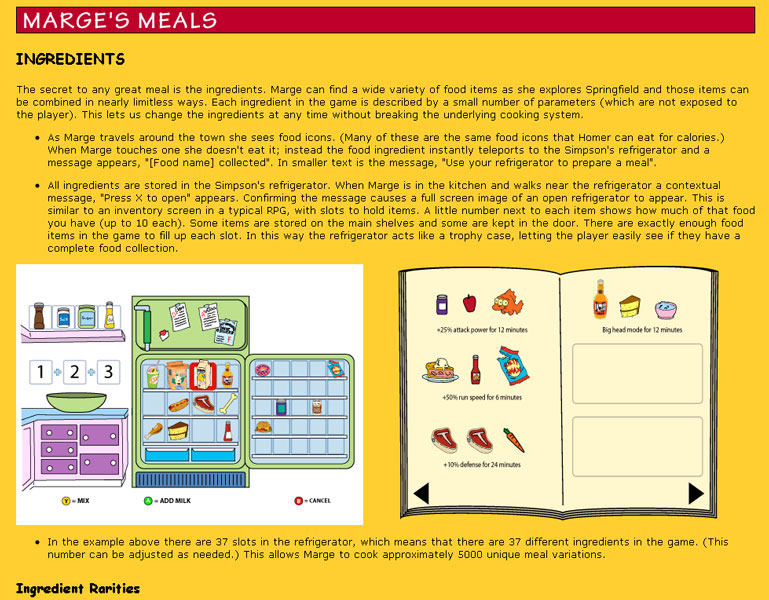
 * All ingredients are stored in the Simpson’s refrigerator. When Marge walks near the refrigerator a contextual message, “Press X to open” appears. Confirming the message causes a full screen image of an open refrigerator to appear. This is similar to an inventory screen in a typical RPG, with slots to hold items. A little number next to each item shows how much of that food you have (up to 10 each). The main compartment holds common items, the door shelves hold uncommon items and the freezer holds rare items. There are exactly enough food items in the game to fill up each slot. In this way the refrigerator acts like a trophy case, letting the player easily see if they have a complete collection.

frig_UI.png

 * If ‘’i’’ is the total number of ingredients available in Springfield, the total number of unique recipes can be calculated with the formula:

   : total_recipes = ‘’i’’ * (i+1)*(i+2) / 6

 : This means that if there are 30 food ingredients then there will be about 5000 meals.

==== Ingredient Rarities ====

Ingredients come in three rarity levels. The rarity level determines where the item is found and how often it appears.

 * **Common:** These ingredients are found at the grocery store. While inside the store Marge can collect the ingredients that are available for that day. The grocery store is re-stocked nightly. There are 10 common items.

 * **Uncommon:** These ingredients are slightly harder to find and are located in restaurants, vending machines and food carts throughout Springfield. These items are re-stocked on a random interval schedule (averaging once a week). There are 10 uncommon items.

 * **Rare:** The most powerful type of ingredient could be anywhere at anytime. They may appear within episodes or as rewards for performing special actions. There are 10 rare items.

==== Ingredient Categories ====

Each ingredient is rated on a scale of 0.0 to 1.0 in 6 major categories.

 * **Sugar:** Candy, donuts and syrup. Sugary ingredients tend to affect the head.

 * **Salt:** Pretzels, chips and beef jerky. Salty foods affect the feet.

 * **Spice:** Hot sauce, curry and jalapenos. These items have fire effects.

 * **Animal:** Bacon, steak and sausage. Ingredients rated high in this category affect the body.

 * **Vegetable:** Carrots, apples, potatoes. Organic ingredients affect "air" traits such as jump height.

 * **Color:** All foods have a base color (red, orange, yellow, green, blue, purple) and a saturation value 0.0-1.0 (dull to bright). If the meal is high in a color value then the character’s skin will change color after eating it.

=== Preparing the Meal ===

 * Marge begins the cooking activity by selecting an item from the open refrigerator and pressing the A button. That item appears on the counter in “Slot 1”. She selects two more ingredients for Slots 2 and 3. When all slots are filled the message, “Press X to prepare meal” appears.

 * After confirming the action a brief cut scene shows Marge cooking and placing the meal on the table. (Alternatively, the food could just magically appear on the table.)

 * At any time you can press the Cancel button to exit the cooking activity. All the food that was on the counter teleports back into the refrigerator.

=== Eating the Meal ===

 * When a meal is on the table any family member that you are controlling can eat it. Simply walk near the plate and confirm the contextual message, “Press X to eat”.

 * Autonomous characters never eat “boost meals”. However, when Marge is in autonomous mode she may play a simple skit that causes her to cook and place food on the table. These “auto-meals” have no special properties. Autonomous characters can eat this type of meal. There will be some sort of graphical effect (such as particle sparkles) around boost meals.

=== Meal Effects ===

 * Meals have effects based on the ingredients. In general, the traits of all the ingredients are added together and the one trait with the highest score provides the boost effect. So a jalapeno (spicy = 0.8, vegetable = 0.3), plus a carrot (vegetable = 1.0), plus hot sauce (spicy = 0.9) concoction would score 1.3 vegetable and 1.7 spicy. This means the dominant trait of spicy would be in effect. The vegetable trait would be ignored.

 * If the dominant color of the food scores 2 or higher than the character that eats the meal will have their skin color changed to match the food. Skin color reverts back to yellow when the effect wears off.

 * [Insert effect table here]

=== Effect Time Out ===

 * Food boosts time out based on the quality (rarity) of the ingredients. The better the ingredients, the longer the effect will last.

 * When you are in an episode the effect’s duration timer continues to count down.

 * All effects need a graphical indicator to show that they are in effect. This might be subtle (sparkling particles around the character’s feet) or pronounced (flames coming out the character’s ears). When the effect goes away an “all finished” sound effect plays and the graphical effect disappears.

 * Characters keep their effects even if the player is not in control. The graphical effect remains (to remind the player) but the effects don’t work as long as the AI is in control. For instance, suppose Bart drinks a speed potion. As long as the player is controlling him then he runs faster. But if the player switches to Marge then Bart will begin moving at regular speed.

== Raiding the Refrigerator ==

To get a quick calorie boost, Homer can eat directly out of the refrigerator. When Homer is near the refrigerator the contextual message, “Press X to eat”. Confirming the message causes a cut scene to play showing Homer bent over (with his face hidden behind the open door) and making “Chomp” sounds. Homer’s calorie meter begins to rise as random ingredients are subtracted from the refrigerator. (Alternately, he eats common items first, uncommon second and rare last.)

Homer eats until either the player cancels the action, he gains maximum calories, or the refrigerator runs out of food.

=== Open Questions ===

REVIEW NOTES:

 * Define power ups per character

 * Add list of foods to objects page (link to from here)

== Assets ==

=== Models ===

 * Various food icons

=== Visual Effects ===

 * [List effects based on food types]

=== Sounds ===

 * [List sounds based on food types]

=== UI ===

Full screen refrigerator inventory with 3 nearby countertop “slots”.

Full screen cookbook