 This article has a talk page!
Not to be confused with the similarly-named yet completely unrelated Game Dev Tycoon, Video Game TYCOON serves as a basic game-making tool. Users can create games using pre-made assets and can burn them to CD to share with friends. This article covers the most common version of the game, Gold Edition.

|
To do: |
Unused Animations#
Golf Club Swing#

Golf was originally planned to be included as a game mode. It was later planned to be released as an expansion pack (which never materialized), and was finally made available in Video Game TYCOON: Online Edition. A few remnants of this mode can still be found in the game, however, such as this animation of the player swinging a golf club.
Player Kneeling#

An animation of the player kneeling. Possibly leftover from a first-person shooter mode that, like the previously mentioned golf mode, is absent from this version of the game.
Player Getting Up#

An animation of the player getting up from laying on the ground. Purpose unknown.
Unused Models#
|
|
To do: |
Motorcycle#

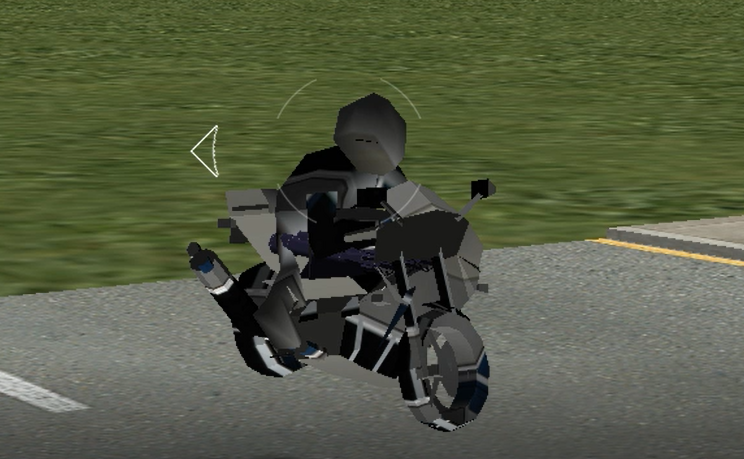
An unused model for a motorcycle can be found in /test (as opposed to /cars, where other vehicles are stored). It can be loaded in-game by swapping its model with one of the used vehicles. Both it and its rider have no animations or textures. Oddly, models for both a red and yellow variant can be found, though both end up looking identical in-game due to the aforementioned lack of textures.
Snowmoblie#

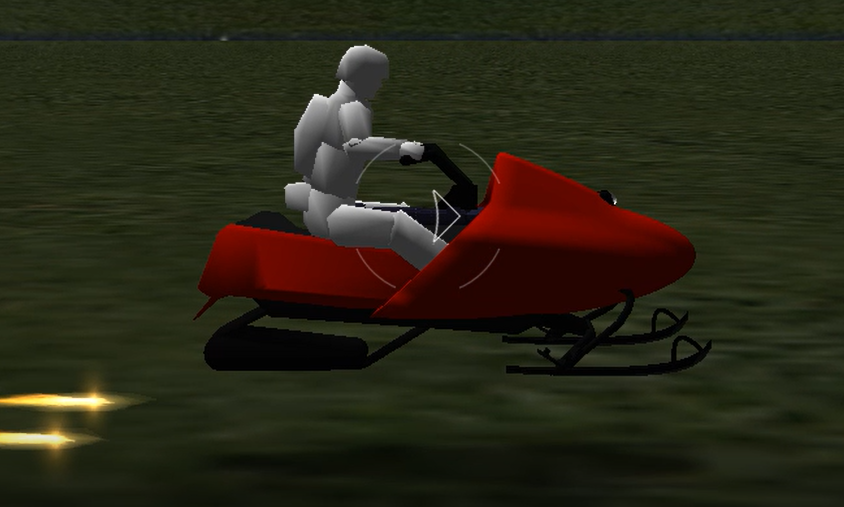
A snowmobile model can be found in /test as well, and can be loaded using the same method. Though the vehicle is textured, its rider lacks textures and neither have animations.
Unused Dialogue#
Placeholder Dialogue#
There are several pieces of placeholder dialogue found with the game’s tutorial audio. They are very low-quality, with ambient noise audible in the background.
Audio |
Subtitle |
|---|---|
Level Editor. |
|
Goals for the level, such as if the player must reach the finish line in a set amount of time, are set within the goals dialogue. The example below shows that to unlock the next level, the player must go through at least two gates. The next example shows a bonus objective where the player must collect 100 coins to get a star as a bonus. This goal is not required to successfully complete the level, so the required box is not checked. |
|
The intro text is used to describe the level. This is where you can describe the overall goals of the level, and add whatever other comments you like. The intro text is displayed once the level is loaded. |
|
If the level is locked, then either one of the goals from another level must indicate how the level is unlocked, or a level unlock egg must be placed in another level and activated by the player. The first level can never be locked. The example shows that when the player successfully goes through two gates, the next level will be unlocked. |
|
The level name is displayed when the level is selected and when the level is loaded. |
|
Set the number of players for the level. Either one or two players are supported. When one player, the mouse, keyboard, or controller can be used. When two players; controller mapping. |
|
Expansion Pack Leftovers#
The game was originally planned to receive expansion packs for additional game modes. These were scrapped in favor of creating the Online Edition. A few audio files that reference this feature still exist.
Audio |
Subtitle |
|---|---|
Expansion packs contain groups of skies, terrain, and models that are similar and can be used to generate similar style games. For example, the auto racing expansion pack can be used to create auto racing-style games. This example shows that all expansion packs are active, which will make all the expansion packs are active, which will make the skies, terrains, and models all available for use in your game. |
|
The expansion packs dialogue is used to enable and disable objects and goals that are specific to certain expansion packs. This can be useful to reduce the clutter of the tree controls in the terrain editor, play editor, and object editor. Selecting only the desired expansion packs can also reduce the time required to save the game to CD/DVD and then reloaded afterwards. |
|
Golf Toolbar Tutorial#
Yet another reference to the cut Golf game mode.
Audio |
Subtitle |
|---|---|
The golf toolbar contains different clubs that may be selected for the golf character. |
|