 This article has a talk page!
Debug Menu#
Accessing the Options menu in the main hub brings up a Temporary menu (かりメニュー) with two options.
- The first one (Option - オプション) is the actual Options menu. The music and sound effects' volume can be altered, as well as the audio playback mode (Mono/Stereo) and the game's language (English/Japanese).
- The second one loads a Test (テスト) menu which allows viewing a handful of the game's resources. Redundantly, almost all of the options are prefixed with Test.
(Translations: Bast & Kobosuke)


テスト『キャラクタービューアー』 (Character Viewer)#

Rather than being what its name claims to be, it shows an odd test environment where a triangle drives itself away off the screen. Start respawns it, and holding L makes it stop. The bit of Katakana on the top-left reads FRAME (フレーム).
テスト『サウンドテスト』 (Sound Test)#

Brings up a sound test for all the game's music and sound effects.
Japanese |
English |
|---|---|
BGM 000…SELECT1 |
BGM 000…SELECT1 |
テスト『ワールドえつらん』 (World Browser)#
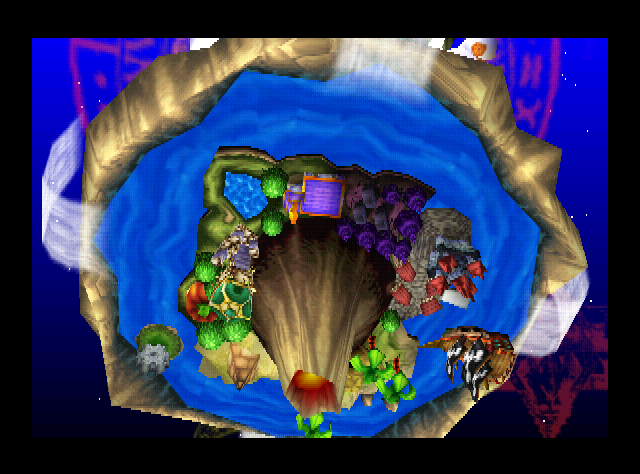
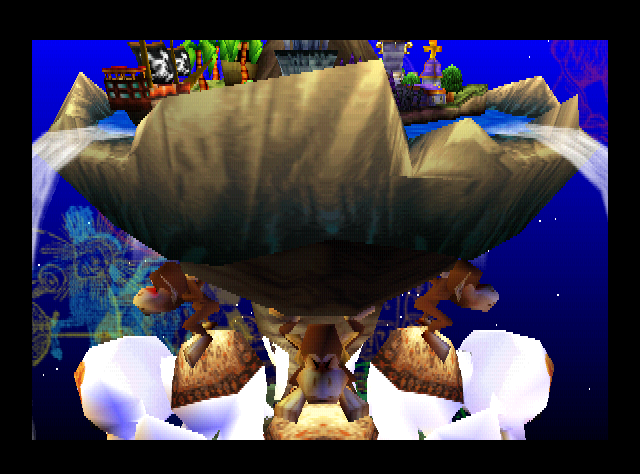
Triggers a specific model viewer for the "island" where all the action takes place. The C-Buttons rotate the mesh in the X and Y axes, while the D-Pad moves it up, down, left, and right.
テスト『はいけいびょが』 (Background Image)#

Displays the title screen's background animations.
テスト『ワールドびょうが』 (World Rendering)#
Triggers a very slow animation that goes upwards the island. Pressing A sends you to the stage select in Multi Play Mode with four players. Remarkably, the game creates clones of your character in order to compensate for the missing AI.
けっ果発ぴょう (Show Results)#

Triggers the Results screen in the Multi Play Mode with some predefined values for the scores. Pressing A brings you back to the Options menu.
テストびょうが (Test Rendering)#

Displays a bright light over a blue background. Purpose unknown.
テスト『フィールドビューアー』 (Field Viewer)#

Brings up a simple map viewer with 「洞窟の奥深く」 (Cave's depth) in the top-left corner.
テスト『キャラクターしょうかい』 (Character Introduction)#

Brings up a character viewer that is unresponsive to all controls.
Unused Music#
The ninth track, labeled as ステージ用『チャーチ』 (For the stage [Church]) in the sound test, goes unused in this prototype. The Church level reuses the Stage Select's music instead.
Unused SFX#
Gameplay#
Due to the lack of AI, several sound effects go unheard. Get ready to hear lots of cartoony slapstick sounds and screams!
Soundbite |
Internal Name |
Translation |
|---|---|---|
ジャンプ音[目だつ] |
Jump sound [stands out] |
|
つうじょうこうげき1 |
General attack 1 |
|
つうじょうこうげき2 |
General attack 2 |
|
つうじょうダメージ声[ナイト] |
General damage voice [Knight] |
|
つうじょうダメージ声[フェニックス] |
General damage voice [Phoenix] |
|
ピヨリ [だったままそのば回てん] |
Dizzy [Rotate on the spot while standing] |
|
よれよれにたおれる |
Collapse from tiredness |
|
リングアウト[ナイト] |
Ring out [Knight] |
|
リングアウ卜[ゴーレム] |
Ring out [Golem] |
|
リングアウ卜[マーマン] |
Ring out [Mammon] |
|
リングアウ卜[フェニックス] |
Ring out [Phoenix] |
|
かたいものをたたく音1 |
Attacking something hard - Sound 1 |
|
キャラふっとばし音1 |
Character going all-out - Sound 1 |
|
ハンマーだげき音1 |
Hammer blow - Sound 1 |
|
キャラクターふっきパターン0 |
Character comeback - Pattern 0 |
|
キャラクターふっきパターン1 |
Character comeback - Pattern 1 |
|
くだける:木へん |
Collapse: Wooden block |
|
くだける:いわ |
Collapse: Rock |
|
くだける:やさい |
Collapse: Vegetables |
|
くだける:ステンドグラス |
Collapse: Stained Glass |
|
くだける:つぼ |
Collapse: Jar |
|
くだける:かい、花だん |
Collapse: Flower pot |
|
クリスタルふんさい:パターン0 |
Crystal smashing: Pattern 0 |
|
クリスタルふんさい:パターン1 |
Crystal smashing: Pattern 1 |
|
クリスタルヒビ:パターン0 |
Crystal cracking: Pattern 0 |
|
クリスタルヒビ:パターン1 |
Crystal cracking: Pattern 1 |
|
ほうだい |
Gun battery |
|
たからばこ |
Treasure chest |
|
システム:スポットいどう |
System: Spot Moving |
Ambiance#
There are also plenty of ambiance sounds that never play in their respective stages, despite their names claiming them to be used.
Soundbite |
Internal Name |
Translation |
|---|---|---|
マップセレク卜がめんCAVEでのかんきょうSE |
Sound Effect on map select screen in CAVE |
|
マップセレク卜がめんVOLCANOでのかんきょうSE |
Sound Effect on map select screen in VOLCANO |
|
PIRATEステージよう:なみ[ループ] |
Used in PIRATE stage: Wave loop |
|
PIRATEステージよう:ふねきしみ0 |
Used in PIRATE stage: Ship creak 0 |
|
PIRATEステージよう:ふねきしみ1 |
Used in PIRATE stage: Ship creak 1 |
|
CHURCHステージよう:かねの音 |
Used in CHURCH stage: Bell sound |
|
TOWNステージよう:ことりのさえずり0 |
Used in TOWN stage: Bird chirp 0 |
|
TOWNステージよう:ことりのさえずり1 |
Used in TOWN stage: Bird chirp 1 |
|
TOWNステージよう:ことりのさえずり2 |
Used in TOWN stage: Bird chirp 2 |
|
TOWNステージよう:ことりのさえずり3 |
Used in TOWN stage: Bird chirp 3 |
|
CEMETERYステージよう:ぶきみな音0 [ループ] |
Used in CEMETERY stage: Eerie sound 0 |
|
CEMETERYステージよう:ぶきみな音1 [ループ] |
Used in CEMETERY stage: Eerie sound 1 |
|
CEMETERYステージよう:ぶきみな音2 [ループ] |
Used in CEMETERY stage: Eerie sound 2 |
|
CEMETERYステージよう:ぶきみな音3 [ループ] |
Used in CEMETERY stage: Eerie sound 3 |
(Translations: Bast)
Unused Graphics#

Present at offset 0x811F0 in the ROM is this instruction sheet detailing an animation viewer.
Button |
Action |
|---|---|
1P A |
Switch between Hi-Res and Lo-Res |
1P B |
Switch character |
1P C-Left, C-Right |
Switch animation |
1P C-Up |
Replay animation |
1P L and R |
Frame-by-Frame Animation |
2P Analog Stick |
Rotate Character |
2P Analog Stick and Z |
Zoom in and out |
2P Start |
Return to default position |

Also present in the ROM at offset 0x80120 is this small drawing of Mario. What he's here for is unknown.
(Source: Kobosuke)

|
To do: |