A puzzle game that was only released in Japan.
Debug Menu#

Game Genie code 0C2-14F-E6A will start you off in a debug menu allowing some basic features such as CHR viewing, sprite viewing, game mode setup and a sound test.
GAME START#

Takes you to a game configuration setup menu where you can adjust parameters and select your Character. Press Start to begin the game with your selected settings.
CHARA DISP#
left View Character Tilesets.
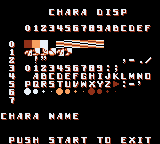
For some reason, the "CHARA NAME" is always empty. However, the ROM contains a full list of corresponding names for all CHR blocks. They are even processed somehow by putting in a RAM buffer, but no code left that actually draws this. List of "CHARA NAME" is after 0x3C869:
 NORMAL ASCII HIGH
 NORMAL ASCII LOW
 CHARA.CBB HIGH
 CHARA.CBB LOW
 T_1P.CBB
 BG_NL.CBB
 BG_2P.CBB  HIGH
 BG_2P.CBB  LOW
 MAPDATA.CBB HIGH
 MAPDATA.CBB LOW
 HOSHI.CBB
  OBI.CBB
 MODE.CBB   HIGH
 MODE.CBB   LOW
 WAM_EX.CBB
 WBN_EX.CBB
 BDR_EX.CBB
 DRG_EX.CBB
 STC_EX.CBB
 GRM_EX.CBB
 GOR_EX.CBB
 AGR_EX.CBB
 DUMMY
 CKT_EX.CBB
 BRK_EX.CBB
 MDS_EX.CBB
 ASR_EX.CBB
 RUS_EX.CBB
 BRA_EX.CBB
 STN_EX.CBB
 LEVEL.CBB
 WAM_EX.CBB
 WBN_EX.CBB
 BDR_EX.CBB
 DRG_EX.CBB
 STC_EX.CBB
 GRM_EX.CBB
 GOR_EX.CBB
 AGR_EX.CBB
 DUMMY
 CKT_EX.CBB
 BRK_EX.CBB
 MDS_EX.CBB
 ASR_EX.CBB
 RUS_EX.CBB
 BRA_EX.CBB
 STN_EX.CBB
MAP DISP#

View stage backdrop tilesets.
JUKEBOX#

Basic sound test. A plays the selected song and B plays the selected sound effect.
C.R.T. Test#

Tests CRT television setup which checks to see if the Super Game Boy flag is set. Basic Super Game Boy commands are sent and then a palette is loaded.
SPRITE TEST#

Sprite viewer. Press A to set the currently selected sprite.
CHR SELECT#
Character Select brings you to the Main Menu.
(Source: Mezmorize - Finding the Debug Text)
(Source: Nensondubois - Activating the Debug Menu)
Unused Super Game Boy Border#
There is an unused and unreferenced Super Game Boy border that looks like an early version of another border used in the game. For comparison, there are less details in the picture, also a yellow frame is used inside the window not outside of it.
|
Early |
Final |
|---|---|

|

|
Unused Super Game Boy Sound#

|
This page or section needs more audio. |
Located at 0x0353F is the first Super Game Boy sound. Game Genie codes 3F3-10C-5D4 + 353-11C-3BA will play this unused sound during startup.
Unused Text#
At 0x3DB5F, there is unused text for another debug mode screen. It is unknown where it should be displayed, but it has no VDP initialization and just copies text to the VRAM directly.
    WARNING  !!


 YOU HAVE TO
           RETURN.


 (PUSH START
      TO RETURN)
Also, at 0x5FC40 and 0x63C40 there two identical strings with some mastering tool signature, probably used to draw SGB borders, since both places are at the end of the SGB borders data.
NAK1989 S-CG-CADVer1.11 930511 F