 This article has a talk page!

|
This page contains no introduction. |
Debug Menu#
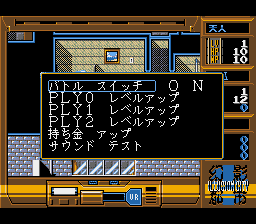
At the SEGA logo, hold A + C + Start, then release the buttons when the title screen appears. Start the game and when you have control of the character, open the menu by pressing any button. Then, enter the 5th option and on the next menu, highlight the 2nd option. Now, press Right, Right, Right, Right, Right, Left, Left, A. If done right, the debug menu will appear.
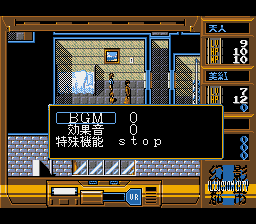
In it, you can turn off random battles (バトル スイッチ, option 1), increase/decrease the level of the player characters (レベルアップ option 2, 3 and 4), money (持ち金 アップ option 5), and access a sound test (サウンド テスト option 6). To increase the player level or money press C, to decrease the player level/money hold Start when pressing C.
Disabled options#
There is text and functionality for several more debug options left in the game code, however they seem to have been disabled from the debug menu. This includes:
- Speed up (on/off)
- 無敵 mode / Invincible mode (on/off)
- 術 無限 mode / Infinite magic mode (on/off)
- 弾 無限 mode / Infinite ammo mode (on/off)
- クイック セーブ / Quick save (on/off)
- エンディング テスト / Ending test (in a debugger you can change memory offset 0x1c67c from 0x0001c800 to 0x0001c824 and press option 6 (sound test) to enable this function).
file:Gen'ei Toshi - Illusion City segacd debug-1.png file:Gen'ei Toshi - Illusion City segacd debug-2.png
(Source: (TienRen))