 This article has a talk page!
Unused 6th Classic Invasion Variant#
The "Classic Invasion" waves have a different variant for every chapter, and the second half of the game repeats the ones from the first (Chapter 1 & 7, Chapter 2 & 8, and so on). This variant goes unused as it's assigned to Chapter 6, which only has Asteroid waves, and there is no Chapter 12 for it to appear in. It was used only in version 2.00, where it swapped places with the current 5th variant.
Unused Music#
mod3#
v2.00-v2.60 |
v2.72 |
|---|---|
Music in earlier versions of the game was split into multiple snippets to save on file size. "mod0" to "mod2" correspond to "lilly chip 08" by Accord, which is used, but there's also "mod3", which is a short 5-second snippet of "L.f.f." by 4-mat. The game loads this upon startup, but it is never used afterwards.
In version 2.72, it was replaced with a copy of "justtofunk0" trimmed down to 0.025 seconds.
By version 2.90, it got removed entirely as the way music works was changed, now relying on a single file instead.
Placeholder Cutscene#
Defined in the code as "CutsceneGeneric", this cutscene plays for chapters that don't have one assigned. It consists of the player spaceship orbiting around a planet once before leaving. The planet shown depends on the current chapter and will crash the game if the chosen planet texture does not exist in the game files. It remained in the files until version 2.90, where only the first part was left in.
Debug Mode#
Edit the game's config file and set the debugMode variable to a non-zero value. 1 will initialize Debug Mode 1, 2 will initialize Debug Mode 2, and 3 or higher will initialize Debug Mode 3.
Debug Mode 1#

Shows some basic debugging stuff.
- Frame: Lists the FPS.
- Min: Lists the maximum amount of FPS the game can reach (it's rather pointless).
- Max: Lists the minimum amount of FPS the game can reach (in this case, it's about 25 FPS).
- Accuracy: Probably lists how accurate the FPS count is.
- Sprites: The left value lists how many sprites are on-screen, while the right value lists how many sprites are loaded.
- Surfaces: Lists the background objects.
- Collisions: Lists the amount of collisions the game deals with.
- Wave, Stage, and System: Values that determine the current wave.
Debug Mode 2#
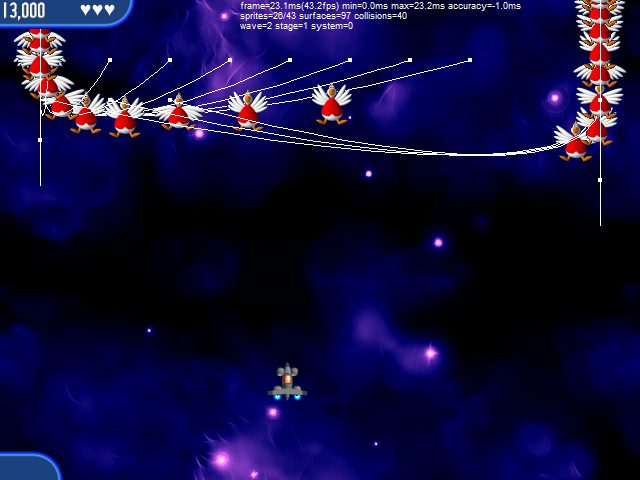
Along with the features from the first debug mode, the second one adds the following:
- The pathfinding system used by AI-controlled objects is displayed.
Debug Mode 3#
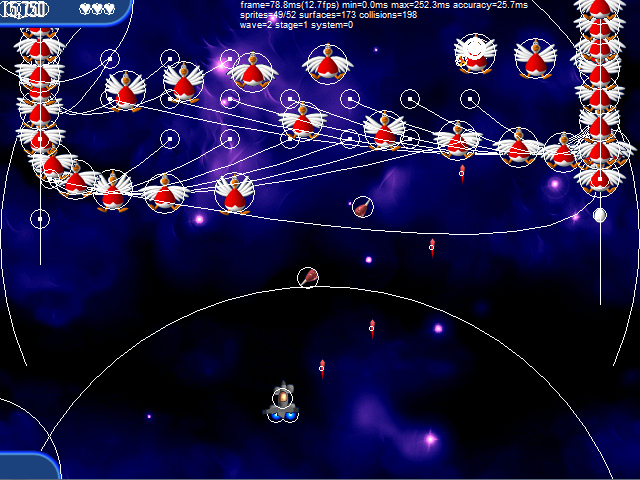
Along with the features from the first and second debug modes, the third one adds the following:
- The hitboxes of various sprites and surfaces are highlighted. Drawing them is very resource-intensive, so the game may slow down.