 This article has a talk page!

|
This page contains no introduction. |
Debug Mode#
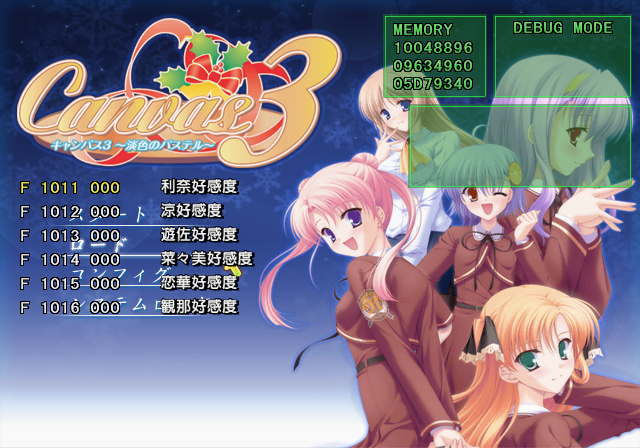
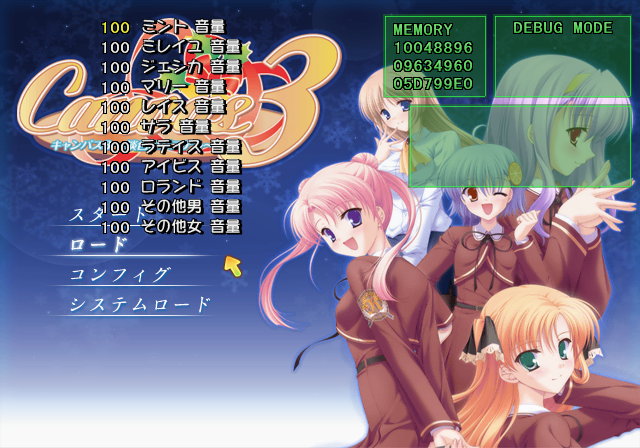
Applying the below code will re-enable the debug mode button combinations. With the code on, at the main menu, press L2, L2, L1, L1, D-Pad Left, D-Pad Left, Circle, Circle, R1, R1, R2, R2 on Controller 2. This same debug system is also present in several other PlayStation 2 games using HuneX's engine.
After entering the above button sequence, press Start on Controller 2 to toggle Debug Mode. This allows you to change game-related flags and the volume of each spoken character in the game. Below are the known Controller 2 inputs while this mode is active.
Master Code (only needed for cheat devices)
901D09F8 0C074226

Re-enable Debug Mode Buttons
1010F2B8 0000C33C- Hold Triangle and press D-Pad Left / Right to change an event. You will start in this event when starting a new game.
- Press L1 for flag list.
- Press R1 for character volume menu.
- Hold Select to make the menu temporarily invisible.
- Press L3 to enable SCRIPT JUMP KINSI.
(Source: Original TCRF research)
Debug Display#
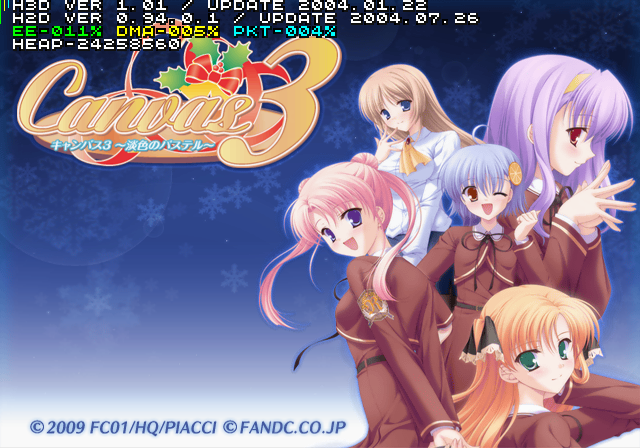
Apply the below code to enable a simple debug display. This is a HuneX debug display present in some other PlayStation 2 games. Apparently, this is an old debug system they are using considering the game was released in 2009.
Enable Debug Display
201709E4 24050001
(Source: Original TCRF research)
Progressive Display Mode (640x480p)#
Holding Triangle + X when the game is first starting up will allow you to turn on progressive mode.