 This article has a talk page!

|
To do:
|
Blood+: One Night Kiss is one of two PS2 games from Suda 51's Grasshopper Manufacture that is based on a licensed anime property. However, this one remained in Japan, despite the Blood+ anime airing in North America not long after this game's release.
Debug Menus#
Present in the game are two debug menus. They can be accessed by applying the below codes. The main debug menu will appear when you select the SPECIAL main menu option and then selecting either 制服図鑑 or 翼手図鑑. The second debug menu, Stage Select, can only be accessed when you have control over your character and then pressing L3 + R3.
Master Code (only needed for cheat devices)
90110958 0C0441FE

Replace 制服図鑑 with Main Debug Menu
0024A604 00000008

or

Replace 翼手図鑑 with Main Debug Menu
0024A874 00000008

L3 + R3 For Stage Select
201F8C60 0C096092
20258248 3C020045
2025824C 84427742
20258250 2403FFF9
20258254 14430002
20258258 2402FFFE
2025825C ACC23D7C
20258260 8CC33D7C
20258264 03E00008
20258268 2402FFFE
Main Debug Menu#

The main debug menu. From here, you can listen to music, view models, view special effects and quickly choose game modes.
Text |
Notes |
|---|---|
GAME |
Sends you to a new game. |
TITLE |
Sends you to the main menu. |
VIEWER |
Sends you to a model viewing option. |
HAY |
Doesn't work. |
YAM |
Effect viewer option. |
WAT |
It's unclear what this is. It has Saya's model on a test map with an unused background. |
HIRO |
Effect test area. Press either Circle, Square, or Triangle to see effects. |
HOSHI |
Softlocks the game. |
NAKA |
Nothing? |
BLOOD |
Opening logos. |
OPTION |
Options menu. |
Y_ZUKAN |
翼手図鑑 menu. |
CLOSET |
Outfit select menu. |
(Source: Original TCRF research)
VIEWER#


This option allows you to view models and listen to music. You can also view animations, although it's not clear if that works. To rotate the model in this mode, use the second controller.
YAM#

An effect viewing option. There will be some corrupted stuff on-screen when entering this menu.
WAT#
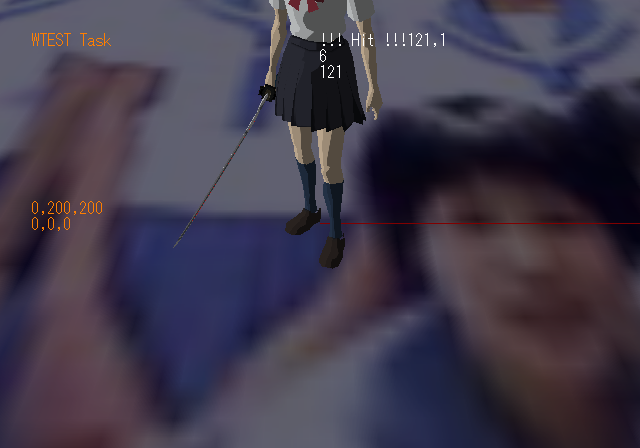
It doesn't appear anything can be done here. It also contains an unused background texture. You can also move Saya around with the second controller.
Map Select#

Pressing L3 + R3 while you have control over your character will bring you to this menu. From here, use D-Pad Up / Down to select a level ID, or R1 to change options.
Unused Maps#
A few test maps can seen in this section. You can warp to them using the Map Select debug menu.
STG2500#

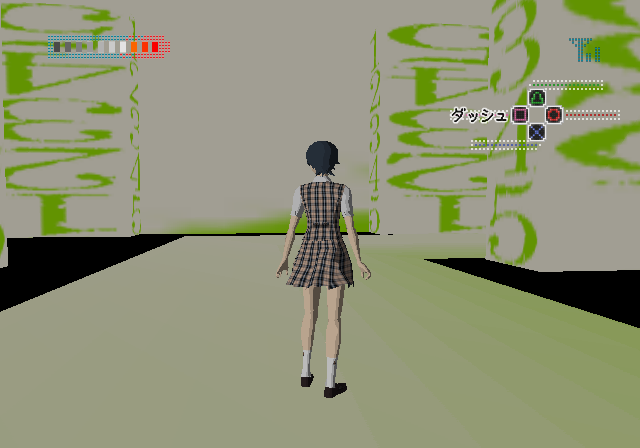
There are several numbers as textures in this map.
STG4200#


This appears to be a work-in-progress school map.
STG9000#
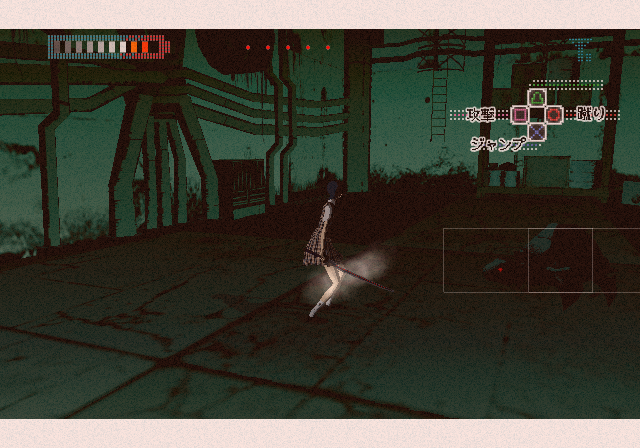
This map contains only one enemy. You can't exit anywhere even after defeating the enemy.
STG9990#

A test map with various objects. Interacting with the objects will play various test cutscenes.
(Source: Original TCRF research)
|
The Blood series | |
|---|---|
|
PlayStation 2 |
|