 This article has a talk page!
This is a sub-page of Proto:The Legend of Zelda: Majora's Mask/Debug Version.
Main Menu#

Press Start on Controller 4 to open the environment editor. You will be presented with two menus:
* ENVIRONMENT TOOL * |
* ENVIRONMENT TOOLS * |
|---|---|
かんきょうしょく せってい |
Various Environment Settings |
じかん ひょうじ&そくどせってい |
Time Display & Speed Settings |
かざむき ふうりょく せってい |
Wind Direction & Force Settings |
* DEMODATA TOOL * |
* CUTSCENE DATA TOOLS * |
デモデータ |
Cutscene Data |
デモサイセイ |
Cutscene Playback |
Read on for more details on each option.
Controls#
All button inputs are used with Controller 4.
Start + A |
|
|---|---|
Start |
Enable/Disable Editor |
A |
Select Menu Option |
ENVIRONMENT TOOL#
Various Environmental Settings#

[かんきょうしょく せってい] |
[Various Environment Settings] |
|---|---|
かくしゅらいと せってい |
Various Light Settings |
VRBOXからーせってい |
VR Box Colour Settings |
Various Light Settings#
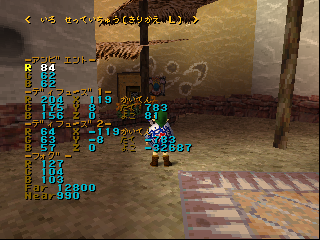
< いろ せっていちゅう(きりかえ L) > |
|
|---|---|
-アンビエント- |
|
R |
000 |
C |
00 |
B |
00 |
-ディフューズ1- |
|
R |
000 |
G |
000 |
B |
000 |
-ディフューズ2- |
|
R |
00 |
G |
00 |
B |
00 |
-フォグ- |
|
R |
00 |
G |
000 |
B |
000 |
Far |
00000 |
Near |
000 |
VR Box Colour Settings#
This menu allows you to change the colour of the sky, as well as switch between skyboxes.
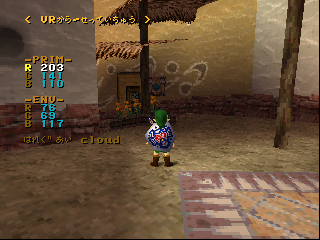
< VRからーせっていちゅう > |
|
|---|---|
-PRIM- |
|
R |
000 |
G |
000 |
B |
000 |
-ENV- |
|
R |
0 |
G |
0 |
B |
000 |
はれぐあい |
xxx |
Weather#
Three weather options are available.
Option |
Result |
|---|---|
fine |
Sunny |
cloud |
Cloudy |
rain |
Rainy |
Time Display & Speed Settings#
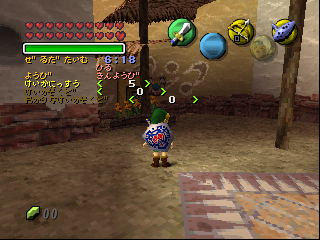
じかん ひょうじ&そくどせってい |
|
|---|---|
ぜるだたいむ |
0:00 |
xxx |
|
ようび |
yyy |
けいかにっすう |
<> |
けいかそくど |
<> |
おかりなけいかそくど |
<> |
Zelda Time#
This option indicates the current time in-game. The xxx variable allows you to choose between two different times of day:
Option |
Result |
From |
Till |
|---|---|---|---|
ひる |
Day |
06:00 |
17:59 |
よる |
Night |
18:00 |
05:59 |
Weekday#
This option indicates the current weekday. The yyy variable allows you to choose between the seven days of the week:
ようび |
Weekday |
Cycle Day |
|---|---|---|
にちようび |
Sunday |
Opening |
げつようび |
Monday |
First Day |
かようび |
Tuesday |
Second Day |
すいようび |
Wednesday |
Third Day |
もくようび |
Thursday |
New Day |
きんようび |
Friday |
- |
どうようび |
Saturday |
- |
You'd expect to be limited to a choice of only 4 days, since these are the only ones that appear in the game, but you can actually set the variable much, much higher. Day 5 and beyond appear to be identical to the New Day on Day 4. The days of the week are tracked all the way through till Sunday. This is probably a remnant of the "cops & robbers" game the time limit concept came from, wherein the goal had to be achieved in 7 days.
Days Passed#
This option displays how many days have passed in-game during the current three-day cycle.
Time Passage Rate#
The rate at which time passes is determined by the current map, rather than globally. When the player enters an area, the value is automatically set to the map default.
Time flows faster during the first cycle of the game (this also changes the Termina Field map to a different one with no music and no enemies). This is actually checked by seeing whether the Ocarina of Time is present in your inventory.
Value |
Effect |
|---|---|
-x |
Time flows backwards. |
0 |
Time does not pass. The time display at the bottom of the screen disappears. |
3 |
Default value. Time passes at the normal speed. |
5 |
Value used during the first cycle of the game. |
400 |
Value used by the Sun's Song. This unused song causes time to pass at a very fast rate until the clock hits 18:00 (if played during the day) or 06:00 (if played during the night). |
Time Passage Rate - Ocarina#
The rate at which time passes can be modified by using the ocarina to play the Inverted Song of Time. This slows down time's passage.
Value |
Effect |
|---|---|
-2 |
Value set by the Inverted Song of Time. |
0 |
Default value. Time passes at the normal speed. |
Curiously, this value is not affected by playing the Song of Time, the Song of Double Time, or the Sun's Song.
Wind Direction & Force Settings#

<かぜ せってい> |
|
|---|---|
ふうりょく |
00 |
たて かいてん |
0000 |
よこ かいてん |
0000 |
DEMODATA TOOL#
scope="row" colspan="2" | * DEMODATA TOOL * |
scope="row" colspan="2" | * CUTSCENE DATA TOOLS * |
|---|---|
デモデータ |
xxx |
デモサイセイ |
yyy |
Cutscene Data#
The only option here appears to be "Normal".
scope="row" colspan="2" | * DEMODATA TOOL * |
scope="row" colspan="2" | * CUTSCENE DATA TOOLS * |
|---|---|
デモデータ |
つうじょう |
Cutscene Playback#

|
This needs some investigation. |
Contrary to the instructions, pressing D-Left on Controller 1 does not appear to have an effect.
デモサイセイ |
Cutscene Playback |
|---|---|
しない |
None |
デモ00(1コンPAD-Lカイシ) |
Demo 00 (Change With D-Left on Controller 1) |
デモ01(1コンPAD-Lカイシ) |
Demo 01 (Change With D-Left on Controller 1) |
デモ02(1コンPAD-Lカイシ) |
Demo 02 (Change With D-Left on Controller 1) |
デモ03(1コンPAD-Lカイシ) |
Demo 03 (Change With D-Left on Controller 1) |
デモ04(1コンPAD-Lカイシ) |
Demo 04 (Change With D-Left on Controller 1) |
デモ05(1コンPAD-Lカイシ) |
Demo 05 (Change With D-Left on Controller 1) |
デモ06(1コンPAD-Lカイシ) |
Demo 06 (Change With D-Left on Controller 1) |
デモ07(1コンPAD-Lカイシ) |
Demo 07 (Change With D-Left on Controller 1) |
デモ08(1コンPAD-Lカイシ) |
Demo 08 (Change With D-Left on Controller 1) |
デモ09(1コンPAD-Lカイシ) |
Demo 09 (Change With D-Left on Controller 1) |
デモ10(1コンPAD-Lカイシ) |
Demo 10 (Change With D-Left on Controller 1) |
デモ11(1コンPAD-Lカイシ) |
Demo 11 (Change With D-Left on Controller 1) |
デモ12(1コンPAD-Lカイシ) |
Demo 12 (Change With D-Left on Controller 1) |
デモ13(1コンPAD-Lカイシ) |
Demo 13 (Change With D-Left on Controller 1) |
デモ14(1コンPAD-Lカイシ) |
Demo 14 (Change With D-Left on Controller 1) |
デモ15(1コンPAD-Lカイシ) |
Demo 15 (Change With D-Left on Controller 1) |
デモ16(1コンPAD-Lカイシ) |
Demo 16 (Change With D-Left on Controller 1) |
デモ17(1コンPAD-Lカイシ) |
Demo 17 (Change With D-Left on Controller 1) |
デモ18(1コンPAD-Lカイシ) |
Demo 18 (Change With D-Left on Controller 1) |
デモ19(1コンPAD-Lカイシ) |
Demo 19 (Change With D-Left on Controller 1) |
Unidentified Text#
|
|
This needs some investigation. |
The following text is present in the Console Output Strings near the text used by the environment editor. It has yet to be accessed in-game.
カンキョウ セッテイ
[セーブ]
[ロード]
[SAVE MODE]
kankyo00.dat
kankyo01.dat
kankyo02.dat
kankyo03.dat
kankyo04.dat
kankyo05.dat
kankyo06.dat
kankyo07.dat
kankyo08.dat
kankyo09.dat
ウワガキ
シンキサクセイ
[LOAD MODE]
DemoTensoData シヨウ