 This article has a talk page!
This is a sub-page of Proto:The Legend of Zelda: Majora's Mask/Debug Version.
The audio debugger is used for testing and monitoring anything related to audio in the game.
Access#
To turn on the Audio Debugger using the Memory Editor, perform the following steps with Controller 2.
- Press L + C-Left to activate SREG in the Memory Editor.
- Press L + C-Left twice more to reach page 3.
- Use D-Down to scroll to SREG36.
- Use D-Right to set SREG36 to 1 (or any odd number), displaying the audio debugger.
- Press L + C-Left four more times to exit SREG, so only the audio debugger is displayed on the screen.
You can also use the Gameshark code 803E416D 0001 to enable the debugger without using the memory editor.
General Controls#
Controller 4 is used with the audio debugger.
These controls apply regardless of what page you're currently on:
Button |
Function |
|---|---|
L |
Go to Previous Page |
R |
Go to Next Page |
Z |
Change color of audio debugger text |
Enumerations#
Some fields on these pages display names and/or numbers from a limited set of values ("enumerations"). For brevity, those enumerations are listed here.
Sound Bank Types |
|---|
Number |
0 |
1 |
2 |
3 |
4 |
5 |
6 |
S-Out Types |
|---|
Number |
0 |
1 |
2 |
3 |
Color Sets |
|---|
Number |
0 |
1 |
2 |
3 |
4 |
5 |
6 |
7 |
Page 1 — Non#
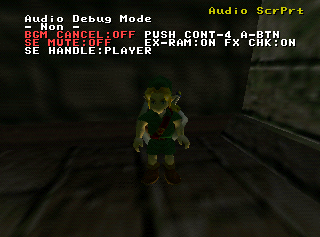
Controls whether or not music/sound effects are muted, various checks, and displays information about sounds Link makes.
Controls#
A + B |
D-Pad |
|
|---|---|---|
A |
Toggle music |
D-Left |
D-Down |
||
B |
Toggle sound effects |
D-Right |
D-Up |
||
Legend#
Editable Properties |
|---|
Field |
BGM CANCEL |
SE MUTE |
EX-RAM |
FX CHK |
Displayed Information |
Field |
SE HANDLE |
SE HANDLE Row |
Page 2 — Free Area#
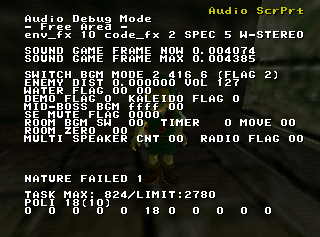
Displays lots of information about audio, the nature of which is presently unclear.
Controls#
This page appears to have no controls.
Legend#
Displayed Information |
|---|
Field |
env_fx |
code_fx |
SPEC |
SOUND GAME FRAME NOW |
SOUND GAME FRAME MAX |
SWITCH BGM MODE |
(FLAG |
ENEMY DIST |
VOL |
WATER FLAG |
DEMO FLAG |
KALEIDO FLAG |
MID-BOSS BGM |
SE MUTE FLAG |
ROOM BGM SW |
TIMER |
MOVE |
ROOM ZERO |
MULTI SPEAKER CNT |
RADIO FLAG |
NATURE FAILED |
TASK MAX |
/LIMIT |
POLI <value 1>(<value 2>) |
There is an additional row of 11 numbers at the bottom, whose meaning is unclear.
Page 3 — Scroll Print#
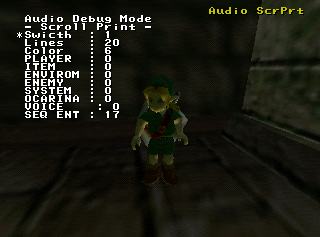
Controls the Audio Scroll Print, which prints what music and sound effects are currently playing.
Controls#
A + B |
D-Pad |
|
|---|---|---|
A |
Reset ScrPrt Position & Color |
D-Left |
D-Down |
||
B |
Clear ScrPrt |
D-Right |
D-Up |
||
Legend#
Editable Properties |
|---|
Field |
Swicth |
Lines |
Color |
PLAYER |
ITEM |
ENVIRONMENT |
ENEMY |
SYSTEM |
OCARINA |
VOICE |
SEQ ENT |
Page 4 — memory dump#

Displays a portion of the RAM memory.
Controls#
A + B |
D-Pad |
|
|---|---|---|
A |
- |
D-Left |
D-Down |
||
B |
- |
D-Right |
D-Up |
||
Legend#
Displayed Information |
|---|
Field |
Address |
Byte |
Page 5 — Link Anime SE Test#

Presumably for testing sound effects played with Link's animations.
Controls#
A + B |
D-Pad |
|
|---|---|---|
A |
(De)select Row |
D-Left |
D-Down |
||
B |
Clear Row |
D-Right |
D-Up |
||
Legend#
Editable Properties |
|---|
Field |
Number Row |
Displayed Information |
Field |
DOUSA |
LOOP |
ANIME |
Page 6 — Demo SE Test#

It's not known what kind of sound effects these are supposed to test.
Controls#
A + B |
D-Pad |
|
|---|---|---|
A |
(De)select Row |
D-Left |
D-Down |
||
B |
Clear Row |
D-Right |
D-Up |
||
Legend#
Editable Properties |
|---|
Field |
Number Row |
Displayed Information |
Field |
DEMO FRAME |
ADM FRAME |
Page 7 — VRS Info#
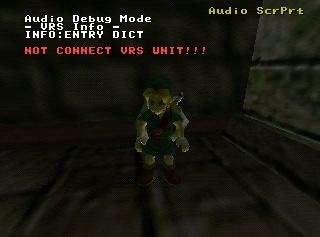
This screen is meant for use with the Voice Recognition System (aka Voice Recognition Unit).
Controls#
A + B |
D-Pad |
|
|---|---|---|
A |
- |
D-Left |
D-Down |
||
B |
- |
D-Right |
D-Up |
||
Legend#
Editable Properties |
|---|
Field |
INFO |
Page 8 — SE Parameter Change#

Used for changing and testing parameters associated with various sound effects.
Controls#
A + B |
D-Pad |
|
|---|---|---|
A |
Play Selected Sound Effect |
D-Left |
D-Down |
||
B |
Cancel All Sound Effects |
D-Right |
D-Up |
||
Legend#
Editable Properties |
|---|
Field |
SE HD |
SE No. |
SE SW8 |
SE SW16 |
SE PR |
Displayed Information |
Field |
SE SW8 |
SE SW16 |
Page 9 — Ocarina Test#

Displays information involving the ocarina. Additional information appears under PLAY INFO via D-Left/Right, but by default nothing appears here.
Controls#
A + B |
D-Pad |
|
|---|---|---|
A |
- |
D-Left |
D-Down |
||
B |
- |
D-Right |
D-Up |
||
Legend#
Displayed Information |
|---|
Field |
SEQ INFO |
PLAY INFO |
<0a, #02x> |
SEQ CHECK STATUS |
OCA |
SEQ |
PLAY |
REC |
DELAY OCA |
TIMER |
First Block |
8min REC POINTER |
Byte |
Second Block |
8note REC POINTER |
Byte |
Third Block |
Check Key Buffer |
Page 10 — Natural Sound Control#

This page is blank, and may no longer be used.
Controls#
No apparent controls.
Legend#
No information on this page.
Page 11 — Block Change BGM#

This page is blank, and may no longer be used.
Controls#
No apparent controls.
Legend#
No information on this page.
Page 12 — SE Flag Swap#
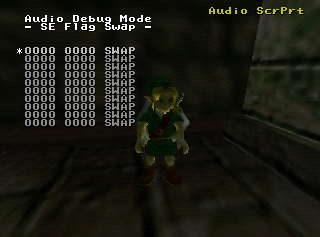
Appears to be for swapping/adding flags of some kind.
Controls#
A + B |
D-Pad |
|
|---|---|---|
A |
(De)select Row |
D-Left |
D-Down |
||
B |
Clear Row |
D-Right |
D-Up |
||
Legend#
Editable Properties |
|---|
Field |
Row |
Displayed Information |
Field |
SWAP OFF |
Page 13 — Interface Info#

Displays information on sound effects playing, organized by bank.
Controls#
A + B |
D-Pad |
|
|---|---|---|
A |
- |
D-Left |
D-Down |
||
B |
Reset Interface Info Position |
D-Right |
D-Up |
||
Legend#
Displayed Information |
|---|
Field |
[bank] <[value]> |
Row of Page 1 |
Row of Page 2 |
Row of Page 3 |
Row of Page 4 |
Page 14 — Channel Info#

This page is blank, and may no longer be used.
Controls#
No apparent controls.
Legend#
No information on this page.
Page 15 — Sub Track Info#
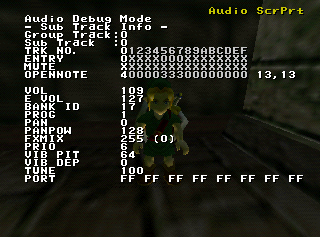
Displays information on each sub track of the four group tracks. The group track value is linked to the one on page 16.
Controls#
A + B |
D-Pad |
|
|---|---|---|
A |
- |
D-Left |
D-Down |
||
B |
- |
D-Right |
D-Up |
||
Legend#
Displayed Information |
|---|
Field |
Group Track |
Sub Track |
TRK NO. |
ENTRY |
MUTE |
OPENNOTE |
The following are blank if the current sub track isn't being used. |
VOL |
E VOL |
BANK ID |
PROG |
PAN |
PANPOW |
FXMIX |
PRIO |
VIB PIT |
VIB DEP |
TUNE |
The preceding are blank if the current sub track isn't being used. |
PORT |
Page 16 — Grp Track Info#
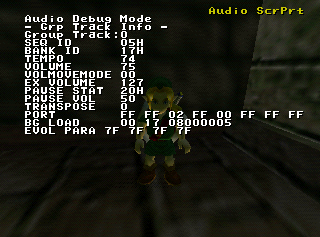
Displays info about each of the five group tracks. The group track value is linked to the one on page 15.
Controls#
A + B |
D-Pad |
|
|---|---|---|
A |
- |
D-Left |
D-Down |
||
B |
- |
D-Right |
D-Up |
||
Legend#
Displayed Information |
|---|
Field |
Group Track |
SEQ ID |
BANK ID |
TEMPO |
VOLUME |
VOLMOVEMODE |
EX VOLUME |
PAUSE STAT |
PAUSE VOL |
TRANSPOSE |
PORT |
BG LOAD |
EVOL PARA |
Page 17 — Heap Info#

Presumably displays info about audio on the heap.
Controls#
This page appears to have no controls.
Legend#
Displayed Information |
|---|
Field |
TOTAL |
DRIVER |
AT-SEQ |
AT-BNK |
ST-SEQ |
ST-BNK |
E-MEM |
S-WAVE-S [ |
S-WAVE-A [ |
Page 18 — Spec Info#
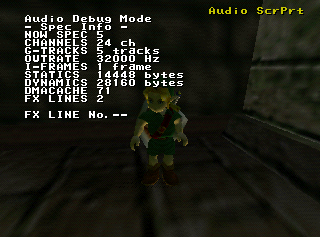
Appears to display information about the audio in general.
Controls#
A + B |
D-Pad |
|
|---|---|---|
A |
- |
D-Left |
D-Down |
||
B |
- |
D-Right |
D-Up |
||
Legend#
Displayed Information |
|---|
Field |
NOW SPEC |
CHANNELS |
G-TRACKS |
OUTRATE |
I-FRAMES |
STATICS |
DYNAMICS |
DMACACHE |
FX LINES |
FX LINE No. |
The following don't appear unless FX LINE No. is set. |
FXCOMP |
FXSIZE |
FXFEEDB |
FXMINGAIN |
CROSS MIX |
CNCT LINE |
CNCT LV |
Page 19 — Sound Control#
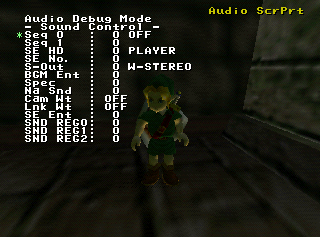
Allows you to play various sound effects and music, and control various other aspects of the game's sound.
Controls#
A + B |
D-Pad |
|
|---|---|---|
A |
Activate Selected Value |
D-Left |
D-Down |
||
B |
Cancel Highlighted Sound Effect/Music |
D-Right |
D-Up |
||
Legend#
Editable Properties |
|---|
Field |
Seq 0 |
Seq 1 |
SE HD |
SE No. |
S-Out |
BGM Ent |
Spec |
Na Snd |
Cam Wt |
Lnk Wt |
SE Ent |
SND REG0 |
SND REG1 |
SND REG2 |