 This article has a talk page!
This page details one or more prototype versions of Genewars.

|
To do: |
A late Beta version of Genewars was commonly available on various warez compilations in 1996, just before the game was released. While date stamps on the files themselves are from mid August 1996, the build comment in the executable states it's from July that year. It's not clear where this version came from exactly, but the fact it defaults to screenshot and tester autosave modes suggest it was likely a QA test build of the game leaked by a tester or journalist.
This version of the game is significant for a number of reasons: firstly it has the full debug mode enabled which was removed for the final release. Even more significantly it still has the level editor intact, which again was purged for the release builds of the game.
Overview#
The beta is intended to be run via a batch file called GENEWARS.BAT, which runs it with the options -g and -z. According to the command line help, these are Screen Shots mode and Tester Autosave mode respectively. The significance of the first option is it supresses the large amount of debug information that is written to the screen in this build without it, even without the debug option enabled. The autosave mode is interesting as well - the beta features a dedicated autosave slot instead of the 8th save game position, presumably to facilitate QA testing (so testers can fall back to the latest autosave if a bug is found). The final release builds have no autosave functionality at all.
The main menu is also different, with an option called Custom that is not present in the final game. Accessing this shows it's just the multiplayer mode. Note that even in the final build multiplayer levels are called "custom" levels internally, and along with some of the options present here suggests it may have originally been intended as a combined multiplayer and skirmish mode (player against computer), which eventually became simply multiplayer only.
The multiplayer screen is an early version of the final game's design, and while most elements are already present, many don't work correctly or are simply rough outlines of functionality that would come later. Most obviously the player number and tech level are simply recorded as text debug overlays and not part of the actual panel yet. One obvious difference is the use of specific 'sockets' that are used to host/limit game sessions on a network, whereas the final game simply lists all detected games. The names for these are clearly early joke ones, which were replaced with scientific terms in the final TEXT.DAT: Arse, Badger, Cucumber, Dentist, Engineer, Fart, Garden, Hedgehog
In-Game Changes#
The actual gameplay mostly seems the same, with some minor changes:
- The "you're on your own now" message is shown before every level where the player must choose their team manually instead of only once in the final game
- It's not clear if any of the extra levels are in the campaign mode or not, the game crashes transitioning to level 8.
- Cheat/debug keys are enabled at all times, so W skips a level.
- The escape key does not lead to the options menu. Instead the O key must be pressed.
- If P is pressed, the game pauses as in the final build. However, it uses a different "Paused" message that seems to be displayed using the wrong palette. In the final game this is replaced by an image of a frozen stopwatch on-screen.
- The mouse cursor is different, resembling a crab's claw.
- The between level summary screens simply print their text directly onto the background picture, the final framed graphic doesn't exist yet.
- Pressing V shows the version info strings and other unknown data. This doesn't work in the final releases even with cheat/debug mode on.
Cut Buildings#
Fusion Battery/Generator#
The beta includes a cut building that can actually be used in play. The Fusion Battery is a high tech level building that can be upgraded to a Fusion Generator (TODO: I'm sure I once upgraded it a further time, which crashed the game, but only achieved this once). This building seems to constantly generate a high level of power, thus avoiding the need for other power generating structures. However, there is a sting in the tail. Building either of the structures massively triggers the Bad-O-Meter and greatly angers the Ethereals (presumably due to its radioactive pollution) making it extremely risky to use.
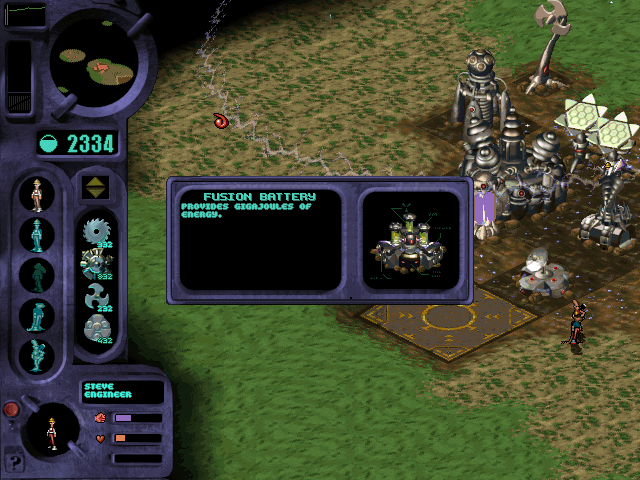
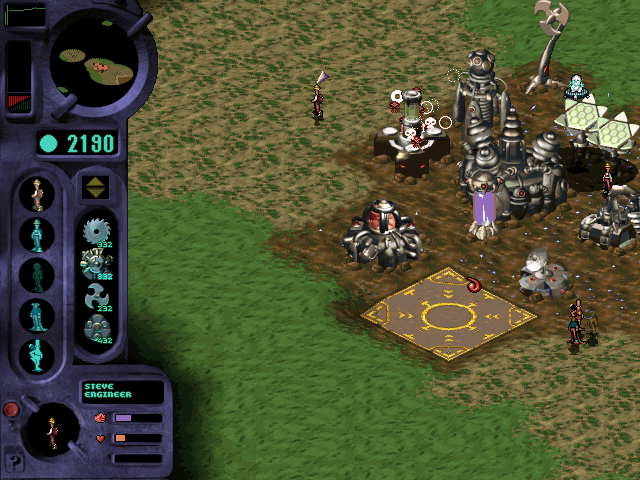
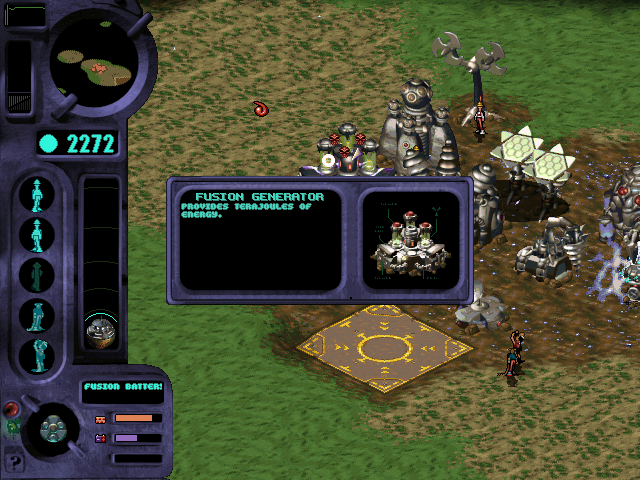
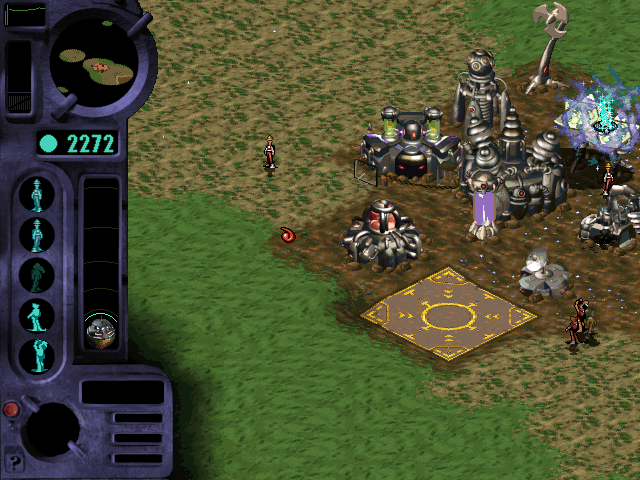
What's odd about the Fusion Battery is that the help text for both buildings is very terse and doesn't explain the purpose of the building like the other entries do, further suggesting it is not finished. The final release of the game has it totally cut, even the graphic files are removed.
Building Graphics#
The final game includes only 13 graphics files for buildings in the DATA\BUILDING directory. The beta however, includes 20 meaning another 7 cut buildings. If existing building graphics are substituted with the files below, they can be seen in-game.
BBUNK.ANB
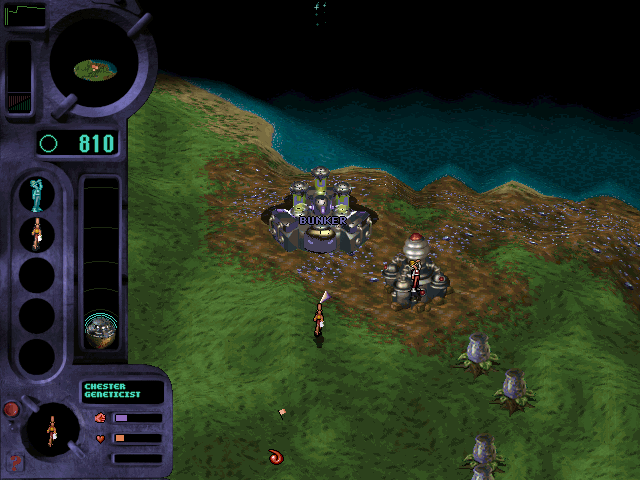
Uses an early version of the cut Fusion Generator building with the work "BUNKER" handily written over it to show what this was a placeholder graphic for. It's unknown what the Bunker's purpose would be.
BLASE.ANB

Some kind of laser? What's interesting about this is it clearly comes from the earlier more naïve cartoony art style, and not the final sci-fi one. When powered on the light on top pulses yellow.
BPUMP.ANB
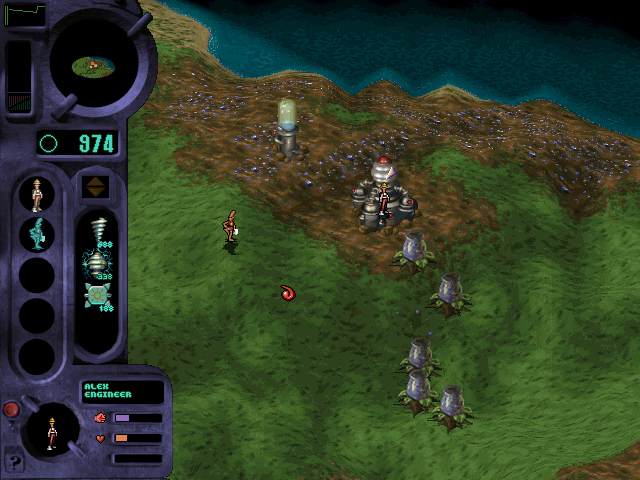
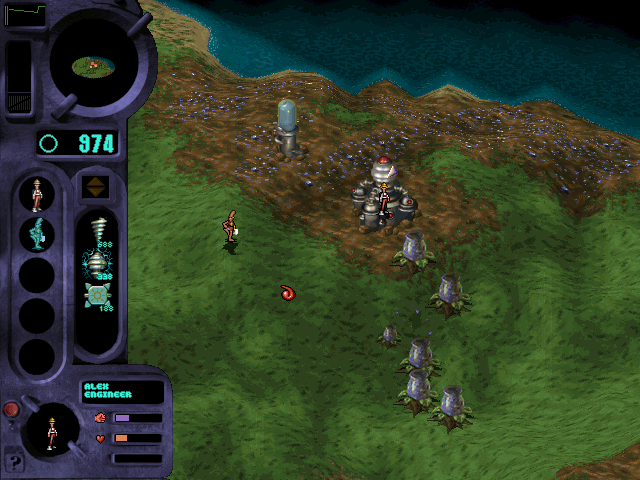
A water pump. Again it's not clear why this would be needed - to hydrate animals or drain swamps/water? It has an animation where it fills with water.
BTEMP.ANB
Just another copy of the Shield Generator.
BTERR.ANB
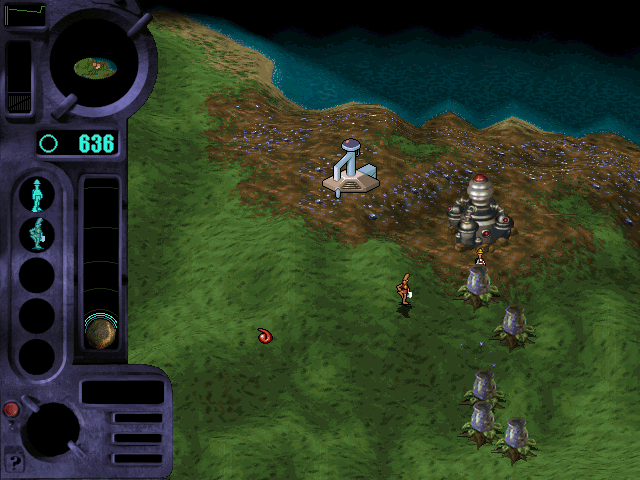
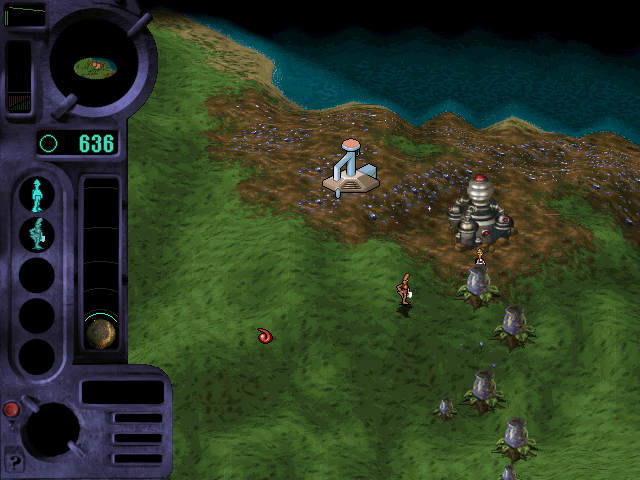
Another very interesting building again in the early naïve style. It's not clear what this was, some kind of terraforming device? Again the light on top turns yellow.
BWEAT.ANB
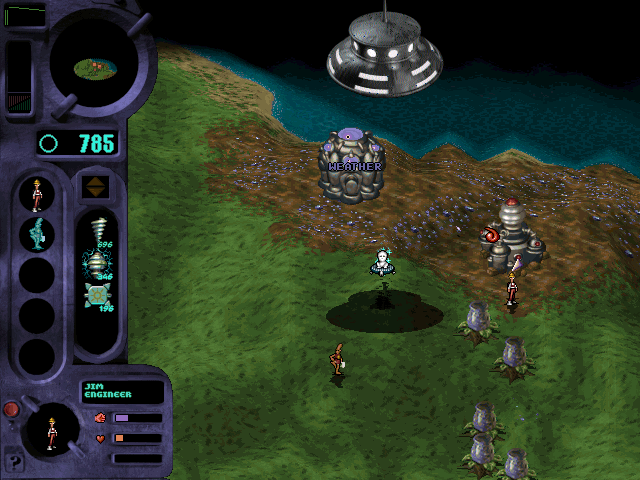
Some kind of weather altering device. Another placeholder, this time using the Genepod building. Helpfully has "WEATHER" written on it also.
Cut Videos#
The INTRO directory is empty, with the game's intro video (BIOINTRO.SMK) not present. However, if the final game intro file is restored here it plays, suggesting it was complete, but merely removed for this leak - probably to facilitate faster downloads of the pirate copy. The other two final intro videos (of the Bullfrog logo and the game's title screen) do not play if restored, however. There is no title screen in this build, it instead goes straight to the main menu.
The between level Smacker animations in the ANIMS directory are mostly different to those of the final game. Even those that seem identical (BIOWIN.SMK) are saved at a higher bitrate than those used by the release build. BIOLOSE.SMK in particular is clearly a very early placeholder version of the lose animation, as it's crudely modelled and lit and doesn't even have any sound yet. Many of the level transition videos are also totally different to those used by the final game, with the beta build including two videos not in the final game, and the final build using a different final video not present in the beta. The table below compares videos from the final release with the beta, N/A means a video file is not present in that build of the game.
Final |
Beta |
Description |
|---|---|---|
SYSTEM1.SMK |
HYPER1.SMK |
Approaching earth-like planet |
N/A |
GOTO51.SMK |
Approaching planet with pale red/blue nebula - not present in final |
N/A |
GOTO61.SMK |
Approaching planet with red/yellow nebula - not present in final |
SYSTEM2.SMK |
GOTO71.SMK |
Approaching planet with blue/white nebula |
SYSTEM3.SMK |
GOTO81.SMK |
Approaching planet with gold nebula |
SYSTEM4.SMK |
N/A |
Approaching planet with purple/blue nebula - not present in beta |
Level Editor#


The editor is integrated into the executable as with other Bullfrog games, and can be entered by starting the game with the -e command line argument. Once entered it has a workflow similar to Magic Carpet, with level maps generated procedurally by populating several values (most notably a seed value) then pressing Go. It's not possible to manually define a landmass, so the seed must be adjusted until a level is created to the user's liking. Once this is done the user can then define other parts of the level, including limitations on which specialist skills are allowed on the level, starting Goop amount, other computer players, and level goals such as needed ethereal points to win.
Once this stage is completed, the Planetside View button is then used to view the generated planet in the in-game engine. Once here, the user can then hand place items such as wild creatures, biomass zones or buildings, and also assign the ownership of the latter to specific players (so they start with a populated base). The Planetside View defaults to a corrupt version of the previous panel on the left side of the screen, but if Tab is pressed on the keyboard it will be removed, granting a full view of the landscape. Pressing the single middle yellow square button returns the view to the original editor control panel.
Internal Building Names#
Placing a building uses the short internal name for a building. These are helpful as they correspond with the various files that make up a building (e.g. the .ANB graphic files for each) but also sometimes hint at a different origin for some. For example, the Recycling Plant has the intriguing internal name of "farm", seemingly a very different purpose.
Building name |
Internal Name |
|---|---|
Genepod |
Genelab ™ |
Recycling Plant |
Farm |
Landing Pad |
Launcher |
Stunner Turret |
Turret |
Pulper |
Sawmill |
First Stage Distributor |
Power Station |
Photon Processor |
Solar Panel |
Ethereal Detector |
Ethereal Temple |
Rotator |
Wind Turbine |
Fusion Battery |
Nuclear Reactor |
Shield Generator |
Shield Generator |
Goop Vat |
Goop Vat |
Tech Facility |
Operations |
Extractor |
Mine |
Cut Editor Options#
Planet Climate#
There are several intriguing features that had already been cut from the game at this point, still visible in the editor. Specifically there are non-working options for Weather, Techtonics and CO2, suggesting there would originally be much more import put into the hazards caused by the make up of the planet itself rather than the final game's focus more on player vs player combat. Especially the Weather option makes sense when combined with the cut weather building as something that may have hindered the player, but could also have been mitigated or harnessed with that structure.
Engineer Abilities#

The Engineer specialist has two additional abilities listed here with the addendum "(Not used)". These are Raise and Lower land. While the engineer performs these tasks automatically in the game to create a stable foundation for buildings, the settings here - along with entries in TEXT.DAT - show that originally the game was going to work like Populous and allow players to manipulate the land to their advantage at will, as well as punish enemies by lowering it.
Cut Levels#
The beta includes 8 level files not included on the final game CD, but is missing one custom level compared to the final build. What's also interesting is that in fact the original level files here have often very different names to the final game, and indeed many levels had their names completely switched around and recycled before release.
Level File |
In Final |
Beta Name |
Final Name |
Notes |
|---|---|---|---|---|
CONQ001.DAT |
Yes |
Exceland |
Exceland |
|
CONQ002.DAT |
Yes |
Utopia |
Krell |
|
CONQ003.DAT |
Yes |
Thyroid |
Madami |
Madami presumably referring to Bullfrog programmer Mark Adami |
CONQ004.DAT |
Yes |
Ataraxia |
Roach |
|
CONQ005.DAT |
Yes |
Shnorden |
Brown |
|
CONQ006.DAT |
Yes |
Altairus |
Lunacon |
|
CONQ007.DAT |
Yes |
Nobase |
Oid |
|
CONQ008.DAT |
Yes |
Pylon |
Fushon |
|
CONQ009.DAT |
Yes |
Vergon |
Vergon |
|
CONQ010.DAT |
Yes |
Nobase |
Pylon |
|
CONQ011.DAT |
Yes |
Getiton |
Zed |
|
CONQ012.DAT |
Yes |
Survivor |
Thyroid |
|
CONQ013.DAT |
Yes |
Phungustra |
Jenner |
|
CONQ014.DAT |
Yes |
Petri |
Petri |
|
CONQ015.DAT |
Yes |
Bounce |
Mirkon |
|
CONQ016.DAT |
Yes |
Survivor |
Kruush |
|
CONQ017.DAT |
Yes |
Survivor |
Ape |
|
CONQ018.DAT |
Yes |
Survivor |
Forte |
|
CONQ019.DAT |
Yes |
Huth |
Huth |
|
CONQ020.DAT |
Yes |
Trynoc |
Voss |
|
CONQ021.DAT |
Yes |
STRONGHOLD |
Shnorden |
The Rotator and Stunner Turret are placed on the long peninsula where the specialists start, not with the main base power generator as in the final version of the level. This makes things much harder |
CONQ022.DAT |
Yes |
Natismad |
Natismad |
Nat here being Genewars level designer Natalie White |
CONQ023.DAT |
Yes |
Natismad |
Kaminski |
|
CONQ024.DAT |
Yes |
Biosphere |
Biosphere |
|
CONQ025.DAT |
No |
Natismad |
||
CONQ026.DAT |
No |
Nosheis |
||
CONQ027.DAT |
No |
Imeanit |
||
CONQ028.DAT |
No |
Pherkdianx |
||
CONQ029.DAT |
No |
Remotsuc |
||
CONQ030.DAT |
Yes |
Biosphere |
Brown |
|
CONQ031.DAT |
No |
Sound Test |
||
CONQ032.DAT |
No |
Exceland |
The player start point is in the middle of an ocean, which causes the game to crash once the rocket lands |
|
CONQ040.DAT |
Yes |
Exceland |
Zed |
|
CONQ041.DAT |
No |
NoBase |
Cut Sounds#
While the SOUND.DAT file is larger in this version than the final release, it's simply because the low quality samples are actually just duplicates of the high quality ones, and hadn't been worked on yet. The Beta is missing a handful of sound effects too, including wind ambience sound and bullet ricochet effect.
Night of the Earthlings#
The Night of the Earthlings minigame is already present in this build. What's curious is that it is not loaded at all by the game's main executable at this point, so not just used as a credits screen. As with the final build, it can be forced to load from DOS by creating the required S.DAT file in the game's root directory, but there doesn't seem to be code to create the file in the Genewars executable yet. At this point it seems likely it was only intended to be seen if the player had completed Genewars rather than to load every time. There are several differences in the executable and graphics files compared to the final build but these aren't obvious in practice, aside from the rotating graphic for the ethereal pick ups being corrupted on one of its frames.
Dungeon Keeper Installer#
Oddly the directory LData in fact contains an early version of the installer for Dungeon Keeper. It makes a little more sense this was present given that Richard Reed wrote the Dungeon Keeper installer as well as that for Genewars. Unlike the final DK installer, it has support for testing MIDI music using a copy of the famous canyon.midi file, here named KEEP.MIDI. The final release of Dungeon Keeper never used MIDI music so these files were not included. This folder is not included with the final releases of ''Genewars'.